Enterprise Java Development@TOPIC@
Performance Topics Related to JPA and SQL
Built on: 2014-03-07 00:12 EST
Copyright © 2014 jim stafford (jcstaff@apl.jhu.edu)
Abstract
This presentation provides information for JPA/SQL developers to better understand how database constructs and database access decisions can impact application performance. It provides a brief discussion of tools that can be used and how to review an execution plan. Relative comparisons between approaches are provided to help show the costs and benefits of different approaches.
- Topics
- 1. SQL Tuning
- 2. Example Domain Model: Movies
- 3. Table Access
- 3.1. Full Table Scan
- 3.1.1. Full Table Scan: Unconstrained Access
- 3.1.2. Full Table Scan: Using Where (without Index)
- 3.1.3. RowId Scan: Using Where (with Index)
- 3.1.4. Full Table Scan: Invalidating Index using Function applied to Row Column
- 3.1.5. RowId Scan: Using Index with Function applied to Row Column
- 3.1.6. Full Table Scan: Invalidating Index by using Leading Wildcards
- 3.2. Order By
- 3.3. Summary
- 4. Indexes
- 5. Joins
- 6. JPA
- 7. H2 Execution Plans
- 8. JPA/SQL Tuning Summary
Why DB access can be inefficient
What is an execution plan
How to access an execution plan
How to analyze an execution plan
Impact of Indexes
to access tables
to access joins
JPA performance pitfalls
Target Audience: JPA/SQL Developers
The material in this paper/presentation is geared towards making JPA/SQL developers more aware of issues that can impact performance in the applications they develop. The material in this paper is not intended to be a performance benchmark for any database or JPA provider -- thus the environment used is not described (and quite far from production standards). Use all reported measurements as relative across the alternatives within the example they are presented. The material covered in this paper should be an excellent start for developers to better understand what costs what, how you can better know when there are issues or success, and where to look for solutions. Some topics were purposely left out to help concentrate on the primary scenarios.
Poorly constructed data model
Poorly constructed access for the data model
Missing access structures
Indexes
Materialized views
Missing constraints
Unique Constraints
NOT null
Sub-optimal execution plan
Incorrect estimates of cost, cardinality, or predictive selectivity
Stale or missing optimizer statistics
Output of the optimizer
Instructions of what execution engine must perform to complete query
Parent-child relationship between steps showing
Ordering of tables referenced
Table access methods used
Join methods used
Data operations (e.g., filter, sort, aggregation)
Cardinality = number of rows selected (based on count of unique columns)
Cost = disk access, I/O and CPU cost estimates for number of rows selected
Partition access
Parallel execution
Figure 1.1. JUnit Benchmark Tool
NoColumnIndex.queryForMovieAndDir: [measured 1 out of 1 rounds, threads: 1 (sequential)]
 round: 3.85 [+- 0.00], round.block: 0.00 [+- 0.00], round.gc: 0.00 [+- 0.00], GC.calls: 0, GC.time: 0.00, time.total: 3.85, time.warmup: 0.00, time.bench: 3.85
Helps you determine which execution plan selected by optimizer
Statement is not executed
Plan is theoretical
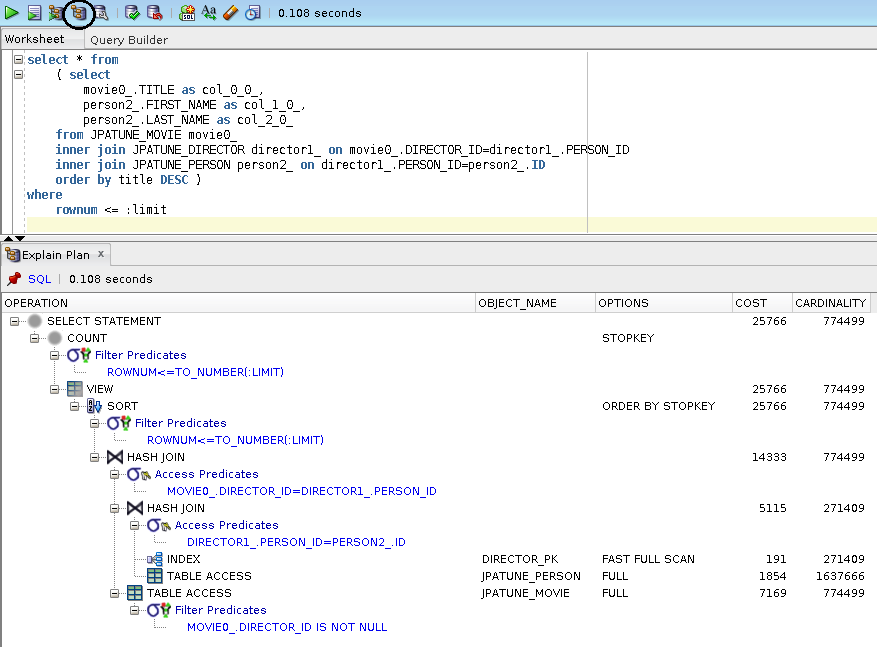
Figure 1.3. EXPLAIN PLAN Example using Text SQL Commands
EXPLAIN PLAN FOR
select * from
    ( select
        movie0_.TITLE as col_0_0_,
        person2_.FIRST_NAME as col_1_0_,
        person2_.LAST_NAME as col_2_0_
    from JPATUNE_MOVIE movie0_
    inner join JPATUNE_DIRECTOR director1_ on movie0_.DIRECTOR_ID=director1_.PERSON_ID
    inner join JPATUNE_PERSON person2_ on director1_.PERSON_ID=person2_.ID
    order by title DESC )
where
    rownum <= :limit;
SET LINESIZE 100
SET PAGESIZE 0
select * from table(DBMS_XPLAN.DISPLAY());
plan FOR succeeded.
Plan hash value: 857441453
----------------------------------------------------------------------------------------------------
| Id | Operation | Name | Rows | Bytes |TempSpc| Cost (%CPU)| Time |
----------------------------------------------------------------------------------------------------
| 0 | SELECT STATEMENT | | 774K| 477M| | 25766 (1)| 00:05:10 |
|* 1 | COUNT STOPKEY | | | | | | |
| 2 | VIEW | | 774K| 477M| | 25766 (1)| 00:05:10 |
|* 3 | SORT ORDER BY STOPKEY | | 774K| 45M| 53M| 25766 (1)| 00:05:10 |
|* 4 | HASH JOIN | | 774K| 45M| 11M| 14333 (1)| 00:02:52 |
|* 5 | HASH JOIN | | 271K| 8746K| 5568K| 5115 (1)| 00:01:02 |
| 6 | INDEX FAST FULL SCAN| DIRECTOR_PK | 271K| 2385K| | 191 (1)| 00:00:03 |
| 7 | TABLE ACCESS FULL | JPATUNE_PERSON | 1637K| 37M| | 1854 (1)| 00:00:23 |
|* 8 | TABLE ACCESS FULL | JPATUNE_MOVIE | 774K| 20M| | 7169 (1)| 00:01:27 |
----------------------------------------------------------------------------------------------------
Predicate Information (identified by operation id):
---------------------------------------------------
1 - filter(ROWNUM<=TO_NUMBER(:LIMIT))
3 - filter(ROWNUM<=TO_NUMBER(:LIMIT))
4 - access("MOVIE0_"."DIRECTOR_ID"="DIRECTOR1_"."PERSON_ID")
5 - access("DIRECTOR1_"."PERSON_ID"="PERSON2_"."ID")
8 - filter("MOVIE0_"."DIRECTOR_ID" IS NOT NULL)
Figure 1.4. EXPLAIN PLAN Example using Named Plan
EXPLAIN PLAN
SET STATEMENT_ID='myplan01'
FOR
select * from
    ( select
        movie0_.TITLE as col_0_0_,
        person2_.FIRST_NAME as col_1_0_,
        person2_.LAST_NAME as col_2_0_
...
select * from table(DBMS_XPLAN.DISPLAY('PLAN_TABLE','myplan01','typical',null));Produces execution plan and statistics after running statement(s)
Statement(s) are actually run -- not theoretical like EXPLAIN PLAN
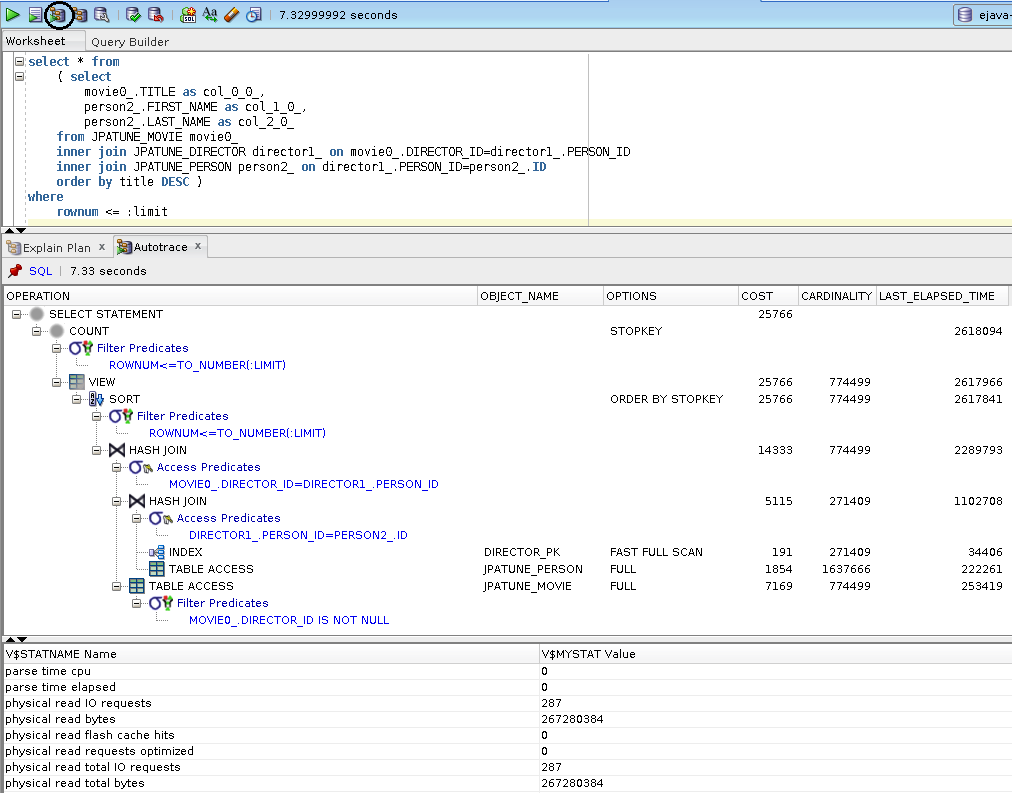
AUTO TRACE Requires Special Role and Permission
grant SELECT_CATALOG_ROLE to (user);
grant SELECT ANY DICTIONARY to (user);
Runtime cursors store execution plans within V$PLAN
Note
DISPLAY_CURSOR requires select privileges on: V$SQL_PLAN, V$SESSION and V$SQL_PLAN_STATISTICS_ALL
Figure 1.6. Example: Connection Generates SQL Commands
select poo.first_name, poo.last_name
from jpatune_person poo;
Figure 1.7. Example: SQL Commands of Interest Located in V$PLAN
select sql_id, sql_fulltext from V$SQL where sql_fulltext like '%from jpatune_person poo%';
87d246wux9qag   "select poo.first_name, poo.last_name from jpatune_person poo"
9bzam4xu5q7p5   select sql_id, sql_fulltext from V$SQL where sql_fulltext like '%from jpatune_person poo%'
Figure 1.8. Example: SQL_ID from V$PLAN Used to Display Execution Plan
select PLAN_TABLE_OUTPUT from
TABLE(DBMS_XPLAN.DISPLAY_CURSOR('87d246wux9qag',null, 'TYPICAL'));
SQL_ID 87d246wux9qag, child number 0 ------------------------------------- select poo.first_name, poo.last_name from jpatune_person poo Plan hash value: 1628338048 ------------------------------------------------------------------------------------ | Id | Operation | Name | Rows | Bytes | Cost (%CPU)| Time | ------------------------------------------------------------------------------------ | 0 | SELECT STATEMENT | | | | 3 (100)| | | 1 | TABLE ACCESS FULL| JPATUNE_PERSON | 10 | 680 | 3 (0)| 00:00:01 | ------------------------------------------------------------------------------------ Note ----- - dynamic sampling used for this statement (level=2)
Figure 1.9. Example: DISPLAY_CURSOR witin Single Command
SELECT t.*
FROM v$sql s, table(DBMS_XPLAN.DISPLAY_CURSOR(s.sql_id, s.child_number)) t WHERE sql_text LIKE '%JPATUNE_MOVIEGENRE%';
- 3.1. Full Table Scan
- 3.1.1. Full Table Scan: Unconstrained Access
- 3.1.2. Full Table Scan: Using Where (without Index)
- 3.1.3. RowId Scan: Using Where (with Index)
- 3.1.4. Full Table Scan: Invalidating Index using Function applied to Row Column
- 3.1.5. RowId Scan: Using Index with Function applied to Row Column
- 3.1.6. Full Table Scan: Invalidating Index by using Leading Wildcards
- 3.2. Order By
- 3.3. Summary
Access paths - strategies used to access data within table
Indexes - good for when accessing small amounts of data out of much larger data set
Full table scans - good for small tables and unrestricted row access
Any row can be *functionally* accessed with either method
Use execution plans to help use the appropriate technique
Database engine derives all information from the table directly from the physical storage location for the table. Table storage is not arranged in any guaranteed order.
Request N rows of data from a table with no defined order
Full Table Scan selected when:
There is no where clause
There is no suitable index
calling functions on row data (ex. upper(title)='TREMORS')
comparing column against data type requiring conversion
using wildcard in leading character (ex. title like '%emors')
searching for null column values (ex. rating is null) with single column indexes
Full Table Scan optimal when:
Using small tables
Majority of the rows in a larger table must be read (e.g., no where clause)
Figure 3.2. Generated SQL
select * from
    ( select
        movie0_.ID as ID1_2_,
        movie0_.DIRECTOR_ID as DIRECTOR7_2_,
        movie0_.MINUTES as MINUTES2_2_,
        movie0_.PLOT as PLOT3_2_,
        movie0_.RATING as RATING4_2_,
        movie0_.RELEASE_DATE as RELEASE5_2_,
        movie0_.TITLE as TITLE6_2_
    from
        JPATUNE_MOVIE movie0_ )
where
    rownum <= ?
DB scans table as a part of getting data to resolve select clause
No added cost for where or order-by clauses
Figure 3.4. Relative Test Result
Table Access without Index.Unrestricted Scan:warmups=2, rounds=11, ave=0.73 [+- 0.03]
No need for an Index for Unconstrained Access to a Table
Since the DB's job in this case is to obtain data from all rows of the table in any order -- an index would not add value.
Request N rows of data matching a condition on an un-indexed column
Figure 3.5. JPA Query
"select m from Movie m
where m.rating = :rating",
params={rating=R}, limit=1000
Figure 3.6. Generated SQL
select * from
    ( select
        movie0_.ID as ID1_2_,
        movie0_.DIRECTOR_ID as DIRECTOR7_2_,
        movie0_.MINUTES as MINUTES2_2_,
        movie0_.PLOT as PLOT3_2_,
        movie0_.RATING as RATING4_2_,
        movie0_.RELEASE_DATE as RELEASE5_2_,
        movie0_.TITLE as TITLE6_2_
    from
        JPATUNE_MOVIE movie0_
    where
        movie0_.RATING=? )
where
    rownum <= ?
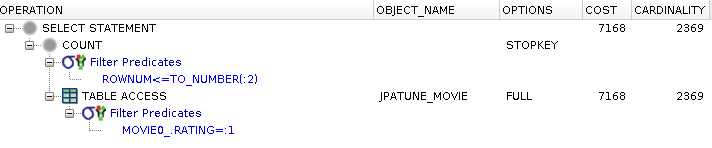
Where constraint adds cost to unconstrained query
DB must scan the rows in the table for a match to query
Figure 3.8. Relative Test Result
Table Access without Index.Value Access:warmups=2, rounds=11, ave=0.80 [+- 0.04]
Where Clauses without a Matching Index results in a Full Table Scan
Full table scans are the most inefficient way to obtain certain rows from a large DB table.
Request N rows of data matching a condition on an indexed column
Uses an exact location for a row -- normally obtained from an index
Fastest way to locate an individual row in a table
Note: rows can be moved during an update -- requiring multiple locations to be accessed when using former rowId
Figure 3.10. JPA Query
"select m from Movie m
where m.rating = :rating",
params={rating=R}, limit=1000
Figure 3.11. Generated SQL
select * from
    ( select
        movie0_.ID as ID1_2_,
        movie0_.DIRECTOR_ID as DIRECTOR7_2_,
        movie0_.MINUTES as MINUTES2_2_,
        movie0_.PLOT as PLOT3_2_,
        movie0_.RATING as RATING4_2_,
        movie0_.RELEASE_DATE as RELEASE5_2_,
        movie0_.TITLE as TITLE6_2_
    from
        JPATUNE_MOVIE movie0_
    where
        movie0_.RATING=? )
where
    rownum <= ?
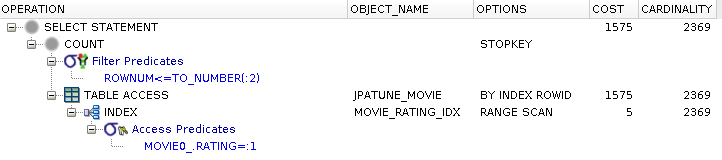
Index on where clause search term avoids scanning table -- index scanned instead
DB row is accessed to satisfy select clause
DB row is located by rowId from index
Figure 3.13. Relative Test Result
Table Access with Single Indexes.Value Access:warmups=2, rounds=11, ave=0.75 [+- 0.03]
Match Indexes for Where Clauses Selecting Small Row Subset from Table
An index will speed access to rows within a table when selecting a small subset of a larger table.
Request N rows of data matching a condition on an indexed column invalidated by a function
Figure 3.15. JPA Query
"select m from Movie m
where upper(m.rating) = :rating",
params={rating=R}, limit=1000
Figure 3.16. Generated SQL
select * from
    ( select
        movie0_.ID as ID1_2_,
        movie0_.DIRECTOR_ID as DIRECTOR7_2_,
        movie0_.MINUTES as MINUTES2_2_,
        movie0_.PLOT as PLOT3_2_,
        movie0_.RATING as RATING4_2_,
        movie0_.RELEASE_DATE as RELEASE5_2_,
        movie0_.TITLE as TITLE6_2_
    from
        JPATUNE_MOVIE movie0_
    where
        upper(movie0_.RATING)=? )
where
    rownum <= ?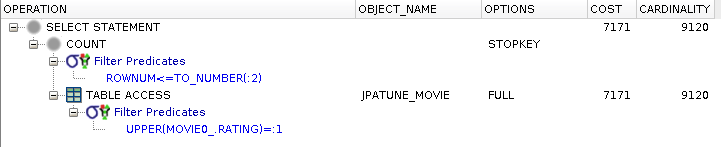
Applying function to column indexed by value invalidates use of index
DB reverts to full table scan to locate row
Figure 3.18. Relative Test Result
Table Access with Single Indexes.Unindexed Function Access:warmups=2, rounds=11, ave=0.79 [+- 0.04]
Avoid using Functions on DB Rows within Where Clause
Calling a function on a DB column within the where clause will invalidate the use of an index on that column -- unless it is a function-based index (matching what is being used in the where)
Request N rows of data matching a functional condition on a function-indexed column
Figure 3.20. JPA Query
"select m from Movie m
where lower(m.rating) = :rating",
params={rating=r}, limit=1000
Figure 3.21. Generated SQL
select * from
    ( select
        movie0_.ID as ID1_2_,
        movie0_.DIRECTOR_ID as DIRECTOR7_2_,
        movie0_.MINUTES as MINUTES2_2_,
        movie0_.PLOT as PLOT3_2_,
        movie0_.RATING as RATING4_2_,
        movie0_.RELEASE_DATE as RELEASE5_2_,
        movie0_.TITLE as TITLE6_2_
    from
        JPATUNE_MOVIE movie0_
    where
        lower(movie0_.RATING)=? )
where
    rownum <= ?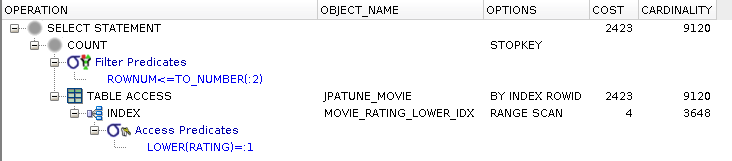
Where clause satisfied by scanning function index
DB row accessed to satisfy select clause
DB row accessed by RowId
COST is same order of magnitude (but )as non-function index
Figure 3.23. Relative Test Result
Table Access with Single Indexes.Indexed Function Access:warmups=2, rounds=11, ave=0.76 [+- 0.04]
Define Function Index where Calling Functions on DB rows cannot be Avoided
The DB will store the pre-calculated value in the index for use during the query.
Request N rows of data matching a like condition containing a leading wildcard
Figure 3.25. JPA Query
"select m from Movie m
where m.title like :title",
params={title=%eventeen: The Faces for Fall}, limit=1000
Figure 3.26. Generated SQL
select * from
    ( select
        movie0_.ID as ID1_2_,
        movie0_.DIRECTOR_ID as DIRECTOR7_2_,
        movie0_.MINUTES as MINUTES2_2_,
        movie0_.PLOT as PLOT3_2_,
        movie0_.RATING as RATING4_2_,
        movie0_.RELEASE_DATE as RELEASE5_2_,
        movie0_.TITLE as TITLE6_2_
    from
        JPATUNE_MOVIE movie0_
    where
        movie0_.TITLE like ? )
where
    rownum <= ?
Row located using full table scan
Leading wildcard in like invalidates use of indexed column
Figure 3.28. Relative Test Result
Table Access with Single Indexes.Ending Wildcard:warmups=2, rounds=11, ave=0.22 [+- 0.04]
Table Access with Single Indexes.Exact Equals:warmups=2, rounds=11, ave=0.20 [+- 0.02]
Table Access with Single Indexes.Exact Like:warmups=2, rounds=11, ave=0.22 [+- 0.05]
Table Access with Single Indexes.Leading Wildcard:warmups=2, rounds=11, ave=0.66 [+- 0.05]
Avoid Leading Wildcards when using Like
Leading wildcards invalidate the use of column indexes. Indexes are still used with non-leading wildcards.
Order returned results by one or more columns
Request N rows of data ordered by (ASC) a column
Figure 3.31. Generated SQL
select * from
    ( select
        movie0_.ID as ID1_2_,
        movie0_.DIRECTOR_ID as DIRECTOR7_2_,
        movie0_.MINUTES as MINUTES2_2_,
        movie0_.PLOT as PLOT3_2_,
        movie0_.RATING as RATING4_2_,
        movie0_.RELEASE_DATE as RELEASE5_2_,
        movie0_.TITLE as TITLE6_2_
    from
        JPATUNE_MOVIE movie0_
    order by
        movie0_.TITLE ASC )
where
    rownum <= ?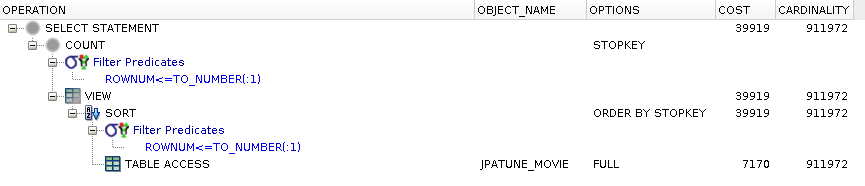
DB table is scanned as before when unconstrained by where clause
Output is sorted at a noticeable cost increase
Figure 3.33. Relative Test Result
Table Access with Single Indexes.OrderBy Non-Null Column:warmups=2, rounds=11, ave=0.76 [+- 0.03]
Sorting adds Cost
Look to reduce the number of rows required to be sorted or to use an index (see next topic).
Request N rows of data ordered by (ASC) indexed column (ASC) from where
Figure 3.35. JPA Query
"select m from Movie m
where m.title like :title
order by title ASC",
params={title=A%}, limit=1000
Figure 3.36. Generated SQL
select * from
    ( select
        movie0_.ID as ID1_2_,
        movie0_.DIRECTOR_ID as DIRECTOR7_2_,
        movie0_.MINUTES as MINUTES2_2_,
        movie0_.PLOT as PLOT3_2_,
        movie0_.RATING as RATING4_2_,
        movie0_.RELEASE_DATE as RELEASE5_2_,
        movie0_.TITLE as TITLE6_2_
    from
        JPATUNE_MOVIE movie0_
    where
        movie0_.TITLE like ?
    order by
        movie0_.TITLE ASC )
where
    rownum <= ?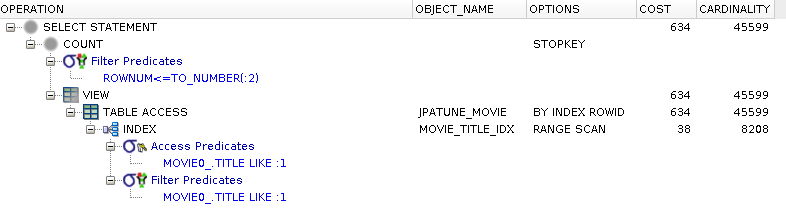
Range scan of index is used to satisfy where clause
Order of index used to satisfy order by clause
Cost significantly less that sort
Figure 3.38. Relative Test Result
Table Access with Single Indexes.OrderBy Non-null Where Column ASC:warmups=2, rounds=11, ave=0.69 [+- 0.02]
Index-based Sorts are more Efficient
It is more efficient to sort results by the indexed values in the where clause because the index is already maintained in sort order.
Request N rows of data ordered by (DESC) indexed column (ASC) from where
Figure 3.40. JPA Query
"select m from Movie m
where m.title like :title
order by title DESC",
params={title=A%}, limit=1000
Figure 3.41. Generated SQL
select * from
    ( select
        movie0_.ID as ID1_2_,
        movie0_.DIRECTOR_ID as DIRECTOR7_2_,
        movie0_.MINUTES as MINUTES2_2_,
        movie0_.PLOT as PLOT3_2_,
        movie0_.RATING as RATING4_2_,
        movie0_.RELEASE_DATE as RELEASE5_2_,
        movie0_.TITLE as TITLE6_2_
    from
        JPATUNE_MOVIE movie0_
    where
        movie0_.TITLE like ?
    order by
        movie0_.TITLE DESC )
where
    rownum <= ?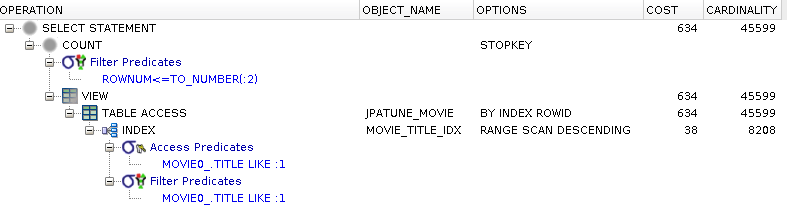
Normal (ASC) indexes can be efficiently traversed in DESC order
Figure 3.43. Relative Test Result
Table Access with Single Indexes.OrderBy Non-null Where Column DESC:warmups=2, rounds=11, ave=0.72 [+- 0.04]
Request N rows of data ordered by (DESC) indexed column (DESC) from where
Figure 3.45. JPA Query
"select m from Movie m
where m.title like :title
order by title DESC",
params={title=A%}, limit=1000
Figure 3.46. Generated SQL
select * from
    ( select
        movie0_.ID as ID1_2_,
        movie0_.DIRECTOR_ID as DIRECTOR7_2_,
        movie0_.MINUTES as MINUTES2_2_,
        movie0_.PLOT as PLOT3_2_,
        movie0_.RATING as RATING4_2_,
        movie0_.RELEASE_DATE as RELEASE5_2_,
        movie0_.TITLE as TITLE6_2_
    from
        JPATUNE_MOVIE movie0_
    where
        movie0_.TITLE like ?
    order by
        movie0_.TITLE DESC )
where
    rownum <= ?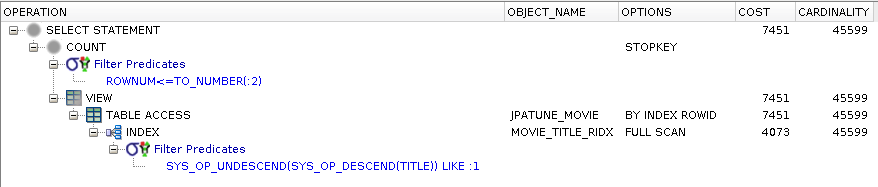
DESC index implementedas a function index
Function indexes are not handled as efficiently as normal indexes ["...cardinality estimates are not as accurate and the SYS_OP_DESCEND and SYS_OP_UNDESCEND functions are used as access/filter conditions as they’re the functions implemented in the function-based index" http://richardfoote.wordpress.com/category/descending-indexes/]
Figure 3.48. Relative Test Result
Table Access with Single Indexes DESC.OrderBy Non-null Where Column DESC:warmups=2, rounds=11, ave=0.99 [+- 0.03]
Choose Ascending Indexes (over Descending) for Single Columns
Ascending indexes can be efficiently traversed in ascending and descending order.
Full table scans efficient when required to access most rows
Indexes access more efficient when selecting small subset of table
Indexes can be invalidated - resulting in full table scans
using functions on columns (without a function index)
using leading wildcards
searching/counting for null column values (single column indexes do not store null values)
Indexes can be used to bypass expensive sort operations. Either:
Column must be non-nullable
Where clause excludes null values
Can be unique or non-unique
Can be simple or composite
Can be normal (ascending) or descending
Can be reverse key (for monotonically incrementing column values) to balance B*-tree
Can be function-based (to address normalization uses)
Can be used to implement sort for "order by"
Can be used to implement the entire table (Index-organized Table(IOT))
Can be traversed in different ways
Unique Scan - used with "unique" or "primary key" indexes to return a single value
Range Scan - used with "unique" and "non-unique" indexes to return multiple matching rows
Full Scan - used with composite indexes where leading where column is not part of index (i.e., can use col2 of composite)
Fast Full Scan - used when all columns of query (where and select) are contained within composite index -- table is skipped
...
Can be coalesced or rebuilt with
ALTER INDEX (index-name) (COALESCE | REBUILD)
Coalesce - repairs index in place. Good for small repairs
Rebuild - totally rebuilds index. Good for large repairs
Request N rows matching a specific criteria using a non-unique index
Figure 4.1. DB Index(es)
alter table jpatune_movie add utitle varchar2(256)
update jpatune_movie set utitle=concat(concat(concat(title,'('),id),')')
create index movie_utitle_idx on jpatune_movie(utitle)
* "utitle" was added as the concatenation of title(id) to create a unique column.
** we are not yet taking advantage of the uniqueness of the column
Figure 4.2. JPA Query
"select m from Movie m
where m.title = :title",
params={title=Tremors(m836199)}
Figure 4.3. Generated SQL
select
    movie0_.ID as ID1_2_,
    movie0_.DIRECTOR_ID as DIRECTOR7_2_,
    movie0_.MINUTES as MINUTES2_2_,
    movie0_.PLOT as PLOT3_2_,
    movie0_.RATING as RATING4_2_,
    movie0_.RELEASE_DATE as RELEASE5_2_,
    movie0_.utitle as utitle6_2_
from
    JPATUNE_MOVIE movie0_
where
    movie0_.utitle=?
Matching row located using index
Since index is non-unique multiple entries must be scanned
Figure 4.5. Relative Test Result
Non-Unique Index.Values By Index:warmups=2, rounds=11, ave=0.17 [+- 0.01]
Request N rows matching a specific criteria using a unique index
* we are now taking advantage of the unique column values.
Figure 4.7. JPA Query
"select m from Movie m
where m.title = :title",
params={title=Tremors(m836199)}
Figure 4.8. Generated SQL
select
    movie0_.ID as ID1_2_,
    movie0_.DIRECTOR_ID as DIRECTOR7_2_,
    movie0_.MINUTES as MINUTES2_2_,
    movie0_.PLOT as PLOT3_2_,
    movie0_.RATING as RATING4_2_,
    movie0_.RELEASE_DATE as RELEASE5_2_,
    movie0_.utitle as utitle6_2_
from
    JPATUNE_MOVIE movie0_
where
    movie0_.utitle=?
Index used to locate table rowId
Unique index scan used since index contains unique values
Figure 4.10. Relative Test Result
Nullable Unique Index.Values By Index:warmups=2, rounds=10, ave=0.18 [+- 0.01]
* the measurements in this test do not prove the following assertion which was based on the execution plan.
Unique Indexes *can* be more Efficient than Non-Unique Indexes
DB knows there can be only a single match and stops index scan after first match found
Indexes with multiple columns to match the where clause and optionally the select and join clauses as well.
Selecting N columns for M rows matching two (2) criteria terms
Figure 4.11. JPA Query
"select m from Movie m
where m.title = :title and m.releaseDate = :releaseDate",
params={title=Apollo 13, releaseDate=1995-07-01}
Figure 4.12. Generated SQL
select
    movie0_.ID as ID1_2_,
    movie0_.DIRECTOR_ID as DIRECTOR7_2_,
    movie0_.MINUTES as MINUTES2_2_,
    movie0_.PLOT as PLOT3_2_,
    movie0_.RATING as RATING4_2_,
    movie0_.RELEASE_DATE as RELEASE5_2_,
    movie0_.TITLE as TITLE6_2_
from
    JPATUNE_MOVIE movie0_
where
    movie0_.TITLE=?
and movie0_.RELEASE_DATE=?First term of a two term where clause indexed
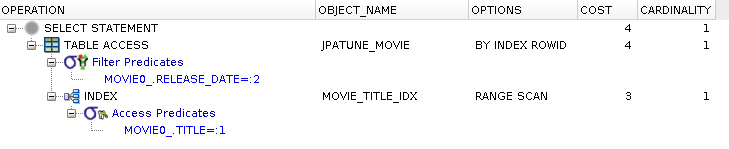
Candidate rows located using a range scan of the index on first condition
Final rows filtered from candidate rows using second condition
Figure 4.15. Relative Test Result
Dual Indexes.Get By Term1 and Term2:warmups=2, rounds=11, ave=0.21 [+- 0.01]
Most Selective Column Should be Indexed
DB will re-order the query to try to take advantage of an index that will result in the least number of rows moving forward to next step.
All terms in the where clause part of same composite index
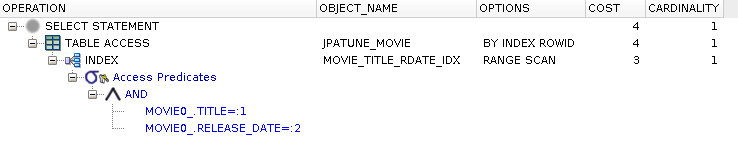
Rows located using range scan of the composite index, applying the two conditions
Select clause satisfied using table rows accessed by rowId
Figure 4.18. Relative Test Result
Compound Index.Get By Term1 and Term2:warmups=2, rounds=11, ave=0.25 [+- 0.02]
Composite Indexes have Minimal Performance Improvement
Adding all terms from the where clause may add some efficiency over a single term index -- but not a significant upgrade from a single index when the contents of the row must be returned anyway.
Incorporate terms from select clause into composite index to bypass table access.
Selecting N columns from M rows matching Q criteria terms
Figure 4.19. JPA Query
"select m.rating from Movie m
where m.title like :title",
params={title=A%}, limit=2000
Figure 4.20. Generated SQL
select * from
    ( select
        movie0_.RATING as col_0_0_
    from
        JPATUNE_MOVIE movie0_
    where
        movie0_.TITLE like ? )
where
    rownum <= ?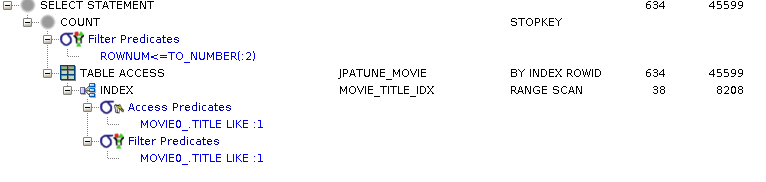
Where clause satisfied using an index range scan
Select clause satisfied using table access by rowId from index
Figure 4.23. Relative Test Result
Where Column Index.Query for Values:warmups=2, rounds=11, ave=1.25 [+- 0.06]
* this index contains columns from both the where and select clauses
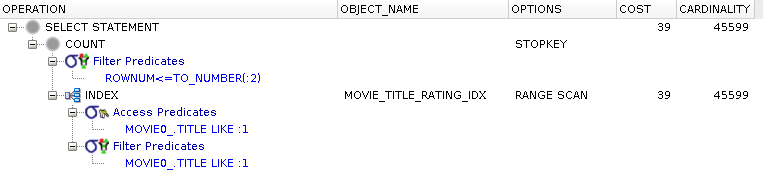
Where clause satisfied using an index range scan
Select clause satisfied using same index since composite index also contains all necessary columns
Figure 4.26. Relative Test Result
Where, Select Index.Query for Values:warmups=2, rounds=11, ave=1.26 [+- 0.06]
Add Columns from Select to Composite Index to Bypass Table Access
DB will bypass rowId access to row if index already contains all columns necessary to satisfy the select clause.
DB can make use of secondary terms within composite index.
* this index is the mirror image of previous example and contains columns from both the select and where clauses

Index did not start with terms from where clause, but usable
Where clause satisfied using a fast full scan of composite index
Select clause satisfied using same index since composite index also contains all necessary columns
Figure 4.29. Relative Test Result
Select, Where Index.Query for Values:warmups=2, rounds=11, ave=1.35 [+- 0.04]
DB Can make use of Secondary Columns of Composite Index
Consider leveraging secondary columns of an existing composite index (over adding another index) to satisfy low-priority queries.
Indexes speed access to specific rows
Indexes should match where clause of high priority queries
Composite indexes can be formed with multiple terms from the where and select clause
Secondary columns of composite indexes can be used (over creating additional index) in lower priority queries
Unique indexes can be searched faster than non-unique indexes -- take advantage of unique column values
Improving performance of foreign key joins.
Select N properties for object M matching certain criteria
Figure 5.1. JPA Query
"select r from MovieRole r
join r.movie m
where m.title=:title and m.releaseDate=:releaseDate",
params={title=Tremors, releaseDate=1990-07-01}
Figure 5.2. Generated SQL
select
    movierole0_.ID as ID1_3_,
    movierole0_.ACTOR_ID as ACTOR3_3_,
    movierole0_.MOVIE_ID as MOVIE4_3_,
    movierole0_.MOVIE_ROLE as MOVIE2_3_
from
    JPATUNE_MOVIEROLE movierole0_
inner join
    JPATUNE_MOVIE movie1_
        on movierole0_.MOVIE_ID=movie1_.ID
where
    movie1_.TITLE=?
and movie1_.RELEASE_DATE=?Perform query without any index support for where, select, or join clauses
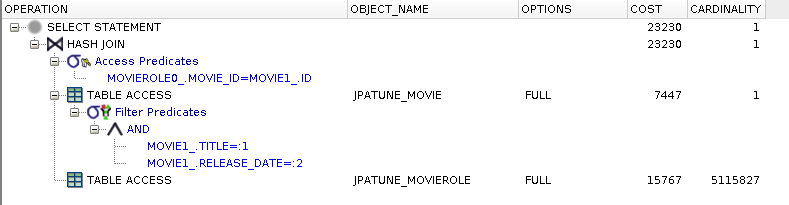
Full table scan of Movie to satisfy where clause and to obtain movie_id for join
Full table scan of MovieRole to locate MovieRoles.movie_id and to obtain rows to satisfy select clause
* Large portion of cost spent looking for children
Full Table Scans (for children) Magified by Multiple Parent Selection
The cost of performing a full table scan of the child table looking for children to match a specific parent is magnified when the overall query selects multiple parent rows. The child table must be scanned for each parent.
Address the biggest cost item in the execution plan by adding an index on the foreign key column.
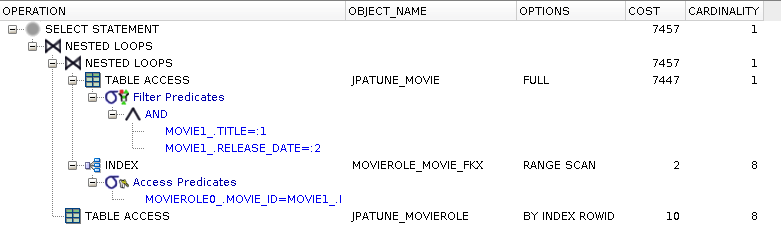
Full table scan of Movie to satisfy where clause and to obtain movie_id for join
Range scan of foreign key index used to locate MovieRoles.movie_id
MovieRole rows accessed by rowId to satisfy select clause
* Eliminated much of the cost to locate children. Still have cost to locate parent
Add Indexes to Foreign Key Columns Joined with Parent
Add indexes to foreign key columns of child tables when the child table is frequently joined with parent rows. The index will go unused if the child is simply searched alone.
Figure 5.8. DB Index(es)
create index movie_title_rdate_idx on jpatune_movie(title, release_date)
create index movierole_movie_fkx on jpatune_movierole(movie_id)
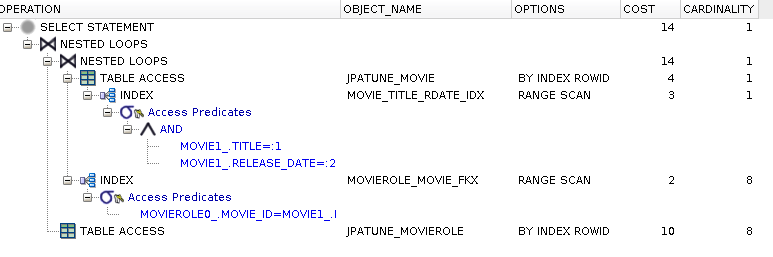
Range scan of composite used to satisfy where clause
Movie rows accessed by rowId to obtain Movie.id for join
(remaining steps are same as prior approach)
Range scan of foreign key index used to locate MovieRoles.movie_id
MovieRole rows accessed by rowId to satisfy select clause
* Eliminated much of the cost to locate children. Still have cost small cost obtaining Movie.id
Figure 5.10. Relative Test Result
FKs and Where Indexed.Get Children:warmups=2, rounds=11, ave=0.18 [+- 0.01]
Figure 5.11. DB Index(es)
create index movie_title_rdate_id_idx on jpatune_movie(title, release_date, id)
create index movierole_movie_fkx on jpatune_movierole(movie_id)
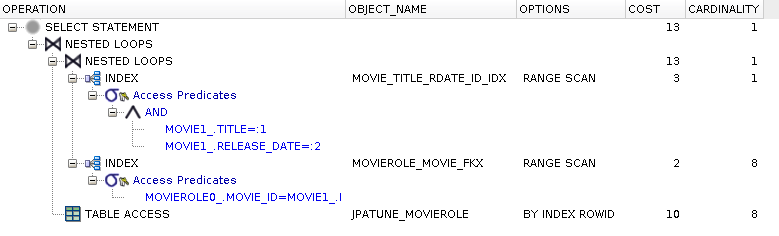
Range scan of composite used to satisfy where clause and obtain Movie.id for join
No access to Movie table required
(remaining steps are same as prior approach)
Range scan of foreign key index used to locate MovieRoles.movie_id
MovieRole rows accessed by rowId to satisfy select clause
* The last rowId access is necessary to return the full MovieRole object
Figure 5.13. Relative Test Result
FKs, Where, and Join Indexed.Get Children:warmups=2, rounds=11, ave=0.20 [+- 0.01]
Adding Join Column to Index Speeds Joins
By adding the join column of the parent to the composite index used to locate the parent rows, you can save row accesses to the parent table (looking for the join column value). This is a small improvement relative to the other indexes added earlier because you are only eliminating an already efficient (but not the most efficient) means of locating row data.
Nested Loop Join - small driving table, join condition used to access second table
Hash Join - larger data joins based on equality matches through hashing functions
Sort-merge Join - larger data joins based on non-equality joins
Used when driving table is small and join condition used to access second table
Select all from table M joined with table P where P.cols match narrow condition
Figure 5.14. JPA Query
"select m from Movie m
join m.cast as r
where r.role=:role",
params={role=Valentine McKee},
limit=2
Figure 5.15. Generated SQL
select
    *
from
    ( select
        movie0_.ID as ID1_2_,
        movie0_.DIRECTOR_ID as DIRECTOR7_2_,
        movie0_.MINUTES as MINUTES2_2_,
        movie0_.PLOT as PLOT3_2_,
        movie0_.RATING as RATING4_2_,
        movie0_.RELEASE_DATE as RELEASE5_2_,
        movie0_.TITLE as TITLE6_2_
    from
        JPATUNE_MOVIE movie0_
    inner join
        JPATUNE_MOVIEROLE cast1_
            on movie0_.ID=cast1_.MOVIE_ID
    where
        cast1_.MOVIE_ROLE=? )
where
rownum <= ?No indexes on where clause or foreign key columns
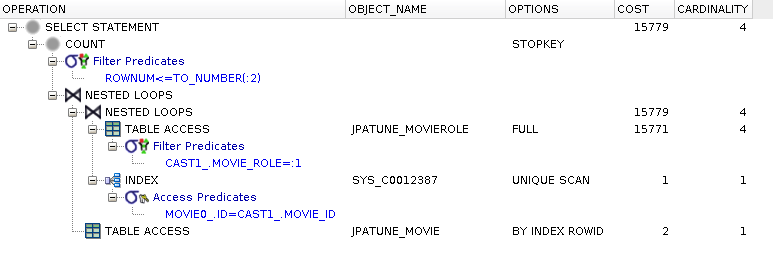
Full table scan of MovieRoles table performed to satisfy role from where clause
Nested Loop using driving table (MovieRole) foreign key (MovieRole.movie_id)
Unique Scan of Movie PK Index (SYS_C0012387) used to locate join rows (MovieRole.movie_id = Movie.id)
RowId scan used to access row data for Movie
Figure 5.17. Relative Test Result
No Table or FK Indexes.Small Driving Table:warmups=2, rounds=11, ave=0.28 [+- 0.04]
Lacking an Index to Match Where Clause Slows Query
Most of the time spent within this query plan is attributed to the full table scan due to the lack of an index matching the where clause.
Single index on where clause column(s)
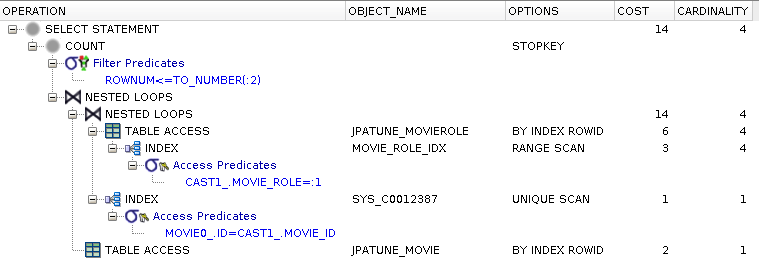
Range scan on index of MovieRoles.roles column used to satisfy where clause
MoveRoles row accessed using RowId from MoviesRoles.roles index to obtain movie_id
(from here is is the same as the previous full table scan case)
Nested Loop using driving table (MovieRole) foreign key (MovieRole.movie_id)
Unique Scan of Movie PK Index (SYS_C0012387) used to locate join rows (MovieRole.movie_id = Movie.id)
RowId scan used to access row data for Movie
Figure 5.20. Relative Test Result
Table Indexes Only.Small Driving Table:warmups=2, rounds=11, ave=0.18 [+- 0.03]
Column Index without FK adds (small) Cost to Join
Adding the foreign key to an (composite) index will eliminate need to access row for foreign key during join.
Separate indexes; one for where clause and second for FK for join
Figure 5.21. DB Index(es)
create index movie_role_idx on jpatune_movierole(movie_role)
create index movie_role_movie_fdx on jpatune_movierole(movie_id)
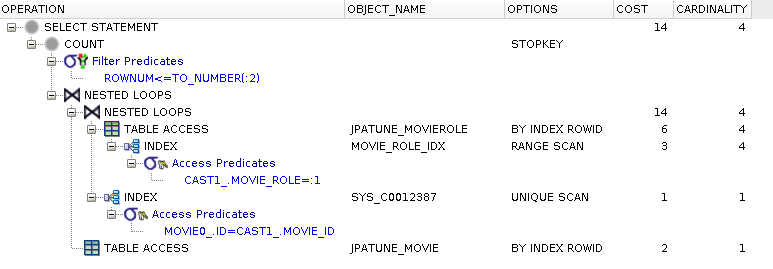
There is no difference between this and the previous case
Foreign Key indexes help locate child rows when join coming from parent
Index identifies rowId of the child having the parent value -- not the rowId of the parent
Figure 5.23. Relative Test Result
Individual Table and FK Indexes.Small Driving Table:warmups=2, rounds=11, ave=0.19 [+- 0.03]
Foreign Key Indexes used to Locate Child RowId -- not Parent
A foreign key index (from the child to the parent) is not used when the child is the driving table and the parent is being located. In this case, the primary key index of the parent is used instead.
Single composite index containing columns from where clause and foreign key
Figure 5.24. DB Index(es)
create index movie_role_movie_cdx on jpatune_movierole(movie_role, movie_id)
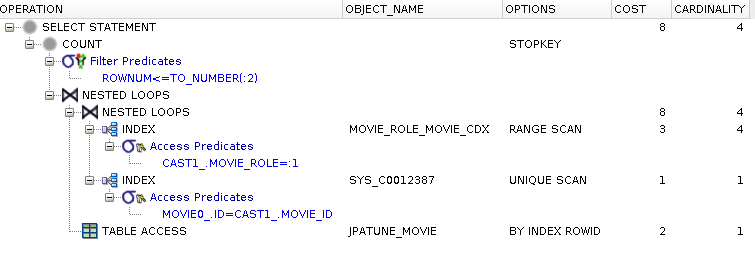
Range scan on composite index of MovieRoles used to satisfy where clause
Composite index provides movie_id without having to access MovieRole row
(from here is is the same as the previous cases)
Nested Loop using driving table (MovieRole) foreign key (MovieRole.movie_id)
Unique Scan of Movie PK Index (SYS_C0012387) used to locate join rows (MovieRole.movie_id = Movie.id)
RowId scan used to access row data for Movie
Figure 5.26. Relative Test Result
Composite with FK Index.Small Driving Table:warmups=2, rounds=11, ave=0.19 [+- 0.03]
Adding Foreign Key to Composite Index Speeds up Join
Adding the foreign key column to an index used to satisfy the where clause can eliminate the need for the DB to access the row for the foreign key during a join operation.
Used when driving table too large to fit into memory and join based on equality
Select all from table M joined with table P where P.cols match broad condition
Figure 5.27. JPA Query
-- Bounded
"select m
from Movie m
join m.cast as r
where r.role like :role",
params={role=V%},
limit=2
-- Offset Bounded ... offset=1000, limit=2
-- Unbounded
...
params={role=V%}
* Used multiple forms of query since Hash algorithm seemed to better detect an early completion limit than the nested loop approach.
Figure 5.28. Generated SQL
select
    *
from
    ( select
        movie0_.ID as ID1_2_,
        movie0_.DIRECTOR_ID as DIRECTOR7_2_,
        movie0_.MINUTES as MINUTES2_2_,
        movie0_.PLOT as PLOT3_2_,
        movie0_.RATING as RATING4_2_,
        movie0_.RELEASE_DATE as RELEASE5_2_,
        movie0_.TITLE as TITLE6_2_
    from
        JPATUNE_MOVIE movie0_
    inner join
        JPATUNE_MOVIEROLE cast1_
            on movie0_.ID=cast1_.MOVIE_ID
    where
        cast1_.MOVIE_ROLE like ? )
where
rownum <= ?No indexes on where clause or foreign key columns
Used When:
Joining large amounts of data
Joining on equality (equi-join) and not relative or function-based
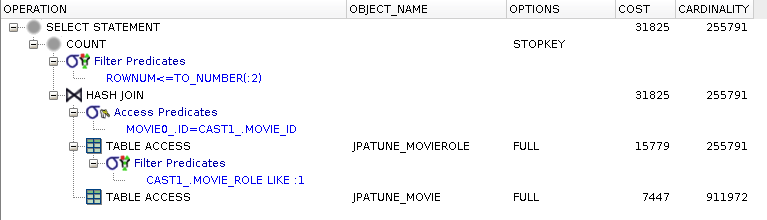
Full table scan of MovieRoles table performed to satisfy role from where clause
DB creates in-memory hash table of foreign key values (i.e., multiple rows/FKs may hash into single hash entry)
Full table scan of Movie table performed to locate and hash(movie.id) -- primary key index is not used
Unique rows located within each hash bucket -- empties discarded
Matching Movies forwarded to next level
Figure 5.30. Relative Test Result
No Table or FK Indexes.Large Driving Table (Bounded):warmups=2, rounds=11, ave=0.17 [+- 0.01]
No Table or FK Indexes.Large Driving Table Offset (Bounded):warmups=2, rounds=11, ave=0.26 [+- 0.02]
No Table or FK Indexes.Large Driving Table (Unbounded:warmups=2, rounds=11, ave=31.51 [+- 1.25]
Single index on where clause column(s)
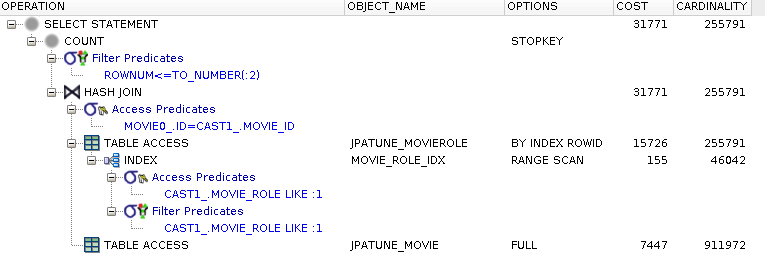
Range scan on index of MovieRoles.roles column used to satisfy where clause
MoveRoles row accessed using RowId from MoviesRoles.roles index to obtain movie_id
DB creates in-memory hash table of foreign key values
(from here is is the same as the previous full table scan case)
Full table scan of Movie table performed to locate and hash(movie.id) -- primary key index is not used
Unique rows located within each hash bucket -- empties discarded
Matching Movies forwarded to next level
Figure 5.33. Relative Test Result
Table Indexes Only.Large Driving Table (Bounded):warmups=2, rounds=11, ave=0.19 [+- 0.03]
Table Indexes Only.Large Driving Table Offset (Bounded):warmups=2, rounds=11, ave=0.26 [+- 0.04]
Table Indexes Only.Large Driving Table (Unbounded:warmups=2, rounds=11, ave=31.40 [+- 1.38]
Single composite index containing columns from where clause and foreign key
Figure 5.34. DB Index(es)
create index movie_role_movie_cdx on jpatune_movierole(movie_role, movie_id)
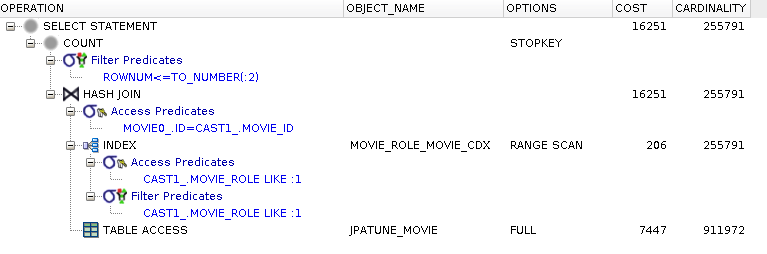
Range scan on composite index of MovieRoles used to satisfy where clause
Composite index provides movie_id without having to access MovieRole row
(from here is is the same as the previous cases)
Full table scan of Movie table performed to locate and hash(movie.id) -- primary key index is not used
Unique rows located within each hash bucket -- empties discarded
Matching Movies forwarded to next level
Figure 5.36. Relative Test Result
Composite with FK Index.Large Driving Table (Bounded):warmups=2, rounds=11, ave=0.18 [+- 0.01]
Composite with FK Index.Large Driving Table Offset (Bounded):warmups=2, rounds=11, ave=0.22 [+- 0.03]
Composite with FK Index.Large Driving Table (Unbounded:warmups=2, rounds=11, ave=30.20 [+- 1.24]
Used:
Over Nested Loops when no suitable driving table can be selected (i.e. fit in memory)
Over Hash Join when join is by non-equality comparison
Basic Algorithm
No driving table selected
Both tables ordered according to a common key
Ordered rows from both tables are then merged
Figure 5.37. Altered SQL
select
    *
from
    ( select /*+ use_merge(cast1_ movie0_) */
        movie0_.ID as ID1_2_,
...
    where
        cast1_.MOVIE_ROLE like ? )
where
    rownum <= ?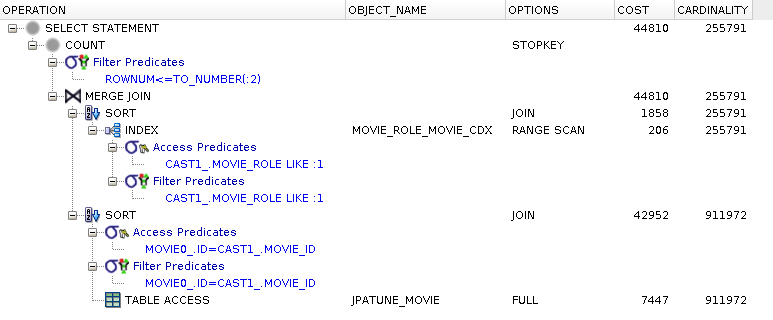
Results from MovieRole (movie_role=:role) and Movie (id=MovieRole.id) sorted at considerable cost
Sorted results merged to form result
Non-equijoins of Large Tables are Expensive
Non-equijoins eliminate DB-flexibility to locate matching rows between tables and force the database to order tables based on the key column prior to forming joined result.
Avoiding inefficient uses of JPA.
Cost impacts of lazy and eager fetch joins
Get just the root parent of an object graph
Figure 6.1. DB Index(es)
alter table jpatune_moviegenre add constraint moviegenre_unique UNIQUE (movie_id, genre)
create index movie_role_movie_fdx on jpatune_movierole(movie_id)
Figure 6.2. Service Tier Code
for (String id: movieIds) {

    Movie m = dao.getMovieById(id);

    m.getTitle();

}
Get just the root parent of an object graph with fetch=LAZY relationships
Figure 6.4. Relationships
public class Movie {

...

    @ElementCollection(fetch=FetchType.LAZY)

    @CollectionTable(

        name="JPATUNE_MOVIEGENRE",

          joinColumns=@JoinColumn(name="MOVIE_ID"),

          uniqueConstraints=@UniqueConstraint(columnNames={"MOVIE_ID", "GENRE"}))

    @Column(name="GENRE", length=20)

    private Set<String> genres;


    @ManyToOne(fetch=FetchType.LAZY,

            cascade={CascadeType.PERSIST, CascadeType.DETACH})

    @JoinColumn(name="DIRECTOR_ID")

    private Director director;


    @OneToMany(fetch=FetchType.LAZY,mappedBy="movie",

            cascade={CascadeType.PERSIST, CascadeType.DETACH, CascadeType.REMOVE})

    private Set<MovieRole> cast;
Two one-to-many relationships (cast and genres) -- genres is a non-entity ElementCollection
One one-to-one relationship (director)
All use fetch=LAZY
Figure 6.5. Generated SQL
select
    movie0_.ID as ID1_2_0_,
    movie0_.DIRECTOR_ID as DIRECTOR6_2_0_,
    movie0_.MINUTES as MINUTES2_2_0_,
    movie0_.RATING as RATING3_2_0_,
    movie0_.RELEASE_DATE as RELEASE4_2_0_,
    movie0_.TITLE as TITLE5_2_0_
from
    JPATUNE_MOVIE movie0_
where
    movie0_.ID=?
Only parent table is queried
Children are lazily loaded

Unique scan of Movie primary key index to satisfy where clause and locate rowId
Row access by rowId to satisfy select clause
Figure 6.7. Relative Test Result
- 20 movies
Fetch Lazy Thin Parent.Get Parent:warmups=2, rounds=10, ave=0.32 [+- 0.03]
Fetch Lazy Thick Parent.Get Parent:warmups=2, rounds=10, ave=0.58 [+- 0.03]
* "Thick" parent has an extra Movie.plot text property mapped to potentially make child joins more expensive. Thin parent does not have Movie plot mapped so the results can focus on access to smaller, related entities.
Fetch=LAZY Speeds Access to Single Entity Core Information
Choosing fetch=LAZY for relationships allows efficient access to the core information for that entity without paying a price for loading unnecessary relations.
Get just the root parent of an object graph with fetch=EAGER relationships
Figure 6.8. Relationships
<entity class="ejava.jpa.examples.tuning.bo.Movie">

    <attributes>

        <many-to-one name="director" fetch="EAGER">

            <join-column name="DIRECTOR_ID"/>

        </many-to-one>

        <one-to-many name="cast" fetch="EAGER" mapped-by="movie"/>


        <element-collection name="genres" fetch="EAGER">

            <column name="GENRE"/>

            <collection-table name="JPATUNE_MOVIEGENRE">

                <join-column name="MOVIE_ID"/>

                <unique-constraint>

                    <column-name>MOVIE_ID</column-name>

                    <column-name>GENRE</column-name>

                </unique-constraint>

            </collection-table>

        </element-collection>


        <transient name="plot"/>

    </attributes>

</entity>
public class MovieRole {

...

    @ManyToOne(optional=false, fetch=FetchType.LAZY,

            cascade={CascadeType.DETACH})

    @JoinColumn(name="ACTOR_ID")

    private Actor actor;
<entity class="ejava.jpa.examples.tuning.bo.MovieRole">

    <attributes>

        <many-to-one name="actor" fetch="EAGER">

            <join-column name="ACTOR_ID"/>

        </many-to-one>

    </attributes>

</entity>
public class Actor {

...

    @OneToOne(optional=false, fetch=FetchType.EAGER,

            cascade={CascadeType.PERSIST, CascadeType.DETACH})

    @MapsId

    @JoinColumn(name="PERSON_ID")

    private Person person;
public class Director {

...

    @OneToOne(optional=false, fetch=FetchType.EAGER,

            cascade={CascadeType.PERSIST, CascadeType.DETACH})

    @JoinColumn(name="PERSON_ID")

    @MapsId

    private Person person;
Movie.director, Movie.genres, Movie.cast relationships overridden in XML to be fetch=EAGER
MovieRole.actor relationship overridden in XML to be fetch=EAGER
Director.person and Actor.person already fetch=EAGER
Figure 6.9. Generated SQL
select
    movie0_.ID as ID1_2_5_,
    movie0_.DIRECTOR_ID as DIRECTOR6_2_5_,
    movie0_.MINUTES as MINUTES2_2_5_,
    movie0_.RATING as RATING3_2_5_,
    movie0_.RELEASE_DATE as RELEASE4_2_5_,
    movie0_.TITLE as TITLE5_2_5_,
    cast1_.MOVIE_ID as MOVIE4_2_7_,
    cast1_.ID as ID1_4_7_,
    cast1_.ID as ID1_4_0_,
    cast1_.ACTOR_ID as ACTOR3_4_0_,
    cast1_.MOVIE_ID as MOVIE4_4_0_,
    cast1_.MOVIE_ROLE as MOVIE2_4_0_,
    actor2_.PERSON_ID as PERSON1_0_1_,
    person3_.ID as ID1_5_2_,
    person3_.BIRTH_DATE as BIRTH2_5_2_,
    person3_.FIRST_NAME as FIRST3_5_2_,
    person3_.LAST_NAME as LAST4_5_2_,
    person3_.MOD_NAME as MOD5_5_2_,
    director4_.PERSON_ID as PERSON1_1_3_,
    person5_.ID as ID1_5_4_,
    person5_.BIRTH_DATE as BIRTH2_5_4_,
    person5_.FIRST_NAME as FIRST3_5_4_,
    person5_.LAST_NAME as LAST4_5_4_,
    person5_.MOD_NAME as MOD5_5_4_,
    genres6_.MOVIE_ID as MOVIE1_2_8_,
    genres6_.GENRE as GENRE2_3_8_
from
    JPATUNE_MOVIE movie0_
left outer join
    JPATUNE_MOVIEROLE cast1_
        on movie0_.ID=cast1_.MOVIE_ID
left outer join
    JPATUNE_ACTOR actor2_
        on cast1_.ACTOR_ID=actor2_.PERSON_ID
left outer join
    JPATUNE_PERSON person3_
        on actor2_.PERSON_ID=person3_.ID
left outer join
    JPATUNE_DIRECTOR director4_
        on movie0_.DIRECTOR_ID=director4_.PERSON_ID
left outer join
    JPATUNE_PERSON person5_
        on director4_.PERSON_ID=person5_.ID
left outer join
    JPATUNE_MOVIEGENRE genres6_
        on movie0_.ID=genres6_.MOVIE_ID
where
    movie0_.ID=?
Single query (as before), but this time it also brings in the entire object graph
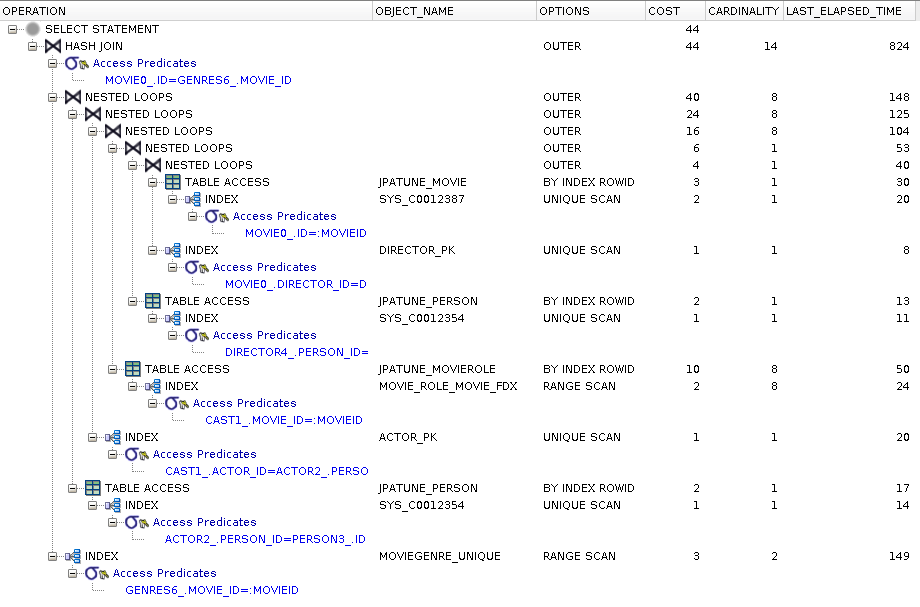
Explain plan shows use of indexes and no full table scans (a missing FK index for MovieRole.movie could have been costly)
Execution plan is significantly more costly than lazy alternative
Figure 6.11. Relative Test Result
- 20 movies
Fetch Eager Thin Parent.Get Parent:warmups=2, rounds=10, ave=2.43 [+- 0.47]
Fetch Eager Thick Parent.Get Parent:warmups=2, rounds=10, ave=2.59 [+- 0.06]
Fetch=EAGER for Single Entity adds Noticeable Overhead
Choosing fetch=EAGER for relationships will make access to a single entity within the relationship more expensive to access. Consider creating a value query, value query with a result class, or a native query when querying for only single entity under these conditions.
Get just the root parent and *ONLY* the parent of an object graph with fetch=EAGER relationships by using a NativeQuery and Result Class
Figure 6.13. DAO Code
public Movie getMovieByIdUnfetched(String id) {

    List<Movie> movies=createQuery(

            String.format("select new %s(m.id, m.minutes, m.rating, m.releaseDate, m.title) ", Movie.class.getName()) +

            "from Movie m " +

            "where id=:id", Movie.class)

            .setParameter("id", id)

            .getResultList();

    return movies.isEmpty() ? null : movies.get(0);

}
public Movie(String id, Integer minutes, String rating, Date releaseDate, String title) {

    this.id=id;

    this.minutes = minutes;

    this.rating=rating;

    this.mrating=MovieRating.getFromMpaa(rating);

    this.releaseDate = releaseDate;

    this.title=title;

}
We define an alternate JPA-QL query for provider to use that does not include relationships
Result class not mapped beyond this query -- does not have to be an entity class
Figure 6.14. Generated JPAQL and SQL
"select new ejava.jpa.examples.tuning.bo.Movie(m.id, m.minutes, m.rating, m.releaseDate, m.title)
from Movie m where id=:id",
params={id=m270003}
select
    movie0_.ID as col_0_0_,
    movie0_.MINUTES as col_1_0_,
    movie0_.RATING as col_2_0_,
    movie0_.RELEASE_DATE as col_3_0_,
    movie0_.TITLE as col_4_0_
from
    JPATUNE_MOVIE movie0_
where
    movie0_.ID=?
Value query with result class constructor permits a bypass of fetch=EAGER relationships

Execution plan identical to fetch=LAZY case
Figure 6.16. Relative Test Result
Fetch Eager Thin Parent.Get Just Parent:warmups=2, rounds=10, ave=0.32 [+- 0.02]
Fetch Eager Thick Parent.Get Just Parent:warmups=2, rounds=10, ave=0.32 [+- 0.02]
Fetch Lazy Thin Parent.Get Just Parent:warmups=2, rounds=10, ave=0.34 [+- 0.03]
Fetch Lazy Thick Parent.Get Just Parent:warmups=2, rounds=10, ave=0.32 [+- 0.02]
* Thick/Thin or Eager/Lazy should not matter to this approach since we only access a specific set of fields in the Movie that does not include Movie.plot.
Use JPA Value or Native Queries to Override Relationship Definitions
JPA provides many escape hatches to achieve desired results. Use JPAQL value queries with Object[], Tuple, or custom result class -or- use SQL to provide efficient override of fetch=EAGER definitions.
Result Class Instances are not Managed
Even though we used an entity class in this example, it is being used as a simple POJO and the returned instance is not managed. Result Classes for value queries provide convenient type-safe access to results. However, they are unmanaged and cannot be used for follow-on entity operations.
Get parent and children in an object graph
Figure 6.17. DB Index(es)
alter table jpatune_moviegenre add constraint moviegenre_unique UNIQUE (movie_id, genre)
create index movie_role_movie_fdx on jpatune_movierole(movie_id)
Figure 6.18. Service Tier Code
for (String id: movieIds) {

    Movie m = dao.getMovieById(id);

    if (m.getDirector()!=null) { m.getDirector().getPerson().getLastName(); }

    m.getGenres().iterator().next();

    for (MovieRole role: m.getCast()) {

        if (role.getActor()!=null) { role.getActor().getPerson().getLastName(); }

    }

}
Get parent and children in an object graph with fetch=LAZY relationships
Query for parent
select movie0_.ID as ID1_2_0_, movie0_.DIRECTOR_ID as DIRECTOR6_2_0_, movie0_.MINUTES as MINUTES2_2_0_, movie0_.RATING as RATING3_2_0_, movie0_.RELEASE_DATE as RELEASE4_2_0_, movie0_.TITLE as TITLE5_2_0_ from JPATUNE_MOVIE movie0_ where movie0_.ID=?Query for Movie.director role
select director0_.PERSON_ID as PERSON1_1_0_ from JPATUNE_DIRECTOR director0_ where director0_.PERSON_ID=?;Query for Movie.director.person identity
select person0_.ID as ID1_5_0_, person0_.BIRTH_DATE as BIRTH2_5_0_, person0_.FIRST_NAME as FIRST3_5_0_, person0_.LAST_NAME as LAST4_5_0_, person0_.MOD_NAME as MOD5_5_0_ from JPATUNE_PERSON person0_ where person0_.ID=?;Query for Movie.genre values
select genres0_.MOVIE_ID as MOVIE1_2_0_, genres0_.GENRE as GENRE2_3_0_ from JPATUNE_MOVIEGENRE genres0_ where genres0_.MOVIE_ID=?;Query for Movie.cast entities
select cast0_.MOVIE_ID as MOVIE4_2_1_, cast0_.ID as ID1_4_1_, cast0_.ID as ID1_4_0_, cast0_.ACTOR_ID as ACTOR3_4_0_, cast0_.MOVIE_ID as MOVIE4_4_0_, cast0_.MOVIE_ROLE as MOVIE2_4_0_ from JPATUNE_MOVIEROLE cast0_ where cast0_.MOVIE_ID=?;Query for MovieRole.actor entity
select actor0_.PERSON_ID as PERSON1_0_0_ from JPATUNE_ACTOR actor0_ where actor0_.PERSON_ID=? ... --repeated for each member of the Movie.castQuery for Actor.person entity
select
    person0_.ID as ID1_5_0_,
    person0_.BIRTH_DATE as BIRTH2_5_0_,
    person0_.FIRST_NAME as FIRST3_5_0_,
    person0_.LAST_NAME as LAST4_5_0_,
    person0_.MOD_NAME as MOD5_5_0_
from
    JPATUNE_PERSON person0_
where
    person0_.ID=?;
...
--repeated for each member of the Movie.cast






Fetch Lazy Thin Parent.Get Parent and Children:warmups=2, rounds=10, ave=7.25 [+- 0.91]
Fetch Lazy Thick Parent.Get Parent and Children:warmups=2, rounds=10, ave=7.25 [+- 0.92]
Make Sparse use of Object Graphs when using fetch=LAZY
Fetch=LAZY is intended for access to a minimal set of objects within a graph. Although each individual query by primary key is quite inexpensive, the sum total (factoring in cardinality) is significant. Consider adding a JOIN FETCH query to your DAO when accessing entire object graph declared with fetch=LAZY.
Get parent and children in an object graph with fetch=EAGER relationships
Loading of the object graph occurs in single DB call
Same cost loading object graph -- whether accessing single or all entities
Figure 6.29. Relative Test Result
Fetch Eager Thin Parent.Get Parent and Children:warmups=2, rounds=10, ave=2.26 [+- 0.06]
Fetch Eager Thick Parent.Get Parent and Children:warmups=2, rounds=10, ave=2.57 [+- 0.06]
Fetch=EAGER Efficient when Accessing Relations
Use fetch=EAGER if related entity *always*/*mostly* accessed. Suggest using a JOIN FETCH query when fetch=LAZY is defined and need entire object graph.
Get parent and children in an object graph with JOIN FETCH query
Figure 6.31. DAO Code/JPAQL
public Movie getMovieFetchedByIdFetched(String id) {

    List<Movie> movies = createQuery(

            "select m from Movie m " +

            "left join fetch m.genres " +

            "left join fetch m.director d " +

            "left join fetch d.person " +

            "left join fetch m.cast role " +

            "left join fetch role.actor a " +

            "left join fetch a.person " +

            "where m.id=:id", Movie.class)

            .setParameter("id", id)

            .getResultList();

    return movies.isEmpty() ? null : movies.get(0);

}
EAGER aspects adding by query adding FETCH to JOIN query construct
Figure 6.32. Generated SQL
select
    movie0_.ID as ID1_2_0_,
    director2_.PERSON_ID as PERSON1_1_1_,
    person3_.ID as ID1_5_2_,
    cast4_.ID as ID1_4_3_,
    actor5_.PERSON_ID as PERSON1_0_4_,
    person6_.ID as ID1_5_5_,
    movie0_.DIRECTOR_ID as DIRECTOR6_2_0_,
    movie0_.MINUTES as MINUTES2_2_0_,
    movie0_.RATING as RATING3_2_0_,
    movie0_.RELEASE_DATE as RELEASE4_2_0_,
    movie0_.TITLE as TITLE5_2_0_,
    genres1_.MOVIE_ID as MOVIE1_2_0__,
    genres1_.GENRE as GENRE2_3_0__,
    person3_.BIRTH_DATE as BIRTH2_5_2_,
    person3_.FIRST_NAME as FIRST3_5_2_,
    person3_.LAST_NAME as LAST4_5_2_,
    person3_.MOD_NAME as MOD5_5_2_,
    cast4_.ACTOR_ID as ACTOR3_4_3_,
    cast4_.MOVIE_ID as MOVIE4_4_3_,
    cast4_.MOVIE_ROLE as MOVIE2_4_3_,
    cast4_.MOVIE_ID as MOVIE4_2_1__,
    cast4_.ID as ID1_4_1__,
    person6_.BIRTH_DATE as BIRTH2_5_5_,
    person6_.FIRST_NAME as FIRST3_5_5_,
    person6_.LAST_NAME as LAST4_5_5_,
    person6_.MOD_NAME as MOD5_5_5_
from
    JPATUNE_MOVIE movie0_
left outer join
    JPATUNE_MOVIEGENRE genres1_
        on movie0_.ID=genres1_.MOVIE_ID
left outer join
    JPATUNE_DIRECTOR director2_
        on movie0_.DIRECTOR_ID=director2_.PERSON_ID
left outer join
    JPATUNE_PERSON person3_
        on director2_.PERSON_ID=person3_.ID
left outer join
    JPATUNE_MOVIEROLE cast4_
        on movie0_.ID=cast4_.MOVIE_ID
left outer join
    JPATUNE_ACTOR actor5_
        on cast4_.ACTOR_ID=actor5_.PERSON_ID
left outer join
    JPATUNE_PERSON person6_
        on actor5_.PERSON_ID=person6_.ID
where
    movie0_.ID=?;
Query identical to fetch=EAGER case
Figure 6.34. Relative Test Result
Fetch Lazy Thin Parent.Get Parent with Fetched Children:warmups=2, rounds=10, ave=2.56 [+- 0.80]
Fetch Lazy Thick Parent.Get Parent with Fetched Children:warmups=2, rounds=10, ave=2.54 [+- 0.08]
Fetch Eager Thin Parent.Get Parent with Fetched Children:warmups=2, rounds=10, ave=2.24 [+- 0.06]
Fetch Eager Thick Parent.Get Parent with Fetched Children:warmups=2, rounds=10, ave=2.58 [+- 0.05]
Make use of JPA Queries to Achieve Tuned-for-Use Query
JPA provides several means to access an entity and its relationships. The properties defined for the relationship help define the default query semantics -- which may not be appropriate for all uses. Leverage JOIN FETCH queries when needing to fully load specific relationships prior to ending the transaction.
Pulling back entire rows from table rather than just the count
Figure 6.35. DB Index(es)
alter table jpatune_moviegenre add constraint moviegenre_unique UNIQUE (movie_id, genre)
create index movie_role_movie_fdx on jpatune_movierole(movie_id)
Get size of a relationship collection.
Figure 6.37. DAO Code/JPAQL
public int getMovieCastCountByDAORelation(String movieId) {

    Movie m = em.find(Movie.class, movieId);

    return m==null ? 0 : m.getCast().size();

}
DAO first gets Movie by primary key
DAO follows up by accessing size of relationship
Figure 6.38. Generated SQL - Fetch=LAZY
select
    movie0_.ID as ID1_2_0_,
    movie0_.DIRECTOR_ID as DIRECTOR6_2_0_,
    movie0_.MINUTES as MINUTES2_2_0_,
    movie0_.RATING as RATING3_2_0_,
    movie0_.RELEASE_DATE as RELEASE4_2_0_,
    movie0_.TITLE as TITLE5_2_0_
from
    JPATUNE_MOVIE movie0_
where
    movie0_.ID=?
select
cast0_.MOVIE_ID as MOVIE4_2_1_,
cast0_.ID as ID1_4_1_,
cast0_.ID as ID1_4_0_,
cast0_.ACTOR_ID as ACTOR3_4_0_,
cast0_.MOVIE_ID as MOVIE4_4_0_,
cast0_.MOVIE_ROLE as MOVIE2_4_0_
from
JPATUNE_MOVIEROLE cast0_
where
cast0_.MOVIE_ID=?Provider will issue follow-on query for all entities in relation
Entity data not used by DAO -- i.e. wasted
Provider will issue one query for entire object graph, to include entities in relation
Entity data not used by DAO -- i.e. even more data is wasted
Figure 6.40. Relative Test Result
Size Lazy.DAO Relation Count:warmups=2, rounds=10, ave=1.83 [+- 0.82]
Size Eager.DAO Relation Count:warmups=2, rounds=10, ave=5.40 [+- 0.83]
Using Relation Collections to Just Obtain Size is Inefficient
Pulling back relationship graphs to just obtain the count in that relationship is inefficient and requires DB to do much more work than it has to.
Query for relationships and count resulting rows
Figure 6.41. DAO Code/JPAQL
public int getMovieCastCountByDAO(String movieId) {

    return createQuery(

            "select role " +

            "from Movie m " +

            "join m.cast role " +

            "where m.id=:id", MovieRole.class)

            .setParameter("id", movieId)

            .getResultList().size();

}
"select role from Movie m join m.cast role where m.id=:id", params={id=m48306}DAO forms query for just related entities
Figure 6.42. Generated SQL - Fetch=LAZY
select
    cast1_.ID as ID1_4_,
    cast1_.ACTOR_ID as ACTOR3_4_,
    cast1_.MOVIE_ID as MOVIE4_4_,
    cast1_.MOVIE_ROLE as MOVIE2_4_
from
    JPATUNE_MOVIE movie0_
inner join
    JPATUNE_MOVIEROLE cast1_
        on movie0_.ID=cast1_.MOVIE_ID
where
    movie0_.ID=?
Provider forms query for related entities
Figure 6.43. Generated SQL - Fetch=EAGER
select
    cast1_.ID as ID1_4_,
    cast1_.ACTOR_ID as ACTOR3_4_,
    cast1_.MOVIE_ID as MOVIE4_4_,
    cast1_.MOVIE_ROLE as MOVIE2_4_
from
    JPATUNE_MOVIE movie0_
inner join
    JPATUNE_MOVIEROLE cast1_
        on movie0_.ID=cast1_.MOVIE_ID
where
    movie0_.ID=?
--this is repeated for each MovieRole.actor
select
actor0_.PERSON_ID as PERSON1_0_0_
from
JPATUNE_ACTOR actor0_
where
actor0_.PERSON_ID=?
select
person0_.ID as ID1_5_0_,
person0_.BIRTH_DATE as BIRTH2_5_0_,
person0_.FIRST_NAME as FIRST3_5_0_,
person0_.LAST_NAME as LAST4_5_0_,
person0_.MOD_NAME as MOD5_5_0_
from
JPATUNE_PERSON person0_
where
person0_.ID=?Provider forms query for related entities and fetch=EAGER relationship specification causes additional MovieRole.actor to be immediately obtained -- except through separate queries by primary key.
Figure 6.44. Relative Test Result
Size Lazy.DAO Count:warmups=2, rounds=10, ave=1.37 [+- 0.03]
Size Eager.DAO Count:warmups=2, rounds=10, ave=16.82 [+- 1.33]
Using fetch=EAGER Relationships can Magnify Data Retrieval Issues
When the entity model over-uses fetch=EAGER, the negative results can be magnified when pulling back unnecessary information from the database.
Issue query to DB to return relationship count
Figure 6.45. DAO Code/JPAQL
public int getMovieCastCountByDB(String movieId) {

    return createQuery(

            "select count(role) " +

            "from Movie m " +

            "join m.cast role " +

            "where m.id=:id", Number.class)

            .setParameter("id", movieId)

            .getSingleResult().intValue();

}
"select count(role) from Movie m join m.cast role where m.id=:id", params={id=m48306}Requesting count(role) rather than returning all roles and counting in DAO.
Figure 6.46. Generated SQL
select
    count(cast1_.ID) as col_0_0_
from
    JPATUNE_MOVIE movie0_
inner join
    JPATUNE_MOVIEROLE cast1_
        on movie0_.ID=cast1_.MOVIE_ID
where
    movie0_.ID=?
Produces a single result/row

DB has already optimized the query to remove unnecessary JOIN
Figure 6.48. Relative Test Result
Size Lazy.DB Count:warmups=2, rounds=10, ave=0.50 [+- 0.04]
Size Eager.DB Count:warmups=2, rounds=10, ave=0.45 [+- 0.02]
* fetch=LAZY or EAGER has no impact in this solution
Perform Counts within DB
It is much more efficient to perform counts within database than to count rows from data returned.
Restructure query to DB to count relations without JOIN
Figure 6.49. DAO Code/JPAQL
public int getCastCountForMovie(String movieId) {

    return createQuery(

            "select count(*) " +

            "from MovieRole role " +

            "where role.movie.id=:id", Number.class)

            .setParameter("id", movieId)

            .getSingleResult().intValue();

}
"select count(*) from MovieRole role where role.movie.id=:id", params={id=m48306}Querying from MovieRole side allows removal of unnecessary JOIN
Figure 6.50. Generated SQL
select
    count(*) as col_0_0_
from
    JPATUNE_MOVIEROLE movierole0_
where
    movierole0_.MOVIE_ID=?
SQL generated queries single table
No improvement in execution plan since DB already performed this optimization in our last attempt
Figure 6.52. Relative Test Result
Size Lazy.DB Count no Join:warmups=2, rounds=10, ave=0.47 [+- 0.01]
Size Eager.DB Count no Join:warmups=2, rounds=10, ave=0.44 [+- 0.02]
* fetch=LAZY or EAGER has no impact in this solution
Look to Remove Unnecessary JOINs
Although in this and the previous case the DB looks to have already optimized the query, try to eliminate unnecessary complexity within the query.
Performing separate subqueries off initial query
Get people who have acted in same movie as a specific actor
Figure 6.53. DB Index(es)
create index movierole_actor_movie_cdx on jpatune_movierole(actor_id, movie_id)
create index movierole_movie_actor_cdx on jpatune_movierole(movie_id, actor_id)
Using DAO to perform initial query and follow-on queries based on results
Figure 6.55. DAO Code/JPAQL
public Collection<Person> oneStepFromPersonByDAO(Person p) {

    Collection<Person> result = new HashSet<Person>();

    //performing core query

    List<String> movieIds = createQuery(

            "select role.movie.id from MovieRole role " +

            "where role.actor.person.id=:personId", String.class)

            .setParameter("personId", p.getId())

            .getResultList();


    //loop through results and issue sub-queries

    for (String mid: movieIds) {

        List<Person> people = createQuery(

                "select role.actor.person from MovieRole role " +

                "where role.movie.id=:movieId", Person.class)

                .setParameter("movieId", mid)

                .getResultList();

        result.addAll(people);

    }

    return result;

}
"select role.movie.id from MovieRole role where role.actor.person.id=:personId", params={personId=p73897}//repeated for each returned movie above
"select role.actor.person from MovieRole role where role.movie.id=:movieId", params={movieId=m239584}DAO makes N separate queries based on results of first query
Distinct was not required in query since it was issued per-movie. Distinct was handed within the DAO using a Java Set to hold the results and hashcode()/equals() implemented within Person class.
Figure 6.56. Generated SQL
select
    movierole0_.MOVIE_ID as col_0_0_
from
    JPATUNE_MOVIEROLE movierole0_,
    JPATUNE_ACTOR actor1_
where
    movierole0_.ACTOR_ID=actor1_.PERSON_ID
    and actor1_.PERSON_ID=?
--repeated for each returned movie above
select
person2_.ID as ID1_5_,
person2_.BIRTH_DATE as BIRTH2_5_,
person2_.FIRST_NAME as FIRST3_5_,
person2_.LAST_NAME as LAST4_5_,
person2_.MOD_NAME as MOD5_5_
from
JPATUNE_MOVIEROLE movierole0_,
JPATUNE_ACTOR actor1_
inner join
JPATUNE_PERSON person2_
on actor1_.PERSON_ID=person2_.ID
where
movierole0_.ACTOR_ID=actor1_.PERSON_ID
and movierole0_.MOVIE_ID=?
SQL generated queries single table

Range scan of compound index(actor_id, person_id) used to satisfy the person_id in where clause and movie_id for select clause
* Query was optimized to bypass Actor table
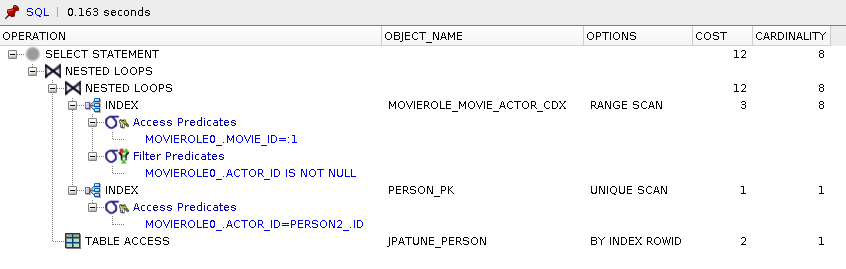
Range scan on compound_index(movie_id, actor_id) to satisfy where condition for Movie.id and locate MovieRole rowId
Unique scan of Person primary key index to obtain rowId for Person.id=MovieRole.actor.id
Person row accessed by rowId to satisfy select clause
* Query was optimized to bypass Actor table
** Compound index(movie_id, actor_id) permitted MovieRole table and lookup of MovieRole.actorId to be bypassed.
Figure 6.59. Relative Test Result
-3924 people found
Loop Lazy.DAO Loop:warmups=2, rounds=10, ave=4.91 [+- 0.88]
Beware of Query Loops Driven from Query Results
Query loops driven off of previous query results can be a sign the follow-queries could have been combined with the initial query to be accomplished within the database within a single statement.
Also beware of how the loop size can grow over the lifetime of the application. The number may grow significantly after testing/initial deployment to a significant size (i.e., from 100 to 100K loops). Defining as a single statement and applying paging limits can help speed the originally flawed implementation.
Expressing nest query as subquery to resolve within database.
Figure 6.60. DAO Code/JPAQL
public List<Person> oneStepFromPersonByDB(Person p) {

    return createQuery(

            "select distinct role.actor.person from MovieRole role " +

            "where role.movie.id in (" +

                "select m.id from Movie m " +

                "join m.cast role2 " +

                "where role2.actor.person.id=:id)", Person.class)

         .setParameter("id", p.getId())

         .getResultList();

}
"select distinct role.actor.person from MovieRole role
where role.movie.id in (
    select m.id from Movie m join m.cast role2
    where role2.actor.person.id=:id
    )",
params={id=p73897}
Distinct was required to remove duplicates
Figure 6.61. Generated SQL
select
    distinct person2_.ID as ID1_5_,
    person2_.BIRTH_DATE as BIRTH2_5_,
    person2_.FIRST_NAME as FIRST3_5_,
    person2_.LAST_NAME as LAST4_5_,
    person2_.MOD_NAME as MOD5_5_
from
    JPATUNE_MOVIEROLE movierole0_,
    JPATUNE_ACTOR actor1_
inner join
    JPATUNE_PERSON person2_
        on actor1_.PERSON_ID=person2_.ID
where
    movierole0_.ACTOR_ID=actor1_.PERSON_ID
    and (
        movierole0_.MOVIE_ID in (
            select
                movie3_.ID
            from
                JPATUNE_MOVIE movie3_
            inner join
                JPATUNE_MOVIEROLE cast4_
                    on movie3_.ID=cast4_.MOVIE_ID,
                JPATUNE_ACTOR actor5_
            where
                cast4_.ACTOR_ID=actor5_.PERSON_ID
                and actor5_.PERSON_ID=?
        )
    )
SQL generated uses a non-correlated subquery
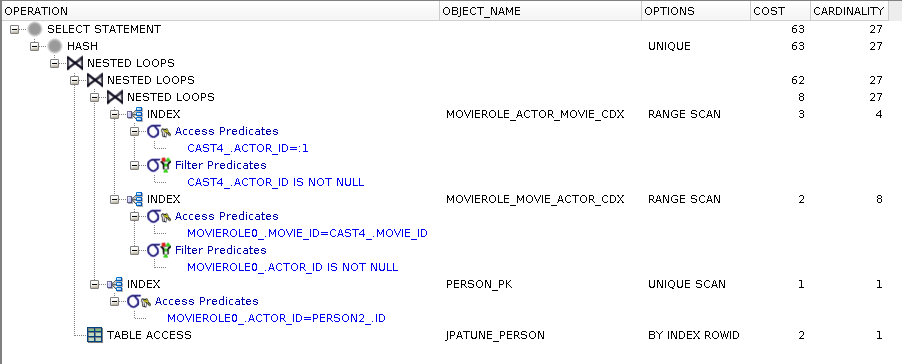
Range scan of MovieRole composite(actor_id, movie_id) used to satisfy subquery where clause for person_id and obtain movie_id
Range scan of MovieRole composite(movie_id, actor_id) used to join movie_ids with root query and obtain person_id
Unique scan of Person primary key index to locate rowId
Person row accessed by rowId
* cast4_ and movierole0_ are both MovieRoles. cast4_ is joined with Movie and subject Person in subquery. movierole0_ is joined with Movie and associated Person in root query.
** execution plan indicates subquery could have been re-written as a JOIN
Figure 6.63. Relative Test Result
-3924 people found
Loop Lazy.DB Loop Distinct:warmups=2, rounds=10, ave=2.52 [+- 0.09]
Delegate Query Logic to Database
If possible, express query as a single transaction to the database rather than pulling data back and re-issuing subqueries from the DAO. Apply paging constraints in order to address issues with excess growth over time.
Placing reasonable limits on amount of data returned
Figure 6.64. DB Index(es)
alter table jpatune_moviegenre add constraint moviegenre_unique UNIQUE (movie_id, genre)
create index movie_role_movie_fdx on jpatune_movierole(movie_id)
Figure 6.65. Service Tier Code
dao.oneStepFromPerson(kevinBacon, offset, PAGE_SIZE, "role.actor.person.lastName ASC")
* Service tier provides not only offset and limit information, but would also benefit from using a sort. The DAO would have to pull back all rows in order to implement the sort within the DAO -- while the DB-based solution can leave all data within the database. Sort will only be implemented here in the DB-based solution.
Implementing paging within the DAO
Figure 6.66. DAO Code/JPAQL
public Collection<Person> oneStepFromPersonByDAO(Person p, Integer offset, Integer limit, String orderBy) {

    Collection<Person> result = new HashSet<Person>();

    //performing core query

    List<String> movieIds = createQuery(

            "select role.movie.id from MovieRole role " +

            "where role.actor.person.id=:personId", String.class)

            .setParameter("personId", p.getId())

            .getResultList();


    //loop through results and issue sub-queries

    int pos=0;

    for (String mid: movieIds) {

        List<Person> people = createQuery(

                "select role.actor.person from MovieRole role " +

                "where role.movie.id=:movieId", Person.class)

                .setParameter("movieId", mid)

                .getResultList();

        if (offset==null || (offset!=null && pos+people.size() > offset)) {

            for(Person pp: people) {

                if (offset==null || pos>=offset) {

                    result.add(pp);

                    if (limit!=null && result.size() >= limit) { break; }

                }

                pos+=1;

            }

        } else {

            pos+=people.size();

        }

        if (limit!=null && result.size() >= limit) { break; }

    }

    return result;

}
DAO logic gets complicated when self-implementing paging.
OrderBy is not implemented by this DAO algorithm. All rows in the table would be required in order to perform ordering within the DAO.
Figure 6.69. Relative Test Result
Loop Lazy.DAO Page 0:warmups=1, rounds=10, ave=0.39 [+- 0.09]
Loop Lazy.DAO Page 10:warmups=1, rounds=10, ave=1.01 [+- 0.45]
Loop Lazy.DAO Page 50:warmups=1, rounds=10, ave=2.80 [+- 0.79]

Loop Eager.DAO Page 0:warmups=1, rounds=10, ave=0.38 [+- 0.10]
Loop Eager.DAO Page 10:warmups=1, rounds=10, ave=1.10 [+- 0.64]
Loop Eager.DAO Page 50:warmups=1, rounds=10, ave=2.53 [+- 0.06]
This example performs better or equal to previous loop/subquery example when earlier pages are requested -- thus fewer rows returned
fetch=EAGER/LAZY have no impact on this test since the entity queried for has no relationships
Performance Degrades in DAO as Row Sizes Increase
Paging within the Java code starts off near equivalent to the database solution for small row sizes but gradually gets worse when row sizes increase and later pages are requested.
Implementing paging within the database
Figure 6.70. DAO Code/JPAQL
public List<Person> oneStepFromPersonByDB(Person p, Integer offset, Integer limit, String orderBy) {

    return withPaging(createQuery(

            "select distinct role.actor.person from MovieRole role " +

            "where role.movie.id in (" +

                "select m.id from Movie m " +

                "join m.cast role2 " +

                "where role2.actor.person.id=:id)", Person.class), offset, limit, orderBy)

         .setParameter("id", p.getId())

         .getResultList();

}
"select distinct role.actor.person from MovieRole role
where role.movie.id in (
    select m.id from Movie m join m.cast role2
    where role2.actor.person.id=:id
) order by role.actor.person.lastName ASC",
params={id=p73897}, offset=500, limit=50
JPA calls to TypedQuery.setFirstResult(), setMaxResults(), and adding the orderBy to the text of the query are abstracted behind withQuery() and createQuery() helper functions within the DAO example class and are not shown here
Figure 6.71. Generated SQL
select
    *
from
    ( select
        row_.*,
        rownum rownum_
    from
        ( select
            distinct person2_.ID as ID1_5_,
            person2_.BIRTH_DATE as BIRTH2_5_,
            person2_.FIRST_NAME as FIRST3_5_,
            person2_.LAST_NAME as LAST4_5_,
            person2_.MOD_NAME as MOD5_5_
        from
            JPATUNE_MOVIEROLE movierole0_,
            JPATUNE_ACTOR actor1_
        inner join
            JPATUNE_PERSON person2_
                on actor1_.PERSON_ID=person2_.ID,
            JPATUNE_PERSON person7_
        where
            movierole0_.ACTOR_ID=actor1_.PERSON_ID
            and actor1_.PERSON_ID=person7_.ID
            and (
                movierole0_.MOVIE_ID in (
                    select
                        movie3_.ID
                    from
                        JPATUNE_MOVIE movie3_
                    inner join
                        JPATUNE_MOVIEROLE cast4_
                            on movie3_.ID=cast4_.MOVIE_ID,
                        JPATUNE_ACTOR actor5_
                    where
                        cast4_.ACTOR_ID=actor5_.PERSON_ID
                        and actor5_.PERSON_ID=?
                )
            )
        order by
            person7_.LAST_NAME ASC ) row_
        where
            rownum <= ?)
    where
        rownum_ > ?
Generated SQL is essentially the same as the looping/subquery example except with the addition of "order by" and paging constructs.
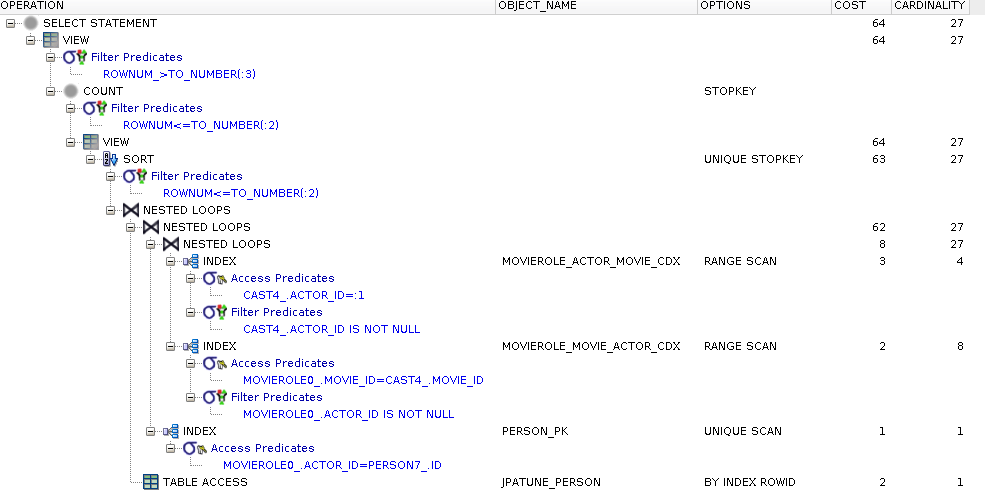
Execution plan is similar as described in the looping/subquery example
Extra cost to sort rows prior to paging operation added
Figure 6.73. Relative Test Result
Loop Lazy.DB Page 0:warmups=1, rounds=10, ave=0.32 [+- 0.02]
Loop Lazy.DB Page 10:warmups=1, rounds=10, ave=0.31 [+- 0.01]
Loop Lazy.DB Page 50:warmups=1, rounds=10, ave=0.32 [+- 0.01]

Loop Eager.DB Page 0:warmups=1, rounds=10, ave=0.32 [+- 0.01]
Loop Eager.DB Page 10:warmups=1, rounds=10, ave=0.32 [+- 0.01]
Loop Eager.DB Page 50:warmups=1, rounds=10, ave=0.32 [+- 0.00]
DB-based Paging Scales
Since only the requested page of rows is returned, delegating paging to the database provides consistent performance for varying row quantities.
Doing Paging within DB enables Sorting
Implementing paging across multiple subquery calls to the database can get ugly and error-prone. Implementing paging for a single query issued to the database is quite trivial.
Hidden performance costs for fetch and resolving with JOIN FETCH and value queries
Hidden performance costs for row counts and resolving with a query function
Performance costs when issuing repeated queries of an initial query from DAO and resolving using subqueries in database
Performance and functional costs when implementing paging in DAO and resolving by delegating paging to database
Figure 7.1. Explain Plan: Where Column Not Indexed
EXPLAIN
select m.title, role.movie_role
from queryex_movie m
join queryex_movierole role on role.movie_id = m.id
where m.rating='R' and role.movie_role='Chip Diller';
PLAN
SELECT
    M.TITLE,
    ROLE.MOVIE_ROLE
FROM PUBLIC.QUERYEX_MOVIEROLE ROLE
    /* PUBLIC.QUERYEX_MOVIEROLE.tableScan */
    /* WHERE ROLE.MOVIE_ROLE = 'Chip Diller'
    */
INNER JOIN PUBLIC.QUERYEX_MOVIE M
    /* PUBLIC.PRIMARY_KEY_C7B: ID = ROLE.MOVIE_ID */
    ON 1=1
WHERE (ROLE.MOVIE_ID = M.ID)
    AND ((M.RATING = 'R')
    AND (ROLE.MOVIE_ROLE = 'Chip Diller'))
Figure 7.2. Index Where Column
create index movierole_role_movie_idx on queryex_movierole(movie_role)
Figure 7.3. Explain Plan: Where Column Indexed
PLAN
SELECT
    M.TITLE,
    ROLE.MOVIE_ROLE
FROM PUBLIC.QUERYEX_MOVIEROLE ROLE
    /* PUBLIC.MOVIEROLE_ROLE_MOVIE_IDX: MOVIE_ROLE = 'Chip Diller' */
    /* WHERE ROLE.MOVIE_ROLE = 'Chip Diller'
    */
INNER JOIN PUBLIC.QUERYEX_MOVIE M
    /* PUBLIC.PRIMARY_KEY_C7B: ID = ROLE.MOVIE_ID */
    ON 1=1
WHERE (ROLE.MOVIE_ID = M.ID)
    AND ((M.RATING = 'R')
    AND (ROLE.MOVIE_ROLE = 'Chip Diller'))
Some topics of possible interest that we did not cover.
Dynamic SQL - parsing penalties paid by building complete SQL strings rather than using a prepared statement template and value parameters.
Cluster Indexes - structurally organize parent and child tables within same data block when commonly accessed together through join operations and rarely alone.
Concurrency - sessions blocked inadvertently by concurrent sessions
...