Enterprise Java Development@TOPIC@
Creating Queries with JPA
Built on: 2014-03-07 00:10 EST
Copyright © 2014 jim stafford (jcstaff@apl.jhu.edu)
Abstract
This document provides exercises to create JPA Queries using JPA Query Language, native SQL, and (future) the Criteria API.
To provide hands on experience
Creating JPA queries
Creating native SQL queries
Performing bulk database updates with JPA queries
Adding locks to JPA queries
At the completion of this exercise, the student will be able to
Create a JPAQL query
Create a SQL query
Set query parameters
Set paging controls
Register a named query
Define a SqlRowSetMapping
Perform a bulk database update using JPAQL and native SQL
Set the lock mode for a query
Note
The primary purpose of this exercise is to provide coverage of the broader capabilities of JPA queries. Although some JPAQL features are exposed, it does not yet provide detailed coverage of the JPA query language or SQL. It is expected that JPAQL will be a future enhancement to what is currently covered.
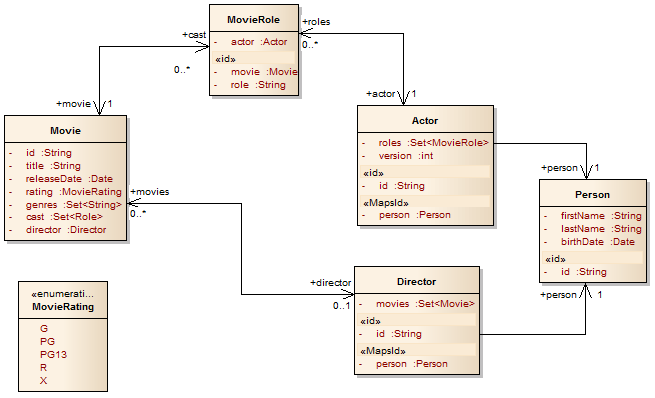
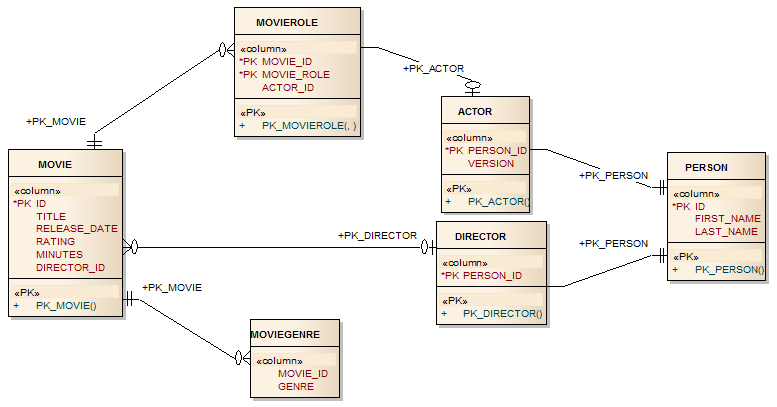
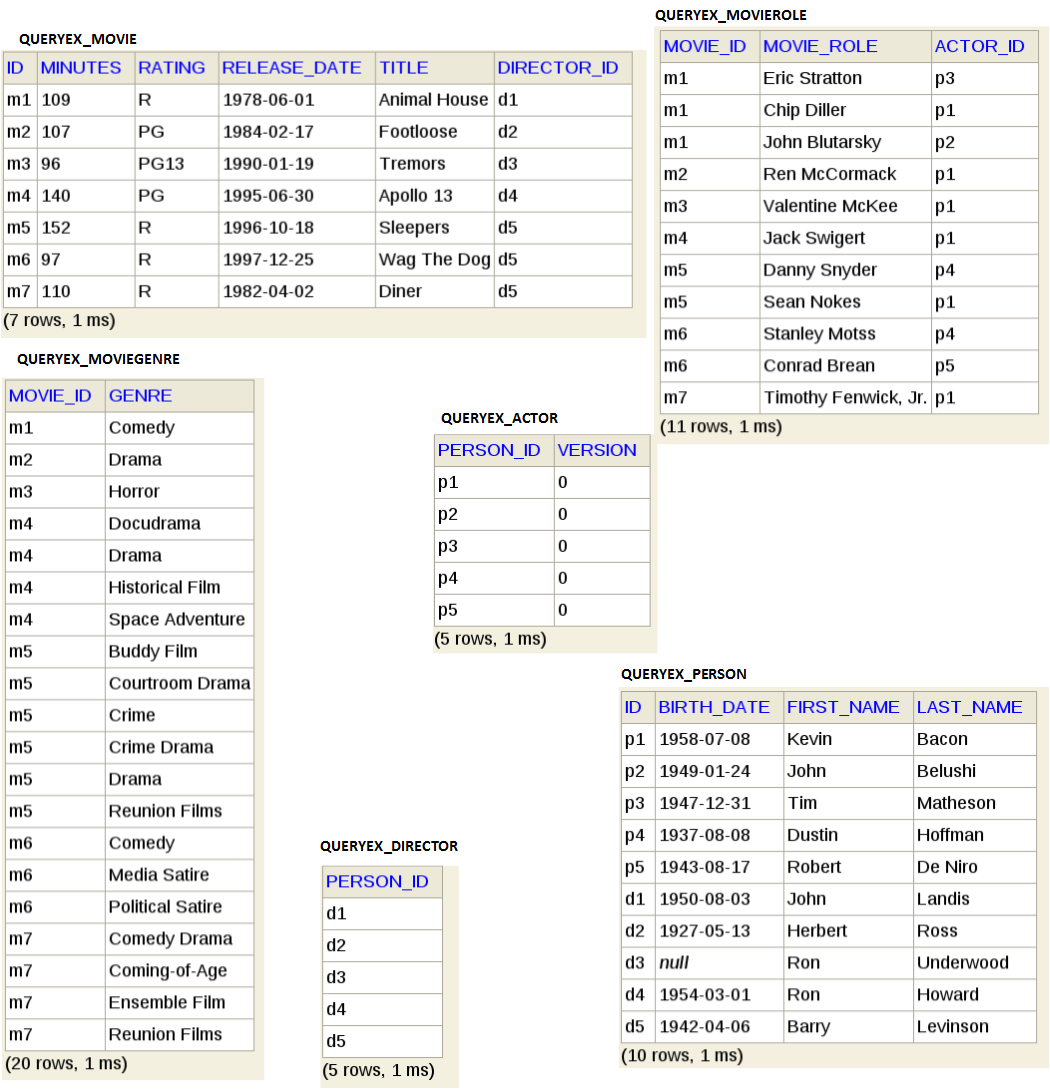
This exercise will start each test case with the following database model in place.
Add the following to your .m2/settings.xml file. This will allow you to resolve the exercise archetype and set a default database for the exercise.
    <profiles>
       <profile>
            <id>webdev-repositories</id>
            <repositories>
                <repository>
                    <id>webdev-baseline</id>
                    <name>webdev.apl.jhu.edu baseline</name>
                    <url>http://webdev.apl.jhu.edu/~jcs/maven2</url>
                </repository>
                <repository>
                    <id>webdev-snapshot</id>
                    <name>webdev.apl.jhu.edu SNAPSHOT</name>
                    <url>http://webdev.apl.jhu.edu/~jcs/maven2-snapshot</url>
                    <snapshots>
                        <enabled>true</enabled>
                        <updatePolicy>daily</updatePolicy>
                    </snapshots>
                </repository>
            </repositories>
            <pluginRepositories>
                <pluginRepository>
                    <id>webdev-plugins</id>
                    <name>ejava webdev repository</name>
                    <url>http://webdev.apl.jhu.edu/~jcs/maven2</url>
                </pluginRepository>
            </pluginRepositories>
        </profile>
    </profiles>
    <activeProfiles>
        <activeProfile>h2db</activeProfile>
        <!--
        <activeProfile>h2srv</activeProfile>
        -->
    </activeProfiles>
Use the ejava.jpa:jpa-queryex-archetype to setup a new Maven project for this exercise. Activate the webdev-repositories profile (-Pwebdev-repositories) so that you can resolve the archetype off the Internet.
Note
This archetype is specific to this exercise and is a different profile than what was used by the previous exercises.
$ mvn archetype:generate -B \
-DarchetypeGroupId=ejava.jpa -DarchetypeArtifactId=jpa-queryex-archetype \
-DgroupId=myorg.queryex -DartifactId=queryEx \
-Pwebdev-repositories

...
[INFO] Generating project in Batch mode
[INFO] Archetype [ejava.jpa:jpa-queryex-archetype:3.0.2013.1-SNAPSHOT] found in catalog local
[INFO] ----------------------------------------------------------------------------
[INFO] Using following parameters for creating project from Archetype: jpa-queryex-archetype:3.0.2013.1-SNAPSHOT
[INFO] ----------------------------------------------------------------------------
[INFO] Parameter: groupId, Value: myorg.queryex
[INFO] Parameter: artifactId, Value: queryEx
[INFO] Parameter: version, Value: 1.0-SNAPSHOT
[INFO] Parameter: package, Value: myorg.queryex
[INFO] Parameter: packageInPathFormat, Value: myorg/queryex
[INFO] Parameter: version, Value: 1.0-SNAPSHOT
[INFO] Parameter: package, Value: myorg.queryex
[INFO] Parameter: groupId, Value: myorg.queryex
[INFO] Parameter: artifactId, Value: queryEx
[INFO] project created from Archetype in dir: /tmp/queryEx
[INFO] ------------------------------------------------------------------------
[INFO] BUILD SUCCESS
You should now have an instantiated template for a JPA project
queryEx/
|-- pom.xml
`-- src
    |-- main
    |   `-- java
    |       `-- myorg
    |           `-- queryex
    |               |-- Actor.java
    |               |-- Director.java
    |               |-- Movie.java
    |               |-- MoviePK.java
    |               |-- MovieRating.java
    |               |-- MovieRole.java
    |               |-- MovieRolePK.java
    |               `-- Person.java
    `-- test
        |-- java
        |   `-- myorg
        |       `-- queryex
        |           |-- BulkUpdateTest.java
        |           |-- MovieFactory.java
        |           |-- QueryBase.java
        |           |-- QueryLocksTest.java
        |           |-- QueryTest.java
        |           `-- SQLQueryTest.java
        `-- resources
            |-- hibernate.properties
            |-- log4j.xml
            `-- META-INF
                `-- persistence.xml
Verify the instantiated template builds in your environment
Activate the h2db profile (and deactivate the h2srv profile) to use an embedded file as your database. This option does not require a server but is harder to inspect database state in between tests.
relationEx]$ mvn clean test -Ph2db -P\!h2srv
...
 -HHH000401: using driver [org.h2.Driver] at URL [jdbc:h2:/home/jcstaff/workspaces/ejava-javaee/git/jpa/jpa-relation/relationEx/target/h2db/ejava]
...
[INFO] ------------------------------------------------------------------------
[INFO] BUILD SUCCESS
[INFO] ------------------------------------------------------------------------
Start your database server
$ java -jar M2_REPO/com/h2database/h2/1.3.168/h2-1.3.168.jar
Activate the h2srv profile (and deactivate the h2db profile) to use a running H2 database server. This option provides more interaction with your database but does require the server to be running.
relationEx]$ mvn clean test -P\!h2db -Ph2srv
...
 -HHH000401: using driver [org.h2.Driver] at URL [jdbc:h2:tcp://127.0.0.1:9092/h2db/ejava]
...
[INFO] ------------------------------------------------------------------------
[INFO] BUILD SUCCESS
[INFO] ------------------------------------------------------------------------
You may now import the instantiated template into Eclipse as an "Existing Maven Project"
In this chapter you will create simple JPAQL queries and work mostly with the outer JPA query framework.
In this section you will setup a JUnit test case to do work within this chapter.
Create a JUnit test case in src/test called QueryTest. Have this class extend QueryBase. Create an initial test method to verify the setup/teardown works correctly.
package myorg.queryex;


import org.apache.commons.logging.Log;

import org.apache.commons.logging.LogFactory;

import org.junit.Test;


public class QueryTest extends QueryBase {

    private static final Log log = LogFactory.getLog(QueryTest.class);

    @Test

    public void test() {}

}
Build the module and run the test case.
$ mvn clean test -P\!h2db -Ph2srv -Dtest=myorg.queryex.QueryTest
...
Tests run: 1, Failures: 0, Errors: 0, Skipped: 0

[INFO] ------------------------------------------------------------------------
[INFO] BUILD SUCCESS
You may remove the sample @Test at this time since we will be adding more below.
In this section you will execute a query that produces different types of results.
Create a query that will return multiple results.
Add the following test method to the test case to return multiple results from a JPAQL query.
@Test

public void testMulti() {

    log.info("*** testMulti ***");


    List<Movie> movies = em.createQuery(

            "select m from Movie m " +

            "order by title ASC", Movie.class)

            .getResultList();

    log.debug("result=" + movies);

    assertEquals("unexpected number of movies", 7, movies.size());

}
Notice...
createQuery() accepts JPAQL syntax
supplying a type (Movie.class) for the second argument produces a type-safe assignment and eliminates the need to perform a cast
getResultList() - returns with zero to many elements
we have added an "order by" to get results in a specified order
getResultList() - returns with zero to many elements
Run the new test method. This should produce a query of the entity class' table and return multiple rows -- which we can display.
$ mvn clean test -P\!h2db -Ph2srv -Dtest=myorg.queryex.QueryTest#testMulti
...
Hibernate:
    select
        movie0_.ID as ID3_,
        movie0_.DIRECTOR_ID as DIRECTOR6_3_,
        movie0_.MINUTES as MINUTES3_,
        movie0_.RATING as RATING3_,
        movie0_.RELEASE_DATE as RELEASE4_3_,
        movie0_.TITLE as TITLE3_
    from
        QUERYEX_MOVIE movie0_
 -result=[Animal House (1978), Apollo 13 (1995), Diner (1982), Footloose (1984), Sleepers (1996), Tremors (1990), Wag The Dog (1997)]
...
[INFO] BUILD SUCCESS
Create a query that will return a single result.
Add the following test method to the test case to return a single result from a JPAQL query.
@Test

public void testSingle() {

    log.info("*** testSingle ***");


    Movie movie = em.createQuery(

            "select m from Movie m " +

            "where m.title='Animal House'", Movie.class)

            .getSingleResult();

    log.debug("result=" + movie);

    assertNotNull("no movie", movie);

}
Notice...
getSingleResult() - returns exactly one result
Run the new test method. This should produce a query of the entity class' table and return a single row -- which we can display.
$ mvn clean test -P\!h2db -Ph2srv -Dtest=myorg.queryex.QueryTest#testSingle
...
 -*** testSingle ***
Hibernate:
    select
        movie0_.ID as ID3_,
        movie0_.DIRECTOR_ID as DIRECTOR6_3_,
        movie0_.MINUTES as MINUTES3_,
        movie0_.RATING as RATING3_,
        movie0_.RELEASE_DATE as RELEASE4_3_,
        movie0_.TITLE as TITLE3_
    from
        QUERYEX_MOVIE movie0_
    where
        movie0_.TITLE='Animal House' limit ?
 -result=Animal House (1978)
...
[INFO] BUILD SUCCESS
Create a query that fails in its attempt to locate a single result because no result is found.
Add the following test method to the test case.
@Test(expected=NoResultException.class)

public void testSingleNoResult() {

    log.info("*** testSingleNoResult ***");


    em.createQuery(

            "select m from Movie m " +

            "where m.title='Animal Hut'", Movie.class)

            .getSingleResult();

    log.debug("query did not produce expected exception");

}
Run the new test method. This should produce a query of the entity class' table, return no rows, and throw an expected javax.persistence.NoResultException
$ mvn clean test -P\!h2db -Ph2srv -Dtest=myorg.queryex.QueryTest#testSingleNoResult

...
 -*** testSingle ***
Hibernate:
    select
        movie0_.ID as ID3_,
        movie0_.DIRECTOR_ID as DIRECTOR6_3_,
        movie0_.MINUTES as MINUTES3_,
        movie0_.RATING as RATING3_,
        movie0_.RELEASE_DATE as RELEASE4_3_,
        movie0_.TITLE as TITLE3_
    from
        QUERYEX_MOVIE movie0_
    where
        movie0_.TITLE='Animal Hut' limit ?
...
[INFO] BUILD SUCCESS
Create a query that fails in its attempt to locate a single result because too many results are found
Add the following test method to the test case.
public void testSingleNonUniqueResult() {

    log.info("*** testSingleNonUniqueResult ***");


    em.createQuery(

            "select m from Movie m " +

            "where m.rating='R'", Movie.class)

            .getSingleResult();

    log.debug("query did not produce expected exception");

}
Run the new test method. This should produce a query of the entity class' table, locate multiple rows, and throw an expected javax.persistence.NonUniqueResultException
$ mvn clean test -P\!h2db -Ph2srv -Dtest=myorg.queryex.QueryTest#testSingleNonUniqueResult
...
-*** testSingleNonUniqueResult ***
Hibernate:
    select
        movie0_.ID as ID3_,
        movie0_.DIRECTOR_ID as DIRECTOR6_3_,
        movie0_.MINUTES as MINUTES3_,
        movie0_.RATING as RATING3_,
        movie0_.RELEASE_DATE as RELEASE4_3_,
        movie0_.TITLE as TITLE3_
    from
        QUERYEX_MOVIE movie0_
    where
        movie0_.RATING='R' limit ?
...
[INFO] BUILD SUCCESS
In this section you will pass in parameters to the JPAQL query.
Add the following test method to your existing test case to execute a query with a provided parameter argument.
@Test

public void testParameters() {

    log.info("*** testParameters ***");


    List<Movie> movies = em.createQuery(

            "select m from Movie m " +

            "where m.rating=:rating", Movie.class)

            .setParameter("rating", MovieRating.R)

            .getResultList();

    log.debug("result=" + movies);

    assertEquals("unexpected number of movies", 4, movies.size());

}
Notice the parameter name is passed in the setParameter() call and is prefaced within the query with the ":" character. A single parameter can appear in the query multiple times.
$ mvn clean test -P\!h2db -Ph2srv -Dtest=myorg.queryex.QueryTest#testParameters
...
 -*** testParameters ***
Hibernate:
    select
        movie0_.ID as ID3_,
        movie0_.DIRECTOR_ID as DIRECTOR6_3_,
        movie0_.MINUTES as MINUTES3_,
        movie0_.RATING as RATING3_,
        movie0_.RELEASE_DATE as RELEASE4_3_,
        movie0_.TITLE as TITLE3_
    from
        QUERYEX_MOVIE movie0_
    where
        movie0_.RATING=?
 -result=[Animal House (1978), Sleepers (1996), Wag The Dog (1997), Diner (1982)]
...
[INFO] BUILD SUCCESS
Updated the query specification to include items that match a date comparison. Be sure to update the expected count.
List<Movie> movies = em.createQuery(

        "select m from Movie m " +

        "where m.rating=:rating " +

        "and m.releaseDate > :date", Movie.class)

        .setParameter("rating", MovieRating.R)

        .setParameter("date", new GregorianCalendar(1980, 0, 0).getTime(), TemporalType.DATE)

        .getResultList();

log.debug("result=" + movies);

assertEquals("unexpected number of movies", 3, movies.size());
Re-run the test method. Notice the extra statement within the WHERE clause and fewer matches as a result of the updated query.
$ mvn clean test -P\!h2db -Ph2srv -Dtest=myorg.queryex.QueryTest#testParameters
...
 -*** testParameters ***
Hibernate:
    select
        movie0_.ID as ID3_,
        movie0_.DIRECTOR_ID as DIRECTOR6_3_,
        movie0_.MINUTES as MINUTES3_,
        movie0_.RATING as RATING3_,
        movie0_.RELEASE_DATE as RELEASE4_3_,
        movie0_.TITLE as TITLE3_
    from
        QUERYEX_MOVIE movie0_
    where
        movie0_.RATING=?
        and movie0_.RELEASE_DATE>?
 -result=[Sleepers (1996), Wag The Dog (1997), Diner (1982)]
...
[INFO] BUILD SUCCESS
Update the query spec to include a LIKE search for text supplied by a parameter. Concatenate JPAQL wildcards to the beginning and ending of the supplied parameter.
List<Movie> movies = em.createQuery(

        "select m from Movie m " +

        "where m.rating=:rating " +

        "and m.releaseDate > :date " +

        "and m.title like concat(concat('%',:title),'%')", Movie.class)

        .setParameter("rating", MovieRating.R)

        .setParameter("date", new GregorianCalendar(1980, 0, 0).getTime(), TemporalType.DATE)

        .setParameter("title", "The")

        .getResultList();

log.debug("result=" + movies);

assertEquals("unexpected number of movies", 1, movies.size());
Re-run test the test method with the additional search string.
$ mvn clean test -P\!h2db -Ph2srv -Dtest=myorg.queryex.QueryTest#testParameters

...

 -*** testParameters ***

Hibernate:

    select

        movie0_.ID as ID3_,

        movie0_.DIRECTOR_ID as DIRECTOR6_3_,

        movie0_.MINUTES as MINUTES3_,

        movie0_.RATING as RATING3_,

        movie0_.RELEASE_DATE as RELEASE4_3_,

        movie0_.TITLE as TITLE3_

    from

        QUERYEX_MOVIE movie0_

    where

        movie0_.RATING=?

        and movie0_.RELEASE_DATE>?

        and (

            movie0_.TITLE like (('%'||?)||'%')

        )

 -result=[Wag The Dog (1997)]

...

[INFO] BUILD SUCCESS
Update the query spec to make the text search case-insensitive
List<Movie> movies = em.createQuery(

        "select m from Movie m " +

        "where m.rating=:rating " +

        "and m.releaseDate > :date " +

        "and lower(m.title) like concat(concat('%',lower(:title)),'%')", Movie.class)

        .setParameter("rating", MovieRating.R)

        .setParameter("date", new GregorianCalendar(1980, 0, 0).getTime(), TemporalType.DATE)

        .setParameter("title", "wag")

        .getResultList();

log.debug("result=" + movies);

assertEquals("unexpected number of movies", 1, movies.size());
Re-run test the test method with the case-insensitive search.
$ mvn clean test -P\!h2db -Ph2srv -Dtest=myorg.queryex.QueryTest#testParameters

...

 -*** testParameters ***

Hibernate:

    select

        movie0_.ID as ID3_,

        movie0_.DIRECTOR_ID as DIRECTOR6_3_,

        movie0_.MINUTES as MINUTES3_,

        movie0_.RATING as RATING3_,

        movie0_.RELEASE_DATE as RELEASE4_3_,

        movie0_.TITLE as TITLE3_

    from

        QUERYEX_MOVIE movie0_

    where

        movie0_.RATING=?

        and movie0_.RELEASE_DATE>?

        and (

            lower(movie0_.TITLE) like (('%'||lower(?))||'%')

        )

 -result=[Wag The Dog (1997)]

...

[INFO] BUILD SUCCESS
In this section you will control the amount of rows returned by using paging parameters.
Add the following test method to the existing test case to demonstrate paging capabilities.
@Test

public void testPaging() {

    log.info("*** testPaging ***");


    List<Movie> movies = new LinkedList<Movie>();
Setup to constant portion of the query up front.
    TypedQuery<Movie> query = em.createQuery(

            "select m from Movie m " +

            "order by title", Movie.class)

            .setMaxResults(2);
Loop thru each page until an empty page is returned
    List<Movie> page=null;

    int offset=0;

    do {

        page = query.setFirstResult(offset).getResultList();

        log.debug("page=" + page);

        movies.addAll(page);

        offset += page.size();

        log.debug("page.size=" + page.size() + ", offset=" + offset);

    } while (page.size() > 0);
Evaluate the count of rows returned.
    log.debug("result=" + movies);

    assertEquals("unexpected number of movies", 7, movies.size());

}
Note
It is recommended that you provide an "order by" with a consistent ordering when working with paging to assure the follow-on page uses the same sort as the prior page. Properties like "createTime" are good default choices when present.
Run the new test method to demonstrate paging.
$ mvn clean test -P\!h2db -Ph2srv -Dtest=myorg.queryex.QueryTest#testPaging
...
 -*** testPaging ***
Hibernate:
    select
        movie0_.ID as ID3_,
        movie0_.DIRECTOR_ID as DIRECTOR6_3_,
        movie0_.MINUTES as MINUTES3_,
        movie0_.RATING as RATING3_,
        movie0_.RELEASE_DATE as RELEASE4_3_,
        movie0_.TITLE as TITLE3_
    from
        QUERYEX_MOVIE movie0_
    order by
        movie0_.TITLE limit ?
 -page=[Animal House (1978), Apollo 13 (1995), Diner (1982)]
 -page.size=3, offset=3
The first page finishes with 3 rows. The row count is added to the offset for the next query.
Hibernate:
    select
        movie0_.ID as ID3_,
        movie0_.DIRECTOR_ID as DIRECTOR6_3_,
        movie0_.MINUTES as MINUTES3_,
        movie0_.RATING as RATING3_,
        movie0_.RELEASE_DATE as RELEASE4_3_,
        movie0_.TITLE as TITLE3_
    from
        QUERYEX_MOVIE movie0_
    order by
        movie0_.TITLE limit ? offset ?
 -page=[Footloose (1984), Sleepers (1996), Tremors (1990)]
 -page.size=3, offset=6
The second page finishes with 3 rows. The row count is added to the offset for the next query.
Hibernate:
    select
        movie0_.ID as ID3_,
        movie0_.DIRECTOR_ID as DIRECTOR6_3_,
        movie0_.MINUTES as MINUTES3_,
        movie0_.RATING as RATING3_,
        movie0_.RELEASE_DATE as RELEASE4_3_,
        movie0_.TITLE as TITLE3_
    from
        QUERYEX_MOVIE movie0_
    order by
        movie0_.TITLE limit ? offset ?
 -page=[Wag The Dog (1997)]
 -page.size=1, offset=7
The third page finishes with 1 row. The row count is added to the offset for the next query.
Hibernate:
    select
        movie0_.ID as ID3_,
        movie0_.DIRECTOR_ID as DIRECTOR6_3_,
        movie0_.MINUTES as MINUTES3_,
        movie0_.RATING as RATING3_,
        movie0_.RELEASE_DATE as RELEASE4_3_,
        movie0_.TITLE as TITLE3_
    from
        QUERYEX_MOVIE movie0_
    order by
        movie0_.TITLE limit ? offset ?
 -page=[]
 -page.size=0, offset=7
The fourth page finishes with 0 rows. This signals the loop to complete. The result is printed.
 -result=[Animal House (1978), Apollo 13 (1995), Diner (1982), Footloose (1984), Sleepers (1996), Tremors (1990), Wag The Dog (1997)]
...
[INFO] BUILD SUCCESS
Use a named query to register re-usable queries.
Observe the @NamedQuery defined within the Movie entity.
@Entity

@Table(name="QUERYEX_MOVIE")

@NamedQueries(value = {

    @NamedQuery(name="Movie.findByTitle", query=

        "select m from Movie m " +

        "where lower(m.title) like concat(concat('%',lower(:title)),'%')")

})

public class Movie implements Comparable<Movie>{

})
Add the following test method to your existing test case to demonstrate calling a named query.
@Test

public void testNamedQuery() {

    log.info("*** testNamedQuery ***");


    Movie movie = em.createNamedQuery("Movie.findByTitle", Movie.class)

            .setParameter("title", "wag")

            .getSingleResult();

    log.debug("result=" + movie);

    assertNotNull("no movie", movie);

}
Re-run the new test method to show the execution of the named query with a parameter supplied at runtime.
$ mvn clean test -P\!h2db -Ph2srv -Dtest=myorg.queryex.QueryTest#testNamedQuery

...

-*** testNamedQuery ***

Hibernate:

    select

        movie0_.ID as ID3_,

        movie0_.DIRECTOR_ID as DIRECTOR6_3_,

        movie0_.MINUTES as MINUTES3_,

        movie0_.RATING as RATING3_,

        movie0_.RELEASE_DATE as RELEASE4_3_,

        movie0_.TITLE as TITLE3_

    from

        QUERYEX_MOVIE movie0_

    where

        lower(movie0_.TITLE) like (('%'||lower(?))||'%') limit ?

 -result=Wag The Dog (1997)

...
Retrieving an entity by its property values and having that entity be managed is a powerful capability provided by JPAQL queries. However, there are times when retrieving a simple value -- rather than the complete entity -- is a better solution.
In this section we will form a query to return a list of values from a single entity property that has a known type. This allows the query result to be placed into a convenient List for processing.
Add the following test method to demonstrate querying an entity model and a collection of values.
@Test

public void testValueQuery() {

    log.info("*** testValueQuery ***");


    List<String> titles = em.createQuery(

            "select m.title from Movie m " +

            "order by title ASC", String.class)

            .getResultList();

    for (String title : titles) {

        log.debug(title);

    }

    assertEquals("unexpected number of titles", 7, titles.size());

}
Notice...
The data type returned in the list is declared in the query
The result is returned as a simple list of values
Run the new test method and observe that only the requested value from the entity is returned and not the entire entity.
$ mvn clean test -P\!h2db -Ph2srv -Dtest=myorg.queryex.QueryTest#testValueQuery
...
 -*** testValueQuery ***
Hibernate:
    select
        movie0_.TITLE as col_0_0_
    from
        QUERYEX_MOVIE movie0_
    order by
        movie0_.TITLE ASC
 -Animal House
 -Apollo 13
 -Diner
 -Footloose
 -Sleepers
 -Tremors
 -Wag The Dog
...
[INFO] BUILD SUCCESS
In the previous section we performed a query on a single property and the result returned a list. From that list we had the capability to get its size to determine how many entities we had that matched the criteria. If that was our only purpose -- that would be inefficient. Lets delegate the counting to the database and simply returned the result.
Add the following test method to demonstrate querying an entity model and returning a single function result.
@Test

public void testResultValueQuery() {

    log.info("*** testResultValueQuery ***");


    int titleCount = em.createQuery(

            "select count(m) from Movie m", Number.class)

            .getSingleResult().intValue();

    log.debug("titleCount=" + titleCount);

    assertEquals("unexpected number of titles", 7, titleCount);

}
Notice...
The query returns the result of a JPAQL function
Adding the return type to the query function allows for type-safe usage of the result
The value can be retrieved using the getSingleResult()
Run the new test method and observe the query produced.
$ mvn clean test -P\!h2db -Ph2srv -Dtest=myorg.queryex.QueryTest#testResultValueQuery
...
 -*** testResultValueQuery ***
Hibernate:
    select
        count(movie0_.ID) as col_0_0_
    from
        QUERYEX_MOVIE movie0_ limit ?
 -titleCount=7
...
[INFO] BUILD SUCCESS
Notice how the count() of rows is calculated in the database and only the result is returned.
In this section you will query for multiple values for the entity. Results for multiple values are returned in a Java Array[]. In the case of the properties being multiple types, the array is an Object[] array.
Add the following test method to demonstrate querying an entity model and returning multiple values of different types.
@Test

public void testMultiValueQuery() {

    log.info("*** testMultiValueQuery ***");


    List<Object[]> results = em.createQuery(

            "select m.title, m.releaseDate from Movie m " +

            "order by title ASC", Object[].class)

            .getResultList();

    for (Object[] result : results) {

        String title = (String)result[0];

        Date releaseDate = (Date)result[1];

        log.debug(String.format("%s (%s)", title, releaseDate));

    }

    assertEquals("unexpected number of results", 7, results.size());

}
Notice...
The query requests multiple values to be returned
The query is declared to return an Object[]
The query returns a List with each element in the List containing an Object[]
The elements of the Object[] are in the order expressed by the query
Run the new test method and observe the database query produced.
$ mvn clean test -P\!h2db -Ph2srv -Dtest=myorg.queryex.QueryTest#testMultiValueQuery
...
 -*** testMultiValueQuery ***
Hibernate:
    select
        movie0_.TITLE as col_0_0_,
        movie0_.RELEASE_DATE as col_1_0_
    from
        QUERYEX_MOVIE movie0_
    order by
        movie0_.TITLE ASC
 -Animal House (1978-06-01)
 -Apollo 13 (1995-06-30)
 -Diner (1982-04-02)
 -Footloose (1984-02-17)
 -Sleepers (1996-10-18)
 -Tremors (1990-01-19)
 -Wag The Dog (1997-12-25)
...
[INFO] BUILD SUCCESS
Notice how the database query resulted in a request for multiple values of different type and the provider made these values available to the application using their assigned type.
Using Object[] arrays is functional but it can lead to some errors or less than desired query result handling. In this section you will encapsulate each row of values returned from the query with an instance of a result class. The result class will provide type-safe access to the returned values as well as any additional functionality we wish to assign.
Add the following result class as a static nested class within your test case. Notice it contains an attribute for each value we expect in the query response and contains a constructor that will process them in a specific order.
private static class MovieRelease {

    public final String title;

    public final Date releaseDate;

    @SuppressWarnings("unused")

    public MovieRelease(String title, Date releaseDate) {

        this.title = title;

        this.releaseDate = releaseDate;

    }

}
Add the following test method to your test case. This test method will issue a similar query as before -- except this time will supply a result class expression for the values to be handled by.
@Test

public void testResultClass() {

    log.info("*** testResultClass ***");


    String query = String.format("select new %s(m.title, m.releaseDate) " +

            "from Movie m order by title ASC",

            MovieRelease.class.getName());

    List<MovieRelease> results = em.createQuery(query, MovieRelease.class)

            .getResultList();

    for (MovieRelease movie: results) {

        log.debug(String.format("%s (%s)", movie.title, movie.releaseDate));

    }

    assertEquals("unexpected number of results", 7, results.size());

}
Notice each row of the query result creates an instance of our result class, passing the values into the constructor in a particular order. Our result class is not an entity and will not be managed within the persistence context.
Run the new test method and observe the JPAQL issued to the entity manager contains a constructor specification for the result class and query values desired. The resultant database query is identical to the one produced in the Object[] array case. The only difference is the provider handles the Object[] array processing for us.
$ mvn clean test -P\!h2db -Ph2srv -Dtest=myorg.queryex.QueryTest#testResultClass
...
 -select new myorg.queryex.QueryTest$MovieRelease(m.title, m.releaseDate) from Movie m order by title ASC
Hibernate:
    select
        movie0_.TITLE as col_0_0_,
        movie0_.RELEASE_DATE as col_1_0_
    from
        QUERYEX_MOVIE movie0_
    order by
        movie0_.TITLE ASC
 -Animal House (1978-06-01)
 -Apollo 13 (1995-06-30)
 -Diner (1982-04-02)
 -Footloose (1984-02-17)
 -Sleepers (1996-10-18)
 -Tremors (1990-01-19)
 -Wag The Dog (1997-12-25)
...
[INFO] BUILD SUCCESS
In the previous chapter we formed queries based on JPAQL -- which are based on entity and property names and the relationships defined within the entity class structure. In a real application, there is also a need to form queries that go outside the boundaries of the entity class model -- but should still be pushed to the database to be performed. JPA provides us an escape hatch to execute raw SQL queries. Unlike JPAQL, SQL queries need not have a direct relation to the JPA entity model. We will start with something simple and then move to more complex usage of the SQL query capability within JPA.
In this section you will setup a JUnit test case to do work within this chapter.
Create a JUnit test case in src/test called SQLQueryTest. Have this class extend QueryBase. Create an initial test method to verify the setup/teardown works correctly.
package myorg.queryex;


import org.apache.commons.logging.Log;

import org.apache.commons.logging.LogFactory;

import org.junit.Test;


public class SQLQueryTest extends QueryBase {

    private static final Log log = LogFactory.getLog(SQLQueryTest.class);

    @Test

    public void test() {}

}
Build the module and run the test case.
$ mvn clean test -P\!h2db -Ph2srv -Dtest=myorg.queryex.SQLQueryTest
...
Tests run: 1, Failures: 0, Errors: 0, Skipped: 0

[INFO] ------------------------------------------------------------------------
[INFO] BUILD SUCCESS
You may remove the sample @Test at this time since we will be adding more tests below.
In this section you will create a simple SQL Query using the entity manager.
Add the following test method to your JUnit test case. This test case will form a native SQL query, have it executed by the entity manager, and be provided with result values. There is no need to open/close SQL Connections, create/close SQL Statements, or work with SQL ResultSets. The results are provided in a List for getResultList() or a value in getSingleResult() that we must cast to the appropriate type.
@Test

public void testSQLQuery() {

    log.info("*** testSQLQuery ***");

    @SuppressWarnings("unchecked")

    List<String> titles = em.createNativeQuery(

            "select title from queryex_movie " +

            "order by title ASC").getResultList();

    for (String title : titles) {

        log.debug(title);

    }

    assertEquals("unexpected number of titles", 7, titles.size());

}
Notice the query expressed is in terms of tables and columns in the database schema and not JPA entity and property names.
Run the new test method and observe the database query that resulted.
$ mvn clean test -P\!h2db -Ph2srv -Dtest=myorg.queryex.SQLQueryTest#testSQLQuery
...
 -*** testSQLQuery ***
Hibernate:
    select
        title
    from
        queryex_movie
    order by
        title ASC
 -Animal House
 -Apollo 13
 -Diner
 -Footloose
 -Sleepers
 -Tremors
 -Wag The Dog
...
[INFO] BUILD SUCCESS
Notice the query issued to the database is exactly what you entered.
You have completed issuing a native SQL query using the entity manager. Native SQL queries support many of the same features as JPAQL queries
Single/Multiple Results
Parameters -- although the JPA spec limits this to ordinal parameters. Using named parameters for native SQL queries is not portable.
Named Queries
As you will see in the follow-on sections -- we can also use SQL queries to return managed entities. This will allow you to tweak the SQL used within a query and not give up receiving a managed entity in what is returned.
Since JPAQL queries can only be expressed in terms of the entity model, there may be times when a more complicated native SQL query is required to obtain the entities you wish to work with. In this section you will use the simplest form of this capability -- where nothing additional is needed except the specification of the entity. We can use this form when the result returns a single entity class.
Add the following test method to your existing JUnit test case. We will form a query that takes advantage of the knowledge that DIRECTOR and PERSON have a primary key join relationship and share the same primary key value. The select provided skips an unnecessary join of the intermediate DIRECTOR table and performs a join from MOVIE straight to the PERSON table -- where a column value is being evaluated.
@Test

public void testSQLResultMapping() {

    log.info("*** testSQLResultMapping ***");

    @SuppressWarnings("unchecked")

    List<Movie> movies = em.createNativeQuery(

            "select m.* from queryex_movie m " +

            "join queryex_person p on p.id = m.director_id " +

            "where p.first_name = 'Ron'" +

            "order by title ASC", Movie.class).getResultList();

    log.debug("result=" + movies);

    for (Movie movie: movies) {

        log.debug("em.contains(" + movie + ")=" + em.contains(movie));

        assertTrue(movie + " not managed", em.contains(movie));

    }

    assertEquals("unexpected number of movies", 2, movies.size());

}
Notice...
The native SQL query is free to do whatever it takes to identify the entity of interest
The native SQL query is required to supply all columns required by the entity
The returned entity is managed
Note -- the example used above is not outside the capability of a JPAQL query. We are using it as a decent example showing some SQL complexity.
Run the new test method.
$ mvn clean test -P\!h2db -Ph2srv -Dtest=myorg.queryex.SQLQueryTest#testSQLResultMapping
  -*** testSQLResultMapping ***
Hibernate:
    select
        m.*
    from
        queryex_movie m
    join
        queryex_person p
            on p.id = m.director_id
    where
        p.first_name = 'Ron'
    order by
        title ASC
 -result=[Apollo 13 (1995), Tremors (1990)]
 -em.contains(Apollo 13 (1995))=true
 -em.contains(Tremors (1990))=true
 ...
[INFO] BUILD SUCCESS
Notice the query executes whatever is in the native SQL and returns the columns required by the default entity mapping. The returned entity instances are managed by the persistence context -- any changes to these entities will cause a database update.
Add the following lines to access an object related to the returned entity.
log.debug("checking unmapped entity name");
assertEquals("unexpected director first name",
        "Ron", movies.get(0).getDirector().getPerson().getFirstName());
Notice that we are going to be traversing a few relationships during the above call. These entities will have to be loaded if they are not yet loaded in the persistence context.
Re-run the unit test and notice the extra calls to the database to retrieve the related entities on demand since they were not previously loaded into the persistence context during the previous query.
$ mvn clean test -Ph2db -Dtest=myorg.queryex.SQLQueryTest#testSQLResultMapping
...
 -result=[Apollo 13 (1995), Tremors (1990)]
 -em.contains(Apollo 13 (1995))=true
 -em.contains(Tremors (1990))=true
 -checking unmapped entity name
Hibernate:
    select
        director0_.PERSON_ID as PERSON1_2_0_
    from
        QUERYEX_DIRECTOR director0_
    where
        director0_.PERSON_ID=?
Hibernate:
    select
        person0_.ID as ID0_0_,
        person0_.BIRTH_DATE as BIRTH2_0_0_,
        person0_.FIRST_NAME as FIRST3_0_0_,
        person0_.LAST_NAME as LAST4_0_0_
    from
        QUERYEX_PERSON person0_
    where
        person0_.ID=?
 ...
[INFO] BUILD SUCCESS
You have finished a quick look at loading a single entity using using a SQL query. In the next section we will look at eagerly fetching more of the object graph into the persistence context during the initial query.
In the previous section you mapped a native SQL query to a single entity and had to do very little work besides specifying the targeted entity and supplying a query that would result in the targeted entity to be populated and managed on return. In this section we will expand our requirements to loading a graph of related entity types during a single query. To do that we must leverage a @SqlResultSetMapping
Define the following SqlResultSetMapping on the Movie entity. This will define a SqlResultSetMapping called "Movie.movieMapping" that will include Movie, Director, and Person entities. All will use their default column mapping.
@Entity

...

@SqlResultSetMappings({

    @SqlResultSetMapping(name="Movie.movieMapping", entities={

            @EntityResult(entityClass=Movie.class),

            @EntityResult(entityClass=Director.class),

            @EntityResult(entityClass=Person.class)

    })

})

public class Movie implements Comparable<Movie>{
Add the following test method to your existing test case.
@Test

public void testSQLMultiResultMapping() {

    log.info("*** testSQLMultiResultMapping ***");

    @SuppressWarnings("unchecked")

    List<Object[]> results = em.createNativeQuery(

            "select * from queryex_movie m " +

            "join queryex_director dir on dir.person_id = m.director_id " +

            "join queryex_person p on p.id = dir.person_id " +

            "where p.first_name = 'Ron'" +

            "order by title ASC", "Movie.movieMapping").getResultList();

    log.debug("query returned " + results.size() + " results");

    for (Object[] result: results) {

        Movie movie = (Movie)result[0];

        Director director = (Director) result[1];

        Person person = (Person)result[2];

        log.debug("em.contains(" + movie + ")=" + em.contains(movie));

        log.debug("em.contains(" + director + ")=" + em.contains(director));

        log.debug("em.contains(" + person + ")=" + em.contains(person));

        assertTrue(movie + " not managed", em.contains(movie));

        assertTrue(director + " not managed", em.contains(director));

        assertTrue(person + " not managed", em.contains(person));

    }

    assertEquals("unexpected number of movies", 2, results.size());

}
Notice...
We have replaced the specification of the Movie.class entity with a SqlResultSetMapping that includes Movie.class and several other entities
The query now returns a List of Object[] with each element in the Object[] containing an entity instance we specified in the @SqlResultSetMapping
What we get returned is a set of entities that are now managed by the container. The query is the same as in the previous section -- we are now instructing the provider to map those results to entity instances and have them managed.
Run the test method and observe the result.
$ mvn clean test -Ph2db -Dtest=myorg.queryex.SQLQueryTest#testSQLMultiResultMapping
...
 -*** testSQLMultiResultMapping ***
Hibernate:
    select
        *
    from
        queryex_movie m
    join
        queryex_director dir
            on dir.person_id = m.director_id
    join
        queryex_person p
            on p.id = dir.person_id
    where
        p.first_name = 'Ron'
    order by
        title ASC
Up to here, we have what we expected. However in the next statements we see the PERSON being re-fetched for each row.
Hibernate:
    select
        person0_.ID as ID0_0_,
        person0_.BIRTH_DATE as BIRTH2_0_0_,
        person0_.FIRST_NAME as FIRST3_0_0_,
        person0_.LAST_NAME as LAST4_0_0_
    from
        QUERYEX_PERSON person0_
    where
        person0_.ID=?
Hibernate:
    select
        person0_.ID as ID0_0_,
        person0_.BIRTH_DATE as BIRTH2_0_0_,
        person0_.FIRST_NAME as FIRST3_0_0_,
        person0_.LAST_NAME as LAST4_0_0_
    from
        QUERYEX_PERSON person0_
    where
        person0_.ID=?
 -query returned 2 results
 -em.contains(Apollo 13 (1995))=true
 -em.contains(Ron Howard)=true
 -em.contains(Ron Howard)=true
 -em.contains(Tremors (1990))=true
 -em.contains(Ron Underwood)=true
 -em.contains(Ron Underwood)=true
...
[INFO] BUILD SUCCESS
Re-write the query to enumerate each column being selected in an attempt to expose the issue with the above query.
List<Object[]> results = em.createNativeQuery(

        "select " +

                "m.id, m.minutes, m.rating, m.release_date, m.title, m.director_id, " +

                "dir.person_id, " +

                "p.id, p.first_name, p.last_name, p.birth_date " +

        "from queryex_movie m " +

        "join queryex_director dir on dir.person_id = m.director_id " +

        "join queryex_person p on p.id = dir.person_id " +

        "where p.first_name = 'Ron'" +

        "order by title ASC", "Movie.movieMapping").getResultList();
Notice there are two columns labeled "ID"; MOVIE.ID and PERSON.ID.
If you re-run the updated query you will observe the same results as before except for the explicit fields in the select. However, with the explicit naming of the fields -- you can now see the overlap between m.id and p.id.
$ mvn clean test -Ph2db -Dtest=myorg.queryex.SQLQueryTest#testSQLMultiResultMapping1
 -*** testSQLMultiResultMapping ***
Hibernate:
    select
        m.id,
        m.minutes,
        m.rating,
        m.release_date,
        m.title,
        m.director_id,
        dir.person_id,
        p.id,
        p.first_name,
        p.last_name,
        p.birth_date
    from
        queryex_movie m
    join
        queryex_director dir
            on dir.person_id = m.director_id
    join
        queryex_person p
            on p.id = dir.person_id
    where
        p.first_name = 'Ron'
    order by
        title ASC
Hibernate:
    select
        person0_.ID as ID0_0_,
...
Hibernate:
    select
        person0_.ID as ID0_0_,
...
 -query returned 2 results
 -em.contains(Apollo 13 (1995))=true
 -em.contains(Ron Howard)=true
 -em.contains(Ron Howard)=true
 -em.contains(Tremors (1990))=true
 -em.contains(Ron Underwood)=true
 -em.contains(Ron Underwood)=true
[INFO] BUILD SUCCESS
Leverage the @FieldResult specification within the @EntityResult fields attribute to be able to specify an alias for the "p.id" result as "p_id" to distinguish it from "m.id". The other columns for PERSON are fine with their default but re-specifying them seems to be required once one of the columns is specified.
@Entity

...

@SqlResultSetMappings({

...

    @SqlResultSetMapping(name="Movie.movieMapping2", entities={

            @EntityResult(entityClass=Movie.class),

            @EntityResult(entityClass=Director.class),

            @EntityResult(entityClass=Person.class, fields={

                @FieldResult(name="id", column="p_id"),

                @FieldResult(name="firstName", column="first_name"),

                @FieldResult(name="lastName", column="last_name"),

                @FieldResult(name="birthDate", column="birth_date")

            })

    })

})

public class Movie implements Comparable<Movie>{
Update the SQL query with the alias defined above. Make sure you update the @SqlResultMapping.name in the query to match what you either added or updated above.
List<Object[]> results = em.createNativeQuery(

        "select " +

                "m.id, m.minutes, m.rating, m.release_date, m.title, m.director_id, " +

                "dir.person_id, " +

                "p.id as p_id, " + //NOTICE: the alias for PERSON.ID

                "p.first_name, p.last_name, p.birth_date " +

        "from queryex_movie m " +

        "join queryex_director dir on dir.person_id = m.director_id " +

        "join queryex_person p on p.id = dir.person_id " +

        "where p.first_name = 'Ron'" +

        "order by title ASC", "Movie.movieMapping2").getResultList();
Re-run the query with the alias in place and observe that everything is resolved within the results of the first query.
$ mvn clean test -Ph2db -Dtest=myorg.queryex.SQLQueryTest#testSQLMultiResultMapping2
...
 -*** testSQLMultiResultMapping ***
Hibernate:
    select
        m.id,
        m.minutes,
        m.rating,
        m.release_date,
        m.title,
        m.director_id,
        dir.person_id,
        p.id as p_id,
        p.first_name,
        p.last_name,
        p.birth_date
    from
        queryex_movie m
    join
        queryex_director dir
            on dir.person_id = m.director_id
    join
        queryex_person p
            on p.id = dir.person_id
    where
        p.first_name = 'Ron'
    order by
        title ASC
 -query returned 2 results
 -em.contains(Apollo 13 (1995))=true
 -em.contains(Ron Howard)=true
 -em.contains(Ron Howard)=true
 -em.contains(Tremors (1990))=true
 -em.contains(Ron Underwood)=true
 -em.contains(Ron Underwood)=true
[INFO] BUILD SUCCESS
Add the following statements to the test method to verify that all related objects have been eagerly fetched/resolved within the initial query.
log.debug("checking unmapped entity name");

assertEquals("unexpected director first name",

        "Ron", ((Movie)((Object[])results.get(0))[0]).getDirector().getPerson().getFirstName());
Re-run the test method to show that no additional queries are issued to the database when navigating the relationships within the object graph.
$ mvn clean test -Ph2db -Dtest=myorg.queryex.SQLQueryTest#testSQLMultiResultMapping2
 -query returned 2 results
 -em.contains(Apollo 13 (1995))=true
 -em.contains(Ron Howard)=true
 -em.contains(Ron Howard)=true
 -em.contains(Tremors (1990))=true
 -em.contains(Ron Underwood)=true
 -em.contains(Ron Underwood)=true
 -checking unmapped entity name
...
[INFO] BUILD SUCCESS
You have completed querying the main points for querying for entities using native SQL.
In this chapter you used native SQL queries to get both values and managed entities from the database. Although you can do the same thing through JPAQL and this way is not portable across database dialects, using native SQL does provide open-ended optimization or specialization of your database queries. While JPAQL is restricted to queries that are consistent with the entity model, the native SQL extension can allow you to form query that bypasses unnecessary joins or navigates both directions of a uni-directional relationship.
Clearly the power of customization is not always worth the extra effort, but definitely keep this capability in mind when you find yourself using native SQL to locate primary key values and then following up that query with an JPAQL query or entity manager command to get a managed object using that primary key.
Leverage XML Mapping Files for Platform-specific Implementations
We leveraged Java Strings and class @Annotations to express the native SQL within this exercise. However, if you find the native SQL being written is too platform-specific and you need to flexibility to run against different database platforms, it is recommended the native SQL be placed in @NamedNativeQueries and defined within an XML mapping file. Once abstracted into the XML mapping file -- platform specific versions of the XML mapping file can be created and used to keep the core DAO platform neutral.
In most of the other chapters we primary show different ways to us JPA to query the database. In this chapter we will use JPA query to perform bulk updates to the database. This capability eliminates the need to query for entire entities, change a few properties, and perform a follow-on update -- which would be very inefficient for a large number of entities. It this chapter we will bypass the persistence context and perform work directly on the database.
Bulk Updates bypass Persistence Context and Invalidate Entities in Cache
It is worth noting that bulk updates bypass the cache entities in the persistence context and will not update their state or leverage defined constructs like cascade delete. You are responsible for either detaching, refreshing, or deleting the impacted entities when performing a bulk update.
In this section you will setup a JUnit test case to do work within this chapter.
Create a JUnit test case in src/test called BulkUpdateTest. Have this class extend QueryBase. Create an initial test method to verify the setup/teardown works correctly.
package myorg.queryex;


import static org.junit.Assert.*;

import org.apache.commons.logging.Log;

import org.apache.commons.logging.LogFactory;

import org.junit.Test;


public class BulkUpdateTest extends QueryBase {

    private static final Log log = LogFactory.getLog(BulkUpdateTest.class);


    @Test

    public void test(){}

}
Build the module and run the test case.
$ mvn clean test -P\!h2db -Ph2srv -Dtest=myorg.queryex.BulkUpdateTest
...
Tests run: 1, Failures: 0, Errors: 0, Skipped: 0

[INFO] ------------------------------------------------------------------------
[INFO] BUILD SUCCESS
You may remove the sample @Test at this time since we will be adding more tests below.
This test case will be changing the database -- so we need to execute the normal test case cleanup/populate in-between test methods to get back to a known state.
Add the following JUnit @Before method to your test case. This will perform the cleanup/populate methods in between each test method since test methods in this test case change the database. The parent class will take care of cleanup/populate prior to running the next test case.
@Before

public void setUpLocksTest() {

    em.getTransaction().commit();

    cleanup(em);

    populate(em);

    em.getTransaction().begin();

}
In this section we will update the properties of an entity directly in the database. To demonstrate the bulk query bypasses and invalidates the cache, a copy of the entity being changed will be purposely brought into the persistence context and queried at different points during the process.
Add the following test method to your existing test case. The test method starts out by getting a copy of the entity to be updated and placing it in the persistence context cache.
@Test

public void testUpdate() {

    log.info("*** testUpdate ***");


    log.debug("get a copy of the entity into the persistence context cache for demo");

    String oldFirst = "Ron";

    String oldLast = "Howard";

    Director d = em.createQuery("select d from Director d JOIN FETCH d.person p " +

            "where p.firstName=:firstName and p.lastName=:lastName", Director.class)

            .setParameter("firstName", oldFirst)

            .setParameter("lastName", oldLast)

            .getSingleResult();

    log.debug("entity in cache=" + d);

}
Run the test method and notice we found the entity we queried for. Since we used a JOIN FETCH -- the default LAZY fetch was ignored and both entities were loaded by the initial query.
$ mvn clean test -Dtest=myorg.queryex.BulkUpdateTest#testUpdate
...
 -*** testUpdate ***
 -get a copy of the entity into the persistence context cache for demo
Hibernate:
    select
        director0_.PERSON_ID as PERSON1_2_0_,
        person1_.ID as ID0_1_,
        person1_.BIRTH_DATE as BIRTH2_0_1_,
        person1_.FIRST_NAME as FIRST3_0_1_,
        person1_.LAST_NAME as LAST4_0_1_
    from
        QUERYEX_DIRECTOR director0_
    inner join
        QUERYEX_PERSON person1_
            on director0_.PERSON_ID=person1_.ID
    where
        person1_.FIRST_NAME=?
        and person1_.LAST_NAME=? limit ?
 -entity in cache=Ron Howard
...
[INFO] BUILD SUCCESS
Add the following lines to the test method. This will perform the actual bulk update. Note the call will return the number of rows updated.
    String newFirst = "Opie";

    String newLast = "Taylor";

    log.debug("performing bulk update");

    int changes=em.createQuery("update Person p " +

            "set p.firstName=:newFirst, p.lastName=:newLast " +

            "where p.firstName=:oldFirst and p.lastName=:oldLast")

            .setParameter("newFirst", newFirst)

            .setParameter("newLast", newLast)

            .setParameter("oldFirst", oldFirst)

            .setParameter("oldLast", oldLast)

            .executeUpdate();

    log.debug("changes=" + changes);

    assertEquals("unexpected changes", 1, changes);
Re-run the test method and note the database update command executed and the number of changes returned.
$ mvn clean test -Dtest=myorg.queryex.BulkUpdateTest#testUpdate
...
 -performing bulk update
Hibernate:
    update
        QUERYEX_PERSON
    set
        FIRST_NAME=?,
        LAST_NAME=?
    where
        FIRST_NAME=?
        and LAST_NAME=?
 -changes=1
...
[INFO] BUILD SUCCESS
Add the following lines to the test method to inspect the entity still in the persistence context cache.
    log.debug("entity still in cache has old values=" + d);

    assertEquals("unexpected cache change", oldFirst, d.getFirstName());

    assertEquals("unexpected cache change", oldLast, d.getLastName());
Re-run the test method to show the cache was bypassed and invalidated by the bulk database updated.
$ mvn clean test -Dtest=myorg.queryex.BulkUpdateTest#testUpdate
...
 -entity still in cache has old values=Ron Howard
...
[INFO] BUILD SUCCESS
Add the following lines to the test method to refresh the stale entities in the persistence context with changes to the database. We must reference each entity we want refreshed unless the relationship has defined cascade=REFRESH.
    log.debug("refreshing cache with changes to database");

    em.refresh(d.getPerson());

    log.debug("refreshed entity in cache has new values=" + d);

    assertEquals("unexpected cache change", newFirst, d.getFirstName());

    assertEquals("unexpected cache change", newLast, d.getLastName());

}
Re-run the test method and observe how the entity within the persistence context has been updated with the current state of the database.
$ mvn clean test -Dtest=myorg.queryex.BulkUpdateTest#testUpdate
...
 -refreshing cache with changes to database
Hibernate:
    select
        person0_.ID as ID0_0_,
        person0_.BIRTH_DATE as BIRTH2_0_0_,
        person0_.FIRST_NAME as FIRST3_0_0_,
        person0_.LAST_NAME as LAST4_0_0_
    from
        QUERYEX_PERSON person0_
    where
        person0_.ID=?
 -refreshed entity in cache has new values=Opie Taylor
...
[INFO] BUILD SUCCESS
You have finished taking a quick look at performing bulk updates using JPAQL. In the next section we will do much the same thing except use native SQL.
In the previous section we used JPAQL to issue a bulk update to the database. In this section we will assume the SQL task to be performed is above and beyond what we can express in the portable JPAQL and must express in native SQL. That may not be the case in this example -- but you will get the point that anything goes with the bulk SQL update.
Add the following test method to your existing test case. This first part will query the database using JPAQL to determine which entities will be updated and to again demonstrate the issues with bulk updates and entries in the cache.
@Test

public void testSQLUpdate() {

    log.info("*** testSQLUpdate ***");


    log.debug("get a copies of the entities into the persistence context cache for demo");

    String genre="Crime Drama";

    @SuppressWarnings("unchecked")

    List<Movie> movies = em.createQuery("select m from Movie m JOIN m.genres g " +

            "where g = :genre")

            .setParameter("genre", genre)

            .getResultList();

    int genreCount=0;

    for (Movie movie : movies) {

        log.debug("entity in cache=" + movie + ", genres=" + movie.getGenres());

        genreCount += movie.getGenres().contains(genre)?1:0;

    }

    assertTrue("no movies found for genre", movies.size()>0);

    assertTrue("unexpected genre count", genreCount > 0);

}
Run the test method to load the targeted entities into the cache.
$ mvn clean test -Dtest=myorg.queryex.BulkUpdateTest#testUpdate
...
 -*** testSQLUpdate ***
 -get a copies of the entities into the persistence context cache for demo
Hibernate:
    select
        movie0_.ID as ID3_,
        movie0_.DIRECTOR_ID as DIRECTOR6_3_,
        movie0_.MINUTES as MINUTES3_,
        movie0_.RATING as RATING3_,
        movie0_.RELEASE_DATE as RELEASE4_3_,
        movie0_.TITLE as TITLE3_
    from
        QUERYEX_MOVIE movie0_
    inner join
        QUERYEX_MOVIEGENRE genres1_
            on movie0_.ID=genres1_.MOVIE_ID
    where
        genres1_.GENRE=?
 -entity in cache=Sleepers (1996), genres=[Buddy Film, Courtroom Drama, Crime, Crime Drama, Drama, Reunion Films]
...
[INFO] BUILD SUCCESS
Add the following lines to the test method to perform the bulk update. Notice that we are using native table and column names in this update command.
log.debug("performing bulk update to remove genre=" + genre);

int changes=em.createNativeQuery("delete from QUERYEX_MOVIEGENRE g " +

        "where g.genre=?1")

        .setParameter(1, genre)

        .executeUpdate();

log.debug("changes=" + changes);

assertEquals("unexpected changes", 1, changes);
Re-run the test method and observe the update issued to the database and the number of changed rows that are returned.
$ mvn clean test -Dtest=myorg.queryex.BulkUpdateTest#testUpdate
...
 -performing bulk update to remove genre=Crime Drama
Hibernate:
    delete
    from
        QUERYEX_MOVIEGENRE g
    where
        g.genre=?
 -changes=1
...
[INFO] BUILD SUCCESS
Add the following lines to your test method to inspect the entity still in the persistence context.
for (Movie movie : movies) {

    log.debug("entity still in cache=" + movie + ", genres=" + movie.getGenres());

}
Re-run the test method to show the cached entity is still in its original fetched state.
$ mvn clean test -Dtest=myorg.queryex.BulkUpdateTest#testUpdate
...
 -entity still in cache=Sleepers (1996), genres=[Buddy Film, Courtroom Drama, Crime, Crime Drama, Drama, Reunion Films]
...
[INFO] BUILD SUCCESS
Add the following lines to the test method to refresh the stale entities.
log.debug("refreshing cached objects");

genreCount=0;

for (Movie movie : movies) {

    em.refresh(movie);

    log.debug("entity in cache=" + movie + ", genres=" + movie.getGenres());

    genreCount += movie.getGenres().contains(genre)?1:0;

}

assertEquals("unexpected cache change", 0, genreCount);
Re-run the test method and observe how the REFRESH from the parent object is cascaded to the child elements because of a built-in rule for @ElementCollections to cascade all commands from parent to child.
$ mvn clean test -Dtest=myorg.queryex.BulkUpdateTest#testUpdate
...
 -refreshing cached objects
Hibernate:
    select
        movie0_.ID as ID3_0_,
        movie0_.DIRECTOR_ID as DIRECTOR6_3_0_,
        movie0_.MINUTES as MINUTES3_0_,
        movie0_.RATING as RATING3_0_,
        movie0_.RELEASE_DATE as RELEASE4_3_0_,
        movie0_.TITLE as TITLE3_0_
    from
        QUERYEX_MOVIE movie0_
    where
        movie0_.ID=?
Hibernate:
    select
        genres0_.MOVIE_ID as MOVIE1_3_0_,
        genres0_.GENRE as GENRE0_
    from
        QUERYEX_MOVIEGENRE genres0_
    where
        genres0_.MOVIE_ID=?
 -entity in cache=Sleepers (1996), genres=[Reunion Films, Crime, Courtroom Drama, Drama, Buddy Film]
...
[INFO] BUILD SUCCESS
You have completed an initial look at performing bulk database updates using SQL queries. This is very similar to the JPAQL technique -- except there is no constraint on how to form the database queries. One use I specifically have found for using native SQL bulk updates is to execute database SQL scripts created by SQL schema generation tools.
In this chapter we provided two basic examples of bulk database updates. This provides a very efficient way to make changes to the database since it bypasses the entity model and other business logic because you are directly working with data in the database. The capability does come at a price. As the exercises showed, the entities within the cache are bypassed and made stale by the direct interaction within the database. This can make it very difficult to work with both persistence contexts and bulk updates at the same time. Bulk updates should be limited to their own transaction or the beginning of transactions using hybrid techniques.
In this chapter we will take a brief look at how you can incorporate database locks into your queries to help address race conditions. We will not be covering JPA locking in detail here. We will be limiting our coverage to how to integrate queries with JPA locks.
In this section you will setup a JUnit test case to do work within this chapter.
Create a JUnit test case in src/test called QueryLocksTest. Have this class extend QueryBase. Create an initial test method to verify the setup/teardown works correctly.
package myorg.queryex;


import static org.junit.Assert.*;

import org.apache.commons.logging.Log;

import org.apache.commons.logging.LogFactory;

import org.junit.Test;


public class QueryLocksTest extends QueryBase {

    private static final Log log = LogFactory.getLog(QueryLocksTest.class);


    @Test

    public void test(){}

}
Build the module and run the test case.
$ mvn clean test -P\!h2db -Ph2srv -Dtest=myorg.queryex.QueryLocksTest
...
Tests run: 1, Failures: 0, Errors: 0, Skipped: 0

[INFO] ------------------------------------------------------------------------
[INFO] BUILD SUCCESS
You may remove the sample @Test at this time since we will be adding more tests below.
For this topic -- we will be looking at the case of a database writer that needs to either update or insert depending on the results of a query. To make this realistic, we will run the same code in multiple threads and purposely form a race condition where we hope to leverage locks to provide us one INSERT and multiple UPDATEs.
Add the following JUnit @Before method to your test case. This will perform the cleanup/populate in between each test method since test methods in this test case change the database. The parent class will take care of cleanup/populate prior to running the next test case.
@Before

public void setUpLocksTest() {

    em.getTransaction().commit();

    cleanup(em);

    populate(em);

}
Add the following enum to your test case. This will be used by the Writer objects to tell the main loop what they did individually to the database.
public static enum Action { INSERT, UPDATE, FAIL };Add the following Writer class. This class will be used to perform a transaction with the database within its own Java Thread. The transaction is started during the constructor and finished during the run method.
private class Writer extends Thread {

    private String context;

    private Actor actor;

    private LockModeType lockMode;

    private EntityManager em_;

    private Action action;

    private int sleepTime=100;

    private String errorText;

    public Writer(String context, Actor actor, LockModeType lockMode) {

        this.context = context;

        this.actor = actor;

        this.lockMode = lockMode;

        em_ = emf.createEntityManager();

        em_.getTransaction().begin();

        log.debug(context + " transaction started");

    }

    public boolean isDone() { return action != null && em_==null; }

    public String getContext() { return context; }

    public Action getAction() { return action; }

    public String getErrorText() { return errorText; }

    public void run() {

    //...

    }

};
Implement the run() method for the Writer class. The method will search for the entity in the database and either create or update it depending on the result of the query.
public void run() {

    try {

        log.debug(context + " selecting with lockMode=" + lockMode);

        List<Actor> actors = em_.createQuery(

            "select a from Actor a JOIN a.person as p " +

            "where p.firstName=:firstName and p.lastName=:lastName " +

            "or p.firstName='" + context + "'", Actor.class)

            .setLockMode(lockMode)

            .setParameter("firstName", actor.getFirstName())

            .setParameter("lastName", actor.getLastName())

            .setMaxResults(1)

            .getResultList();
Notice...
We are passing in a lockMode property into the query above.
We are performing an INSERT if nothing is returned -- else UPDATE
        try {

            log.debug(context + " sleeping " + sleepTime + " msecs");

            Thread.sleep(sleepTime);

        } catch (Exception ex){}

        if (actors.size()==0) {

            log.debug(context + " creating entity");

            em_.persist(actor);

            action=Action.INSERT;

        } else {

            log.debug(context + " updating entity");

            actors.get(0).setBirthDate(actor.getBirthDate());

            action=Action.UPDATE;

        }
We finish up the method with a commit/rollback of the transaction and general accounting so the main loop will know what this instance did.
        em_.flush();

        log.debug(context + " committing transaction version=" + actor.getVersion());

        em_.getTransaction().commit();

        log.debug(context + " committed transaction version=" + actor.getVersion());

    } catch (PersistenceException ex) {

        log.debug(context + " failed " + ex);

        em_.getTransaction().rollback();

        action = Action.FAIL; errorText = ex.toString();

    } finally {

        em_.close(); em_=null;

    }

}
Add a helper method to setup and execute each test. This helper will accept a LockModeType and count of threads to execute. The helper method will supply each thread with an instance to either INSERT or UPDATE. The primary key is unique -- so the thread will use a query based on the properties of the object.
protected int testUpsert(LockModeType lockMode, int count) {

    List<Writer> writers = new ArrayList<QueryLocksTest.Writer>();

    //create writer instances within their own thread

    for (int i=0; i<count; i++) {

        Date birthDate = new GregorianCalendar(1969+i, Calendar.MAY, 25).getTime();

        Actor actor = new Actor(new Person("test-actor" + i)

            .setFirstName("Anne")

            .setLastName("Heche")

            .setBirthDate(birthDate));

        writers.add(new Writer("writer" + i, actor, lockMode));

    }

    //...

}
This portion of the helper method will cause the following output from each thread.
-writer0 transaction started
Add the following lines to the helper method to start each thread.
//start each of the threads

List<Writer> working = new ArrayList<Writer>();

for (Writer writer : writers) {

    working.add(writer); writer.start();

}
This will produce the following output out of each thread. However, the queries will differ slightly depending on the LockModeType used.
-writer0 selecting with lockMode=NONE
Hibernate:
    select
        actor0_.PERSON_ID as PERSON1_1_,
        actor0_.version as version1_
    from
        QUERYEX_ACTOR actor0_
    inner join
        QUERYEX_PERSON person1_
            on actor0_.PERSON_ID=person1_.ID
    where
        person1_.FIRST_NAME=?
        and person1_.LAST_NAME=?
        or person1_.FIRST_NAME='writer0' limit ?
 -writer0 sleeping 100 msecs
The above code will also cause the following to be produced when no match is found by the query.
 -writer0 creating entity
Hibernate:
    insert
    into
        QUERYEX_PERSON
        (BIRTH_DATE, FIRST_NAME, LAST_NAME, ID)
    values
        (?, ?, ?, ?)
Hibernate:
    insert
    into
        QUERYEX_ACTOR
        (version, PERSON_ID)
    values
        (?, ?)
The threads have been designed to delay processing between the select and the INSERT/UPDATE to simulate additional work and to cause neighboring threads to wait (if configured to do so).
 -writer0 committing transaction version=0
 -writer0 committed transaction version=0
Add the following lines to the helper method to wait for the threads to complete.
//run until all writers complete

while (!working.isEmpty()) {

    try { Thread.sleep(100); } catch (Exception ex) {}

    Iterator<Writer> itr = working.iterator();

    while (itr.hasNext()) {

        if (itr.next().isDone()) { itr.remove(); }

    }

}
Add the following lines to the helper method to query for the results and log them. Notice the use of a JOIN FETCH in the query to assure the query performs an EAGER fetch of Person in the same query as the Actor.
//get the resultant entries in database

List<Actor> actors = em.createQuery(

    "select a from Actor a JOIN FETCH a.person as p " +

    "where p.firstName=:firstName and p.lastName=:lastName", Actor.class)

    .setParameter("firstName", "Anne")

    .setParameter("lastName", "Heche")

    .getResultList();

log.debug("actors=" + actors);

for (Writer w : writers) {

    log.debug(String.format("%s => %s %s", w.getContext(), w.getAction(), w.getErrorText()==null?"":w.getErrorText()));

}
This will produce the following output during the test method.
Hibernate:
    select
        actor0_.PERSON_ID as PERSON1_1_0_,
        person1_.ID as ID0_1_,
        actor0_.version as version1_0_,
        person1_.BIRTH_DATE as BIRTH2_0_1_,
        person1_.FIRST_NAME as FIRST3_0_1_,
        person1_.LAST_NAME as LAST4_0_1_
    from
        QUERYEX_ACTOR actor0_
    inner join
        QUERYEX_PERSON person1_
            on actor0_.PERSON_ID=person1_.ID
    where
        person1_.FIRST_NAME=?
        and person1_.LAST_NAME=?
 -actors=[Anne Heche, version=0]
 -writer0 => INSERT
Notice there is an audit of what each of the threads performed (INSERT or UPDATE) at the end of the above output.
Add the following line to the helper method to return the number of rows found in the database.
return actors.size();Add the following test method to verify the code added above and the general working of the test case.
@Test

public void testSimple() {

    log.info("*** testPersistentSimple ***");

    assertEquals("unexpected number of actors", 1, testUpsert(LockModeType.NONE, 1));

}
Run the simple test method to verify the functionality of the test case. Since we use a single thread and no locking, the output is pretty straight forward.
$ mvn clean test -Dtest=myorg.queryex.QueryLocksTest#testSimple
...
 -*** testPersistentSimple ***
 -writer0 transaction started

 -writer0 selecting with lockMode=NONE
Hibernate:
    select
        actor0_.PERSON_ID as PERSON1_1_,
        actor0_.version as version1_
    from
        QUERYEX_ACTOR actor0_
    inner join
        QUERYEX_PERSON person1_
            on actor0_.PERSON_ID=person1_.ID
    where
        person1_.FIRST_NAME=?
        and person1_.LAST_NAME=?
        or person1_.FIRST_NAME='writer0' limit ?
 -writer0 creating entity
Hibernate:
    insert
    into
        QUERYEX_PERSON
        (BIRTH_DATE, FIRST_NAME, LAST_NAME, ID)
    values
        (?, ?, ?, ?)
Hibernate:
    insert
    into
        QUERYEX_ACTOR
        (version, PERSON_ID)
    values
        (?, ?)
 -writer0 sleeping 100 msecs
 -writer0 committing transaction version=0
 -writer0 committed transaction version=0
Hibernate:
    select
        actor0_.PERSON_ID as PERSON1_1_0_,
        person1_.ID as ID0_1_,
        actor0_.version as version1_0_,
        person1_.BIRTH_DATE as BIRTH2_0_1_,
        person1_.FIRST_NAME as FIRST3_0_1_,
        person1_.LAST_NAME as LAST4_0_1_
    from
        QUERYEX_ACTOR actor0_
    inner join
        QUERYEX_PERSON person1_
            on actor0_.PERSON_ID=person1_.ID
    where
        person1_.FIRST_NAME=?
        and person1_.LAST_NAME=?
 -actors=[Anne Heche, version=0]
 -writer0 => INSERT
...
[INFO] BUILD SUCCESS
In this first section we will demonstrate the problem of implementing INSERT/UPDATE without the ability to form a database lock within the initial query. Without a lock -- the results of the initial query become invalidated by the time this transaction completes and we do not get the desired results.
Add the following test method to your existing test case. This will add additional threads to the simple test case run earlier.
@Test

public void testNONE() {

    log.info("*** testNONE ***");

    int count=testUpsert(LockModeType.NONE, 5);

    for (int i=0; i<10 && count<=1; i++) {

        //can't always trigger race condition -- so retry

        cleanup(em);

        populate(em);

        count=testUpsert(LockModeType.NONE, 5);

    }

    assertTrue("unexpected number of actors", count > 1);

}
Note
Due to the unpredictability of the race condition -- we may have to run the test more than once.
Run the new test method and observe the final results. Although each execution will be slightly different -- the issue is we get more than a single thread creating an instance of the entity. You will find all INSERTS got their query results first and all UPDATES go their results last.
$ mvn clean test -Dtest=myorg.queryex.QueryLocksTest#testNONE
...
 -writer0 => INSERT
 -writer1 => UPDATE
 -writer2 => UPDATE
 -writer3 => UPDATE
 -writer4 => INSERT
...
[INFO] BUILD SUCCESS
In this section we will drop back to a single thread but add LockMode to the query so the difference can be easily seen.
Add the following test method to your existing test case.
@Test

public void testPessimisticWrite1() {

    log.info("*** testPersistentWrite1 ***");

    assertEquals("unexpected number of actors", 1, testUpsert(LockModeType.PESSIMISTIC_WRITE, 1));

}
Run the new test method and note the difference in the query output. The provider has added a "for update" at the end of the query. This will form a lock in the database. For the H2 database we are using -- this is a table lock.
$ mvn clean test -Dtest=myorg.queryex.QueryLocksTest#testPessimisticWrite1
...
 -*** testPersistentWrite1 ***
 -writer0 transaction started
 -writer0 selecting with lockMode=PESSIMISTIC_WRITE
Hibernate:
    select
        actor0_.PERSON_ID as PERSON1_1_,
        actor0_.version as version1_
    from
        QUERYEX_ACTOR actor0_
    inner join
        QUERYEX_PERSON person1_
            on actor0_.PERSON_ID=person1_.ID
    where
        person1_.FIRST_NAME=?
        and person1_.LAST_NAME=?
        or person1_.FIRST_NAME='writer0' limit ? for update
...
 -writer0 => INSERT
...
[INFO] BUILD SUCCESS
In this section we will add several threads -- all using PESSIMISTIC_WRITE locks.
Add the following test method to your existing test case. This is the same LockMode as before except we have added additional threads.
@Test

public void testPessimisticWrite() {

    log.info("*** testPersistentWrite ***");

    assertEquals("unexpected number of actors", 1, testUpsert(LockModeType.PESSIMISTIC_WRITE, 5));

}
Run the new test method and notice we get a single INSERT and multiple UPDATEs every time the test is run. That is because all subsequent selects are blocked until the first select commit()s its transaction.
$ mvn clean test -Dtest=myorg.queryex.QueryLocksTest#testPessimisticWrite
...
 -writer0 => INSERT
 -writer1 => UPDATE
 -writer2 => UPDATE
 -writer3 => UPDATE
 -writer4 => UPDATE
...
[INFO] BUILD SUCCESS
This chapter exposed at least one problem that can be corrected using pessimistic locking and lockMode within the JPA query. The details of locking are outside the scope of this chapter and is also subject to database capability and connection modes selected. We want to leave you with just a taste of what you can do and how to express that within a JPA query.