Enterprise Java Development@TOPIC@
Revision: v2013-09-09Built on: 2014-03-07 00:44 EST
Copyright © 2014 jim stafford (jcstaff@apl.jhu.edu)
Abstract
This presentation provides an introduction to development tools and techniques for building enterprise Java applications.
Become familiar with the development environment used with class and commonly used for enterprise Java developments
At the completion of this topic, the student shall
have more understanding of:
Maven project structure
Maven project pom.xml
Maven/Eclipse integration
Eclipse development tasks
be able to:
Establish a Maven project structure
Create and execute a test for Java class
within Eclipse
from Eclipse, within Maven
Debug a Java test and its associated class
within Eclipse
from Eclipse, within Maven (remote debugging)
Follows a standard layout by convention
Can be customized
Root directory stays fairly clean
|-- pom.xml
|-- src
|   |-- main
|   `-- test
`-- target
    |-- classes
    |-- ex1-1.0-SNAPSHOT.jar
    |-- surefire-reports
    `-- test-classes
srcSource tree for all developed code
targetBuild tree for artifacts created by the build
pom.xmlDefines the build
Managed by CM along with src tree
Related artifacts normally placed in src/compile, etc.
Managed by CM
Should not contain any auto-generated artifacts
src
|-- main
|   |-- java
|   |   `-- myorg
|   |       `-- mypackage
|   |           `-- ex1
|   |               `-- App.java
|   `-- resources
`-- test
    |-- java
    |   `-- myorg
    |       `-- mypackage
    |           `-- ex1
    |               `-- AppTest.java
    `-- resources
`-- log4j.xmlmainContains production artifacts for module
Built artifacts from this tree are generally placed in the produced archive
jar tf target/ex1-1.0-SNAPSHOT.jar
META-INF/
META-INF/MANIFEST.MF
myorg/
myorg/mypackage/
myorg/mypackage/ex1/
myorg/mypackage/ex1/App.class
...
testContains test artifacts for module
Built artifacts from this tree are not generally placed in the produced archive
A separate archive of built test artifacts can be optionally generated for reuse
[main or test]/javaContains Java classes
Placed in a directory that matches the Java package for the class
[main or test]/resourcesContains property or other data files
Generally copied to target tree as-is or optionally filtered by the build
Note
Resource filtering is when substitution ${placeholder}s in source files are replaced by their declared property values in the target tree. This is quite useful in customizing URLs, credentials, and other properties that might be unique to the current build environment. Properties can be defined in the pom.xml, settings.xml or injected into the build through various plugins (e.g., inject current date).
Not managed by CM
Contains auto-generated artifacts
Can be deleted at any time
target
|-- classes
|   `-- myorg
|       `-- mypackage
|           `-- ex1
|               `-- App.class
|-- ex1-1.0-SNAPSHOT.jar
|-- log4j-out.txt
|-- surefire-reports
|   |-- myorg.mypackage.ex1.AppTest.txt
|   `-- TEST-myorg.mypackage.ex1.AppTest.xml
`-- test-classes
    |-- log4j.xml
    `-- myorg
        `-- mypackage
            `-- ex1
`-- AppTest.classclassesAn exploded directory tree for built artifacts to be placed into the module archive
Mixture of Java and resource artifacts
test-classesAn exploded directory tree for built artifacts used for test
Mixture of Java and resource artifacts
Part of the test classpath
*-reportsResults of unit and integration testing
surefire-reportsunit test resultsfailsafe-reportsintegration test resultsLocate details of test pass/failures within this directory
$ mvn clean test
...
Failed tests:   testFail(myorg.mypackage.ex1.AppTest): app didn't return 0

Tests run: 2, Failures: 1, Errors: 0, Skipped: 0
[INFO] ------------------------------------------------------------------------
[INFO] BUILD FAILURE
[INFO] ------------------------------------------------------------------------
...

$ more target/surefire-reports/*.txt
-------------------------------------------------------------------------------
Test set: myorg.mypackage.ex1.AppTest
-------------------------------------------------------------------------------
Tests run: 2, Failures: 1, Errors: 0, Skipped: 0, Time elapsed: 0.608 sec <<< FAILURE!
testFail(myorg.mypackage.ex1.AppTest)  Time elapsed: 0.019 sec  <<< FAILURE!
java.lang.AssertionError: app didn't return 0
        at org.junit.Assert.fail(Assert.java:93)
        at org.junit.Assert.assertTrue(Assert.java:43)
        at myorg.mypackage.ex1.AppTest.testFail(AppTest.java:28)
...
{artifactId}-{version}.jarResults of unit and integration testing
Archive with contents of target/classes
Can be installed into local Maven repo by build
log4j-out.txtAn example output file of the build/tests written to the target directory
Produced by log4j based on configuration in src/test/resources/log4j.xml or log4j.properties
Defines the artifact for dependents
Defines the build of the local module
<?xml version="1.0"?>

<project

    xmlns="http://maven.apache.org/POM/4.0.0"

    xmlns:xsi="http://www.w3.org/2001/XMLSchema-instance"

    xsi:schemaLocation="http://maven.apache.org/POM/4.0.0 http://maven.apache.org/maven-v4_0_0.xsd">

    <modelVersion>4.0.0</modelVersion>


    <groupId>myorg.myproject</groupId>

    <artifactId>ex1</artifactId>

    <version>1.0-SNAPSHOT</version>

    <packaging>jar</packaging>


    <name>My First Simple Project</name>

        ...

    <properties>

        ...

    </properties>


    <dependencies>

        ...

    <dependencies>


    <build>

        <plugins>

            ...

        </plugins>

    </build>

</project>
Defines the type of module and automatically enacts a profile of plugs (default=jar)
packaging=jar - primary artifact is a Java archive
packaging=ejb - primary artifact is a JavaEE EJB
packaging=war - primary artifact is a JavaEE WAR
packaging=ear - primary artifact is a JavaEE EAR
packaging=pom - parent pom, used primarily for grouping leaf modules
packaging=... - custom extensions
Value assigned relates to dependency type element
<dependency>
    <groupId>ejava.coursedocs</groupId>
    <artifactId>ejbsessionBankEAR</artifactId>
    <version>3.0.2013.2-SNAPSHOT</version>
    <type>ear</type>
    <scope>compile</scope>
</dependency>Used to uniquely identify the module
<groupId>myorg.myproject</groupId>

<artifactId>ex1</artifactId>

<version>1.0-SNAPSHOT</version>
groupIdHierarchical name used to group a set of one or more artifacts
Represented as a directory structure in repositories
myorg/
`-- myproject
    `-- ex1
        |-- 1.0-SNAPSHOT
        |   |-- ex1-1.0-SNAPSHOT.jar
        |   |-- ex1-1.0-SNAPSHOT.pom
        ...
artifactIdBase name for the artifacts produced by this module
1.0-SNAPSHOT/
|-- ex1-1.0-SNAPSHOT.jar
|-- ex1-1.0-SNAPSHOT.pom
|-- ex1-1.0-SNAPSHOT-tests.jar
versionVersion ID for the artifact
Release: 1.0
Snapshot: 1.0-SNAPSHOT
Timestamped release that does not change name
Useful for active development not yet ready for release
Dependents poll for new snapshots and get the latest version
Easy to use during development but nearly impossible to manage changes
-SNAPSHOT suffix added to version
<version>1.0-SNAPSHOT</version>
1.0-SNAPSHOT/
|-- ex1-1.0-SNAPSHOT.jar
Locations where Maven stores and locates artifacts
Each user has a local repository referenced by
/home/jenkins/.m2/repository. This defaults to $HOME/.m2/repository<settings xmlns="http://maven.apache.org/POM/4.0.0"
xmlns:xsi="http://www.w3.org/2001/XMLSchema-instance"
xsi:schemaLocation="http://maven.apache.org/POM/4.0.0 http://maven.apache.org/xsd/settings-1.0.0.xsd">
<localRepository>c:/jhu/repository</localRepository>
...
MAVEN_HOME/conf/settings.xml defines a core set of remote repositories
Maven poms can define extensions to the remote repository list
<repositories>

    <repository>

        <id>jboss-nexus</id>

        <name>JBoss Nexus Repository</name>

        <url>https://repository.jboss.org/nexus/content/groups/public-jboss/</url>

    </repository>

</repositories>
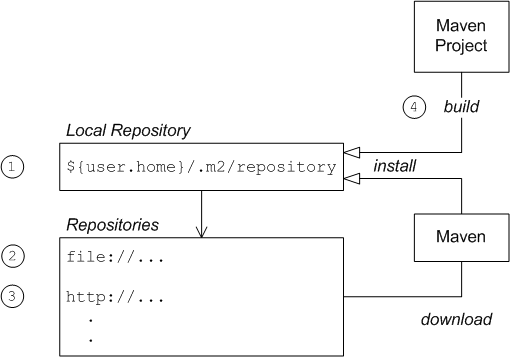
Maven will first look for a dependency artifact in the local repository
Maven will then look for a dependency artifact in a remote repository like ibiblio
Maven will search all known repositories until the artifact is found or all repositories have been checked
Maven will install module artifacts into the local repository during the
installphase of the build$ mvn install ... [INFO] --- maven-install-plugin:2.3.1:install (default-install) @ ex1 --- [INFO] Installing /home/jcstaff/proj/ejava-javaee/solutions/ex1/target/ex1-1.0-SNAPSHOT.jar to /home/jcstaff/.m2/repository/myorg/myproject/ex1/1.0-SNAPSHOT/ex1-1.0-SNAPSHOT.jar [INFO] Installing /home/jcstaff/proj/ejava-javaee/solutions/ex1/pom.xml to /home/jcstaff/.m2/repository/myorg/myproject/ex1/1.0-SNAPSHOT/ex1-1.0-SNAPSHOT.pom [INFO] ------------------------------------------------------------------------ [INFO] BUILD SUCCESS [INFO] ------------------------------------------------------------------------
Use -U to force an update check
Maven will limit its search of a remote repository to
expressed time limits. If it attempts and fails to locate
an artifact from a remote repository it will not re-attempt
to query that repository until the time limit expires.
Sometimes the failure has nothing to do with the repository
not having the artifact (e.g., wireless network down) and
when you clear the error you can force Maven to retry before
the timeout period expires by adding a -U
to the command line.
Use the -o offline flag to eliminate repository checks
Many times Maven will be too aggressive searching for artifacts you already know are not of value to the current build. You can tell Maven to work in an offline mode to bypass the work involved. This is helpful when you are disconnected from the network but will fail if you are truly missing a required artifact. You can activate/deactivate the offline more consistently using an element in the settings.xml
<offline>false</offline>
Provide a means to define behavior of the build
Provide a means to define values once and re-use across the build
Promotes consistency
<properties>

    <project.build.sourceEncoding>UTF-8</project.build.sourceEncoding>

    <maven-compiler-plugin.version>2.5.1</maven-compiler-plugin.version>

    <java.source.version>1.6</java.source.version>

    <java.target.version>1.7</java.target.version>

</properties>
Properties can also be expressed using
-Dkey=valuesystem properties
Modules depend on artifacts from other modules
<dependencies>

    <dependency>

        <groupId>commons-logging</groupId>

        <artifactId>commons-logging</artifactId>

        <version>1.1.1</version>

        <type>jar</type>

        <scope>compile</scope>

    </dependency>

    <dependency>

        <groupId>junit</groupId>

        <artifactId>junit</artifactId>

        <version>4.10</version>

        <scope>test</scope>

    </dependency>

....

</dependencies>
GAVMust provide its groupId, artifactId, and version for each dependency
scopeDefines when the dependency applies (default=compile)
scope=compile - classpath of src/main, src/test, and dependents
scope=provided - classpath of src/main, src/test but not dependents
scope=test - classpath of src/test but not src/main and dependents
scope=runtime - classpath of src/test and dependents but not of src/main
scope=import - used to replace locally declared dependencyManagement dependencies with the contents from another pom. Useful when declaring complex dependencies and want to make easy wholesale changes in dependency versions.
scope=system - used to declare a direct reference to a local archive. Not portable.
typeDefines the artifact type of ther module (default=jar)
type=jar - java archive
type=ejb - javaee EJB archive
type=war - javaee WAR archive
type=ear - javaee EAR archive
type=... - custom type
Value directly relates to the project packaging element of the dependency
|-- ejbsessionBankImpl
|       |-- ejbsessionBankImpl-3.0.2013.2-SNAPSHOT.jar
|-- ejbsessionBankEJB
|       |-- ejbsessionBankEJB-3.0.2013.2-SNAPSHOT.jar
|-- ejbsessionBankWAR
|       |-- ejbsessionBankWAR-3.0.2013.2-SNAPSHOT.war
|-- ejbsessionBankEAR
|       |-- ejbsessionBankEAR-3.0.2013.2-SNAPSHOT.ear
classifierDefines a special type of artifact/custom from a module
classifier=tests - java archive containing test artifacts
classifier=sources - java archive containing module source code
type=... - custom classifiers
`-- target
...
    |-- txHotelDAO-3.0.2013.2-SNAPSHOT.jar
    |-- txHotelDAO-3.0.2013.2-SNAPSHOT-sources.jar
    `-- txHotelDAO-3.0.2013.2-SNAPSHOT-tests.jar
Provides specific instructions for build
Usually does the right thing by default when possible
All actions of the build are directed by plugins
Even the simplest commands will result in plugin downloads when you first start
Specific plugins are wired into the build by the module packaging type
Plugins have goals (analogous to public methods)
Plugins may have default phases for the goals to be executed
Plugins can be configured
<build>
    <plugins>
        <plugin>
            <groupId>org.apache.maven.plugins</groupId>
            <artifactId>maven-compiler-plugin</artifactId>
            <version>2.5.1</version>
            <configuration>
                <source>1.6</source>
                <target>1.7</target>
            </configuration>
        </plugin>
         <!-- surefire.argLine is set in debugger profile -->
        <plugin>
            <groupId>org.apache.maven.plugins</groupId>
            <artifactId>maven-surefire-plugin</artifactId>
            <version>2.12.2</version>
            <configuration>
                <argLine>${surefire.argLine}</argLine>
            </configuration>
        </plugin>
        ...
New plugins can be added, but will need to be wired into a specific lifecycle phase of the build.
<plugin>

    <groupId>org.apache.maven.plugins</groupId>

    <artifactId>maven-failsafe-plugin</artifactId>

    <version>2.16</version>

    <configuration>

        <argLine>${surefire.argLine}</argLine>

    </configuration>

    <executions>

        <execution> <!-- run the tests here -->

           <id>integration-tests</id>

               <phase>integration-test</phase>

           <goals>

               <goal>integration-test</goal>

           </goals>

        </execution>

        <execution> <!--  delay failures to after undeploy -->

            <id>verify</id>

            <phase>verify</phase>

            <goals>

                <goal>verify</goal>

            </goals>

        </execution>

    </executions>

</plugin>
The above example shows the failsafe plugin being configured to share some properties with surefire and have specific goals wired into the integration-test and verify lifecycle phases.
Maven build broken into phases
Plugins are added to the build and their goals execute during a specific phase
Build invoked using the
mvncommand
$ mvn (phase) (plugin:goal) -D(system-property) -P(profile)
phase
cleanRemove contents of target tree
testBuild the src/main and src/test tree and execute the unit tests as defined by the surefire plugin
pre-integrationPerform unit tests and perform any steps required to ready for integration test
integration-testPerform integration tests as defined by the failsafe plugin
post-integration-testTear down anything required to perform integration tests
verifyEvaluate results of integration tests
installInstall module artifacts into local repository
(plugin:goal)
Manually trigger a plugin goal without a specific build lifecycle
ex. jetty:run, dependency:tree, or dependency:help
-D(system-property)
Manually define a system property key or key and value to be used as a property in the build
Must configure surefire/failsafe to promote these as properties Junit -- these are system properties of the maven build and not of the JVM tasks kicked off by the maven build.
-P(profile)
Manually trigger build configurations latched by a profile
e.g., which DB driver to use
-P!(profile)
Manually turn off a profile
e.g., turn off a profile activated by a rule or settings.xml
Use -P\!(profile) with bash shell
The bash shell requires the bang ("!") character to be escaped. Use -P\!(profile) when using the bash shell.
Provide groups of conditional configuration
Adds flexibility to build
Flexibility can sometimes add confusion for both developers and build tools -- be careful
Can consist of
properties
dependencies
build elements
...
Cannot include GAV elements
<profile> <!-- defines our default database -->

        <id>h2db</id>

        <properties>

              <jdbc.driver>org.h2.Driver</jdbc.driver>

              <jdbc.url>jdbc:h2:${basedir}/target/h2db/ejava</jdbc.url>

              <jdbc.user>sa</jdbc.user>

              <jdbc.password/>

              <hibernate.dialect>

                  org.hibernate.dialect.H2Dialect

              </hibernate.dialect>

        </properties>

        <dependencies>

            <dependency>

                <groupId>com.h2database</groupId>

                <artifactId>h2</artifactId>

                <scope>test</scope>

            </dependency>

        </dependencies>

    </profile>
The example above defines the properties and dependencies for the H2 database driver
when the h2db profile is active
Use
-P(profile)to manually trigger a profile to be included$ mvn test -Ph2db
Use
-P!(profile)to manually trigger a profile to be excluded. Use -P\!(profile) with bash shell$ mvn test -P\!h2db
Specify an active profile in settings..xml
<activeProfiles>
    <activeProfile>jboss7</activeProfile>
    <activeProfile>h2db</activeProfile>
</activeProfiles>
Property having a value
<profile>

    <id>h2db</id>

    <activation>

        <property>

            <name>jdbcdb</name>

            <value>h2</value>

        </property>

    </activation>
The h2db profile will activate when -Djdbc=h2 is specified on the command line
Property existing
<profile>

    <id>h2db</id>

    <activation>

        <property>

            <name>h2db</name>

        </property>

    </activation>
The h2db profile will activate when -Dh2db is specified on the command line -- no matter the value
Property not existing
<profile>

    <id>h2db</id>

    <activation>

        <property>

            <name>!h2db</name>

        </property>

    </activation>
The h2db profile will activate when -Dh2db is not specified
Property not a spefici value
<profile>

    <id>h2db</id>

    <activation>

        <property>

            <name>jdbcdb</name>

            <value>!hsql</value>

        </property>

    </activation>
The h2db profile will activate in cases when -Dhsql is not equal to hsql
Maven modules boundaries are highly influenced by the re-usable artifacts that must be produced
If you have many .jars, you likely have many maven modules
If you have few but large .jars, you likely have few but large maven modules
If you require different types of artifacts, you likely have different maven modules
Maven can be used in multi-module configuration
Many maven modules share the same configuration needs -- could lead to duplication
POM Inheritance helps mitigate duplication issues
Common properties can be defined in parent pom
<project>
    <modelVersion>4.0.0</modelVersion>
    <groupId>ejava</groupId>
    <artifactId>ejava-root</artifactId>
    <version>3.0.2012.2-SNAPSHOT</version>
    <packaging>pom</packaging>

    <name>Enterprise Java</name>
    <scm>
        <url>https://jcstaff@github.com/jcstaff/ejava-javaee/tree/master</url>
        <connection>scm:git:git@github.com:jcstaff/ejava-javaee.git</connection>
        <developerConnection>scm:git:git@github.com:jcstaff/ejava-javaee.git</developerConnection>
    </scm>
    ...
In the above example -- the parent pom is defining the CM repository for all sub-modules
Child projects can inherit from a parent pom
<project>
    <parent>
        <groupId>ejava</groupId>
        <artifactId>ejava-root</artifactId>
        <version>3.0.2012.2-SNAPSHOT</version>
        <relativePath>..</relativePath>
    </parent>
    <modelVersion>4.0.0</modelVersion>

    <groupId>ejava.javaee.intro</groupId>
    <artifactId>javase5Enhancements</artifactId>

    <name>Java SE 5 Enhancements</name>
    ...
In the above example, the javase5Enhancements project inherits the CM configuration from the parent
If you include a relativePath to the parent, then changes to parents in your build environment will be immediately reused without having to install them into the localRepository.
Avoid defining thick parents
Be careful not to attempt to blindly merge all project definition into a single parent pom. This can bloat the inheriting children with unwanted dependency, cause slower builds, and can even break a build. When in doubt -- push active definitions (like dependencies and plugin declarations) to the leaf modules and leave only passive declarations (like properties, dependencyManagement, and pluginManagement) in the parent.
Parent modules can be created to delegate build commands to a group of child modules
Child modules can be physically placed anywhere, but commonly in immediate sub-directories named after their artifactId
<project>

   <parent>

        <groupId>ejava</groupId>

        <artifactId>ejava-root</artifactId>

        <version>3.0.2012.2-SNAPSHOT</version>

        <relativePath>..</relativePath>

    </parent>

    <modelVersion>4.0.0</modelVersion>


    <groupId>ejava.javaee.ejb</groupId>

    <artifactId>ejbsessionBank</artifactId>

    <packaging>pom</packaging>


    <name>Session Bean</name>

    <description>

        This project is the root project for the core session bean example.

    </description>

    <modules>

        <module>ejbsessionBankImpl</module>

        <module>ejbsessionBankEJB</module>

        <module>ejbsessionBankWAR</module>

        <module>ejbsessionBankEAR</module>

        <module>ejbsessionBankTest</module>

    </modules>

</project>
The example above has several child modules that it will build in the order they are specified.
Defines what is possible without actively imposing the dependency or plugin defined
Placed in a parent of multi-module project
Consolidate management of dependency versions without adding active dependencies to all inheriting children
<properties>

    <junit.version>4.7</junit.version>

    <log4j.version>1.2.13</log4j.version>

</properties>


<dependencyManagement>

    <dependencies>

        <dependency>

            <groupId>junit</groupId>

            <artifactId>junit</artifactId>

            <version>4.10</version>

        </dependency>

        <dependency>

            <groupId>log4j</groupId>

            <artifactId>log4j</artifactId>

            <version>1.2.13</version>

        </dependency>

        ...

    </dependencies>

</dependencyManagement>
Parent defines dependency versions for two artifacts (passive)
<dependencies>

    <dependency>

        <groupId>junit</groupId>

        <artifactId>junit</artifactId>

        <scope>test</scope>

    </dependency>

</dependencies>
Child declares a dependency on one of the artifacts (active)
<dependencies>

    <dependency>

        <groupId>junit</groupId>

        <artifactId>junit</artifactId>

        <version>4.7</version>

        <scope>test</scope>

    </dependency>

</dependencies>
Net result is a consistent version for dependency in effective pom
Control artifact versions used in transitive dependencies
Exclude artifacts from transitive dependencies
<dependencyManagement>

    <dependencies>

        <dependency>

            <groupId>org.jboss.jbossas</groupId>

            <artifactId>jboss-as-server</artifactId>

            <version>${jboss-as-server.version}</version>

            <classifier>jmx-invoker-adaptor-client</classifier>

            <exclusions>

                <exclusion> <!-- gets in the way with JBoss6 and M2 -->

                    <groupId>org.jboss.security</groupId>

                    <artifactId>jbosssx-client</artifactId>

                </exclusion>

                <exclusion> <!-- gets in the way with newer versions -->

                    <groupId>org.slf4j</groupId>

                    <artifactId>slf4j-api</artifactId>

                </exclusion>

            </exclusions>

        </dependency>
Parent defines exclusions for possible dependency (passive)
<dependencies>

    <dependency>

        <groupId>org.jboss.jbossas</groupId>

        <artifactId>jboss-as-server</artifactId>

        <classifier>jmx-invoker-adaptor-client</classifier>

    </dependency>
Child includes simple dependency declaration (active)
Consolidate management of plugin versions and default configuration without adding activations to all inheriting children
<build>

        <pluginManagement>

            <plugins>

                <plugin>

                    <groupId>org.apache.maven.plugins</groupId>

                    <artifactId>maven-compiler-plugin</artifactId>

                    <version>3.1</version>

                    <configuration>

                            <source>1.6</source>

                            <target>1.7</target>

                    </configuration>

                </plugin>

                ...

            </plugins>

        </pluginManagement>

    </build>
Parent defines version for compiler plugin and configures for Java 6
<parent>

    <groupId>ejava</groupId>

    <artifactId>ejava-root</artifactId>

    <version>3.0.2012.2-SNAPSHOT</version>

    <relativePath>..</relativePath>

</parent>

<modelVersion>4.0.0</modelVersion>


<groupId>ejava.javaee.intro</groupId>

<artifactId>javase5Enhancements</artifactId>

<packaging>jar</packaging>
Child of packaging=jar type automatically get compiler configured to parent specs
A more complicated example
<pluginManagement>

    <plugins>

        <plugin>

            <groupId>org.codehaus.cargo</groupId>

            <artifactId>cargo-maven2-plugin</artifactId>

            <version>1.4.3</version>

            <configuration>

                <container>

                    <containerId>jboss71x</containerId>

                    <type>remote</type>

                    <log>target/server.log</log>

                    <output>target/output.log</output>

                </container>

                <configuration>

                    <type>runtime</type>

                    <properties>

                        <cargo.hostname>127.0.0.5</cargo.hostname>

                        <cargo.jboss.management.port>9999</cargo.jboss.management.port>

                    </properties>

                </configuration>

            </configuration>

            <dependencies>

                <dependency>

                    <groupId>org.jboss.as</groupId>

                    <artifactId>jboss-as-controller-client</artifactId>

                    <version>7.2.0.Final</version>

                </dependency>

            </dependencies>

            <executions>

               <execution>

                   <id>cargo-prep</id>

                       <phase>pre-integration-test</phase>

                   <goals>

                        <goal>redeploy</goal>

                   </goals>

               </execution>

                <execution>

                    <id>cargo-post</id>

                    <phase>post-integration-test</phase>

                    <goals>

                        <goal>undeploy</goal>

                    </goals>

                </execution>

            </executions>

        </plugin>

    </plugins>

</pluginManagement>
Parent defines details of deployment to JBoss container (passive)
<build>

    <plugins>

        <!-- artifacts to deploy to server -->

        <plugin>

            <groupId>org.codehaus.cargo</groupId>

            <artifactId>cargo-maven2-plugin</artifactId>

            <configuration>

                <deployables>

                    <deployable>

                        <groupId>ejava.coursedocs</groupId>

                        <artifactId>ejbsessionBankEAR</artifactId>

                        <type>ear</type>

                    </deployable>

                </deployables>

            </configuration>

        </plugin>

...

    </plugins>

</build>
Child declares plugin (active) with configuration extensions specific to child project
Maven/Eclipse integration is handled by adding the M2E plugin to your Eclipse environment and followng a pom-first configuration strategy.
Import an existing maven project into Eclipse as a maven project
M2E will inpsect the pom.xml and configure Eclipse accordingly
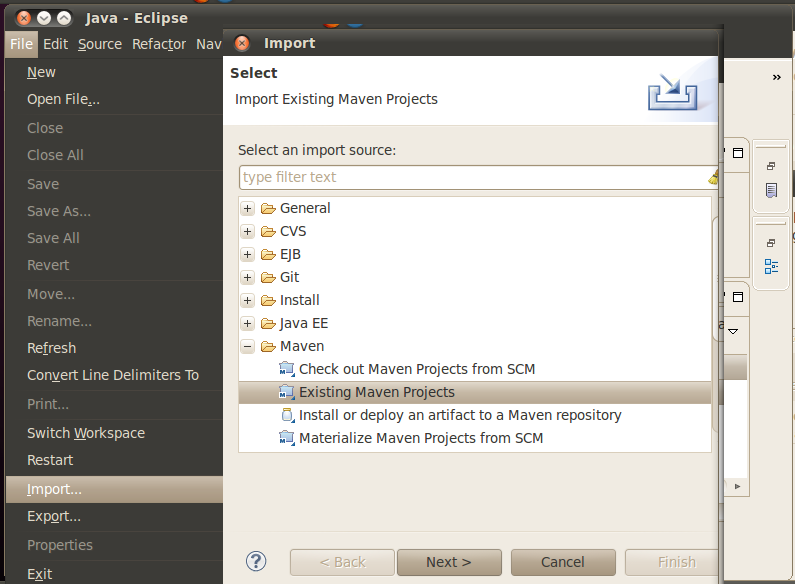
M2E provides mechanisms to create new maven projects (we will not discuss)
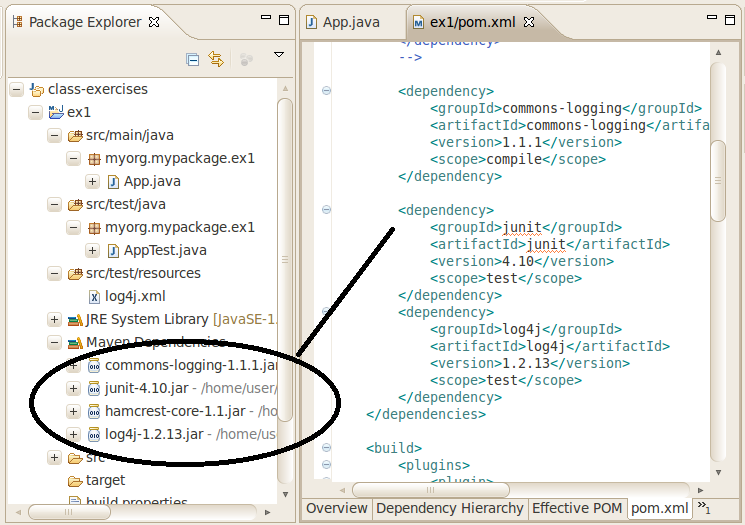
Notice the Eclipse project dependencies are in sync with the versions specified in the pom.xml
If you make a valid change to the pom.xml the Eclipse dependencies will update
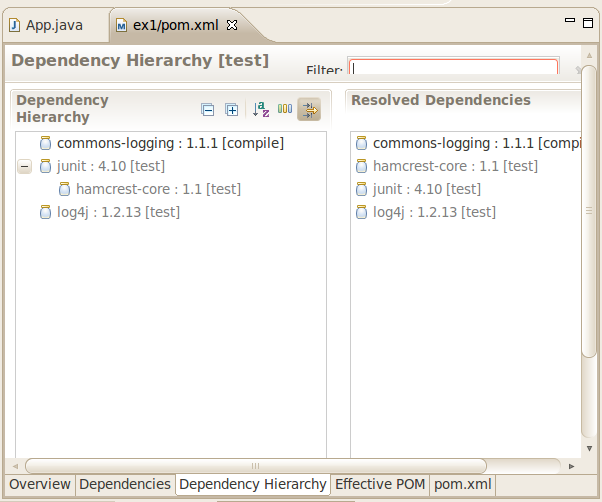
Dependency hierachy shows
Which modules bring in other modules
Specific versions and where there are conflicts
When things are not automatically updated, try...
Refresh/F5
Project->Clean
Maven->Update Projects
Note
A build from the command line that includes a clean
and fails to complete can leave Eclipse in an unhappy state
(lots of red unresolved references). Resolve with a successful
build and repeat some/all of the above actions.
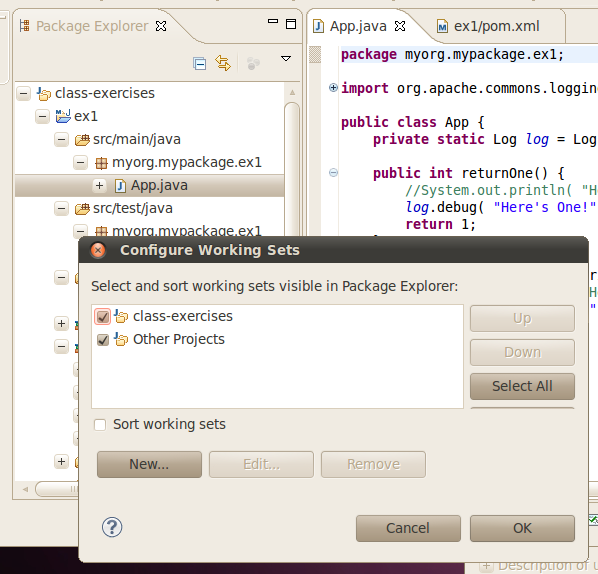
Working sets can be quite helpful organizing multi-modules
You can control their contents, order them, and hide them
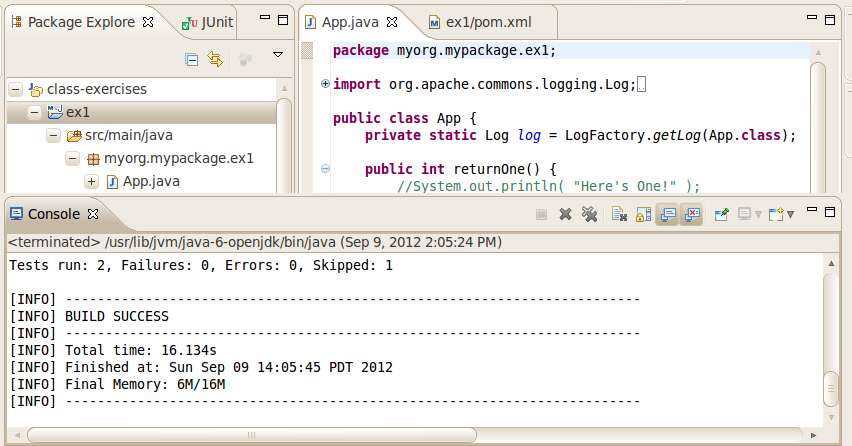
Maven builds can be directly launched from within Eclipse
No significant difference from normal command line
Can create custom launchers for common targets and pin for easy recall
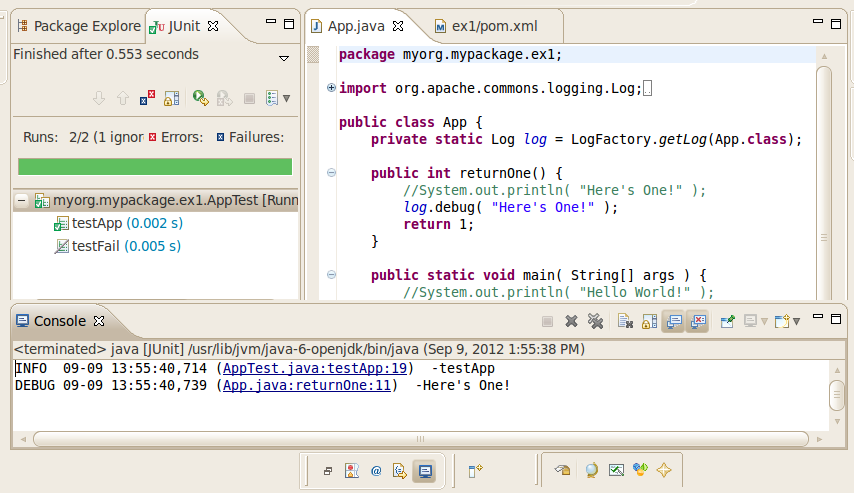
Unit tests can be directly executed within Eclipse without Maven
Make your Unit Tests Eclipse-friendly
Maven is quite useful in setting up robust test environments but at a cost of repeated seconds of unnecessary work at times. Have your unit tests assume reasonable defaults and provide the ability to optionally override those values through surefire or launcher configurations. That way you can develop by compiling only changes classes within Eclipse and move forward in only a few seconds. Delegate the maven build at that point to batch regression testing.
Necessary evil in application development
Powerful capabilities should not be ignored
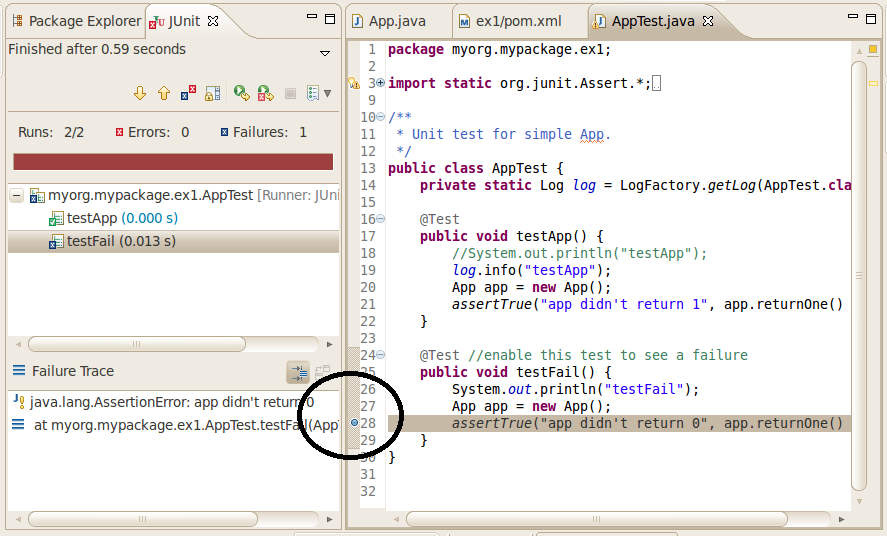
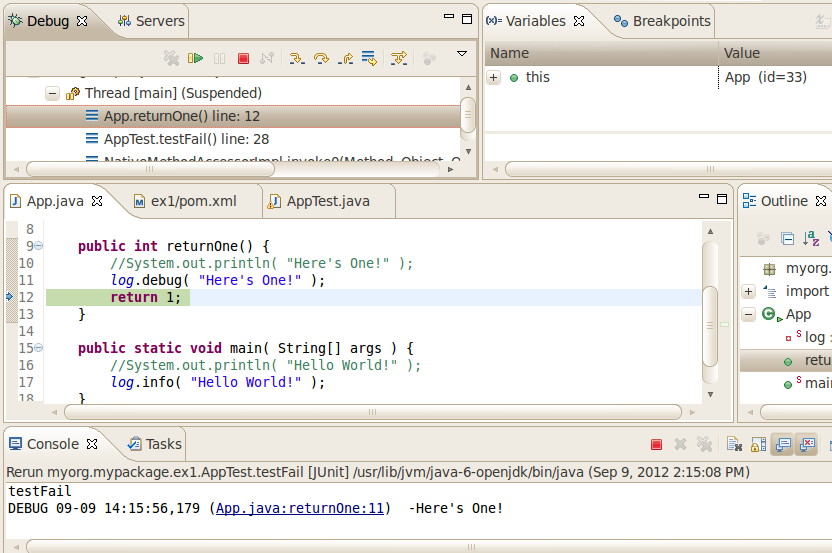
Set program breakpoints where problems have been identified
If runnable directly from Eclipse -- use debug option
If not runnable within Eclipse -- use remote debugging option
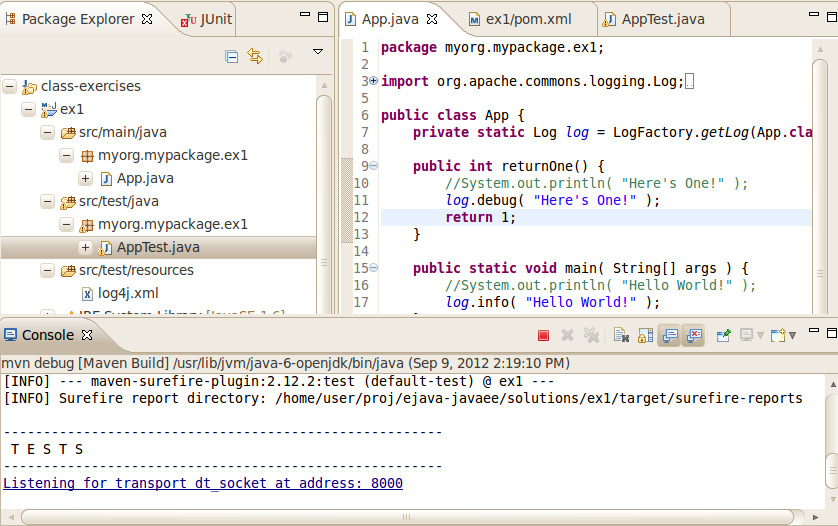
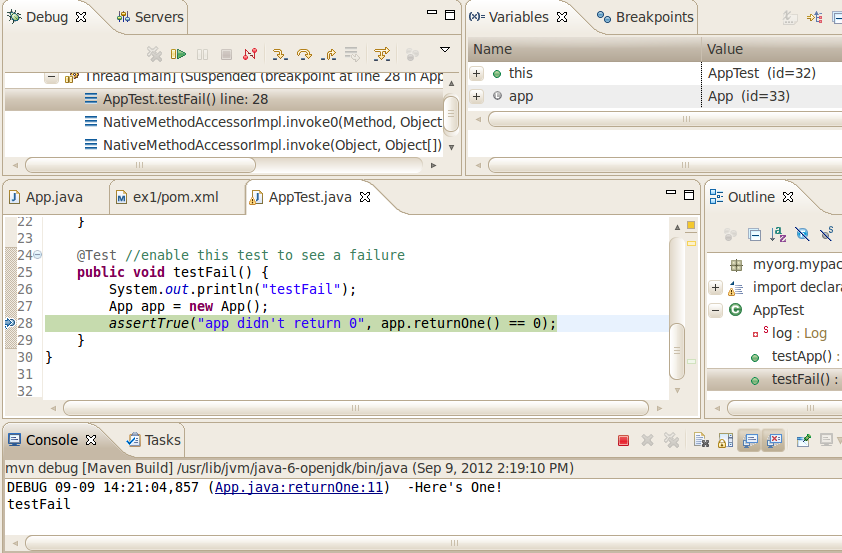
Remote debugging requires special system properties issued to JVM
surefire and failsafe can be setup to optionally pass system properties to JUnit JVM
<plugin>

    <groupId>org.apache.maven.plugins</groupId>

    <artifactId>maven-surefire-plugin</artifactId>

    <version>2.16</version>

    <configuration>

        <argLine>${surefire.argLine}</argLine>

        <testSourceDirectory>src/test/java</testSourceDirectory>

    </configuration>

</plugin>
<profile> <!-- tells surefire to run JUnit tests with remote debug -->

    <id>debugger</id>

    <activation>

        <property>

            <name>debugger</name>

        </property>

    </activation>

    <properties>

        <surefire.argLine>-Xrunjdwp:transport=dt_socket,server=y,suspend=y,address=8000 -Xnoagent -Djava.compiler=NONE</surefire.argLine>

    </properties>

</profile>